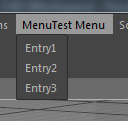
• Adding icon to submenu

    Cinema 4D SDK python windows r20
    7
    1
    0 Votes
    7 Posts
    2k Views
    B
    Thanks, Maxime! I will use that in the meantime. Edit: Why can't I flag your posts as the correct answer? I can only flag my own.
  • 0 Votes
    4 Posts
    867 Views
    a_blockA
    Yes, that's appropriate. Thanks
  • Use of undeclared identifier 'g_resource'

    Cinema 4D SDK
    8
    0 Votes
    8 Posts
    2k Views
    R
    Good news. And... more good news. The best news are that, after creating a Debug version and running Cinema 4D R20 from XCode, all of a sudden, the plugin started working!!! I then created a simple build (not a Debug one) and it is still working fine The other good news is that I now know how to create a Debug version
  • 0 Votes
    6 Posts
    1k Views
    fwilleke80F
    Hi Maxime, now that's interesting. You code runs perfectly fine. If I copy & paste your dialog code into my script, it still works, though your dialog is seemingly similar to mine. So, I have no idea what fixed it, but it did. Maybe some excess trailing spaces somewhere? Weird... but thank you for doing your magic If I ever find out what was happening here, I'll post here. Cheers, Frank
  • Issues using GL Vertex Buffers

    Cinema 4D SDK r20 c++
    5
    1
    0 Votes
    5 Posts
    2k Views
    a_blockA
    Hi Roger, I'm glad you were able to identify the issue and made some progress. And thanks for taking the time to share your findings with the forum. Much appreciated! Cheers, Andreas
  • Polygon selection order

    Cinema 4D SDK python r20
    2
    0 Votes
    2 Posts
    649 Views
    r_giganteR
    Hi Pim, thanks for reaching us. With regard to your question, I confirm that there's no option to get the order of the selected polygons nor the interaction tag can help in this direction. Best, Riccardo
  • GeDialog in a Python Script does not work

    Cinema 4D SDK r20 python
    3
    1
    0 Votes
    3 Posts
    873 Views
    fwilleke80F
    Aaah, ok, thanks! I browsed a couple of examples here in the forum, and always saw them return True. Should've known better Cheers, Frank
  • Undefined symbols for architecture x86_64

    Cinema 4D SDK
    9
    0 Votes
    9 Posts
    3k Views
    R
    This is really weird but after getting this error (and everything all being Ok), the way that I found to get rid of this error is to delete the xcodeproj, the props, the vcxproj and the vcxproj.filters files from the project folder, leaving just the projectdefinition.txt file there, and running the Project Tool again. Then, opening the newly created xcodeproj file, I no longer get this error and it compiles fine.
  • Can't open project file in XCode

    Cinema 4D SDK
    7
    0 Votes
    7 Posts
    1k Views
    R
    I found the culprit. My cmyk.cpp file was inside of a folder. When I got it out and placed it alongside the main.cpp file, the project file created by the Project Tool finally opened in XCode. Now I'm getting other errors, but at least the problem reported in this post is solved.
  • PluginID / ModuleID

    Cinema 4D SDK
    7
    0 Votes
    7 Posts
    1k Views
    B
    Thanks Riccardo, I will look into that.
  • Struggling with Python Documentation and pyc4d

    Cinema 4D SDK python r20
    3
    0 Votes
    3 Posts
    1k Views
    M
    Hi @sungam, first of all, welcome in the plugincafe community and thanks a lot for your feedback. I know these words will not help you but we are currently working to improve our Python Documentation and examples as well. With that's said, I know documentation should be sufficient, but MAXON offers free support for developers at plugincafe. So please contact us when you are in trouble, don't know where to look at or even get SDK issue. res folder is a specific folder where resources needed for your plugin are stored. (e.g. you develop an ObjectData plugin(a new object, like a cube), this cube get a description (a set of parameters, which make a description of the actual object representation), so you need to define theses descriptions within the res folder. Same thing for string and so on...). Clion is actually a C++ IDE, JetBrains offer Pycharm which is also supported by c4dpy. See C4DPY manual we cover how to setup Pycharm with c4dpy. "EnvironmentError: cannot find pyp file - plugin registration failed". I'm not sure to understand this, this error comes from c4dpy? Is it possible to get your current plugin, at least the code of your pyp file? If you have any questions, please open a new thread, in plugincafe we prefer to have one topic per thread so we can focus only into this specific issue and don't screw conversation, it's also easier for other peoples to find information. Do not hesitate to explain to us your project, so we can guide you (help us, to help you ). If it's something you don't want to disclose you can always reach us at [email protected]. Cheers, Maxime.
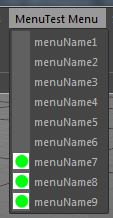
  • Check if Cinema window is active

    Cinema 4D SDK python windows r20
    3
    0 Votes
    3 Posts
    746 Views
    B
    Ok, that's a shame. Would have been useful. Thanks anyway.
  • (Again) adding python external modules

    Cinema 4D SDK r20 python
    5
    0 Votes
    5 Posts
    1k Views
    M
    Sorry if I wasn't clear. Cinema 4D Python does not come with setuptools or pip installed you have to do it. My point was, PyCharm automatically do it as long as the defined Project Interpreter is c4dpy. Just a quick overview: In Pycharm go to File -> Setting (CTRL+ALT+S) [image: 1547561831227-01.jpg] Then Project Interpreter [image: 1547561878261-02-resized.jpg] In the top, click on the bolt button and Add [image: 1547561922410-03-resized.jpg] Make sure to rename c4dpy.exe to python.exe (Pycharm do not support something not called python) Then define the interpreter as python.exe (our c4dpy.exe located in our Cinema 4D installation) [image: 1547562066435-04-resized.jpg] Click Ok, Select it in the dropDown list, it should load a bit (installation process for pip and setuptools) Then click apply and pip/setuptools is available. You can also search for any package available from pip which is compatible with our version of Cinema 4D by clicking on the Green addition sign. With regards o your question, yes python installation directory is C:\Program Files\MAXON\CINEMA 4D R20.038\resource\modules\python\libs\python27 but you should never modify these files. And we are not responsible for any issues related to any modification of these files. Cheers, Maxime.
  • Blocking interaction like a modal dialog

    Cinema 4D SDK python r20 windows
    4
    0 Votes
    4 Posts
    1k Views
    B
    Just to follow up, what Maxime suggested worked perfectly. No more cheating, basically just c4d.StopAllThreads() dialogThread.Start() dialogThread.Wait(True)
  • Use maxon::StringDecodings::Utf8()

    Cinema 4D SDK c++ r20
    3
    0 Votes
    3 Posts
    719 Views
    O
    @r_gigante Thank you for your help. I used the maxon::String and it works fine.
  • MatrixToHPB Negative values

    Cinema 4D SDK python r20
    4
    0 Votes
    4 Posts
    1k Views
    r_giganteR
    Hi @owen, thanks for following up. As @m_adam has already pointed out there's actually no difference in the values defininig a matrix representing a rotation on -30, -390, 330 or 690 on a certain axis. The lifesafer in this case is to use the already mentioned GetOptimalAngle which actually provides you with the HPB vector that would minimize the rotation given the previous HPB and the current HPB. For the sake of completeness let's assume that at frame 0 H = 0 whilst at frame 1 H = -5. Running the following code just returns the "expected" HPB vector def main(): # set the lastHPB to the previous frame value (in this case zero) lastHPB = c4d.Vector(0,0,0) # retrieve the current rotation order rotOrder = op.GetRotationOrder() # convert from matrix to HPB representation currentHPB = c4d.utils.MatrixToHPB(op.GetMg(), rotOrder) # get the optimal HPB vector optimalHPB = c4d.utils.GetOptimalAngle(lastHPB, currentHPB, rotOrder) print optimalHPB Now using this strategy and knowing the HPB of a clone at the previous frame, you are able to obtain a meaningful HPB representing of the matrix describing the rotation at the current frame of a certain clone (or object). Best, Riccardo
  • iferr warn_unused_result missed

    Cinema 4D SDK
    6
    0 Votes
    6 Posts
    1k Views
    S
    Hello, the Source Processor only checks for coding style violations and creates auxiliary code. It cannot check for valid C++ syntax (because C++ is quite an complex language). Coming back to the issue of return values, only the compiler can check that at compile time. And, yes, unfortunately Visual Studio and Xcode behave differently. best wishes, Sebastian
  • SetBool RDATA_RENDERENGINE

    Cinema 4D SDK
    2
    0 Votes
    2 Posts
    575 Views
    M
    Hi Daniel, Thanks a lot, you are indeed right, SimpleMaterial.cpp has been fixed. Cheers, Maxime.
  • Slow Python in R20 ?

    Cinema 4D SDK r19 r20 python
    4
    0 Votes
    4 Posts
    1k Views
    M
    After a reboot, I'm able to reproduce it again... I will create a bug report and more testing after Season's Greetings & SDK Team Vacation. Anyway thanks a lot. Cheers, Maxime.
  • Mac build fails, PC build OK

    Cinema 4D SDK
    8
    0 Votes
    8 Posts
    2k Views
    C4DSC
    @a_block No need for apologies. I thought the bearded guy had something to do with it ... Hence the reason I posted the message again. Luckily, JIT before the easter bunny was to blame.