• Modify FBX Exporter?

    Cinema 4D SDK r20 python
    5
    0 Votes
    5 Posts
    1k Views
    B
    Sure sure we can label at as solved at the moment. Thanks again for the help!
  • 0 Votes
    3 Posts
    536 Views
    P
    Yes, I do the same. I can check whether the obj is dirty and set the nbits again. Thank you.
  • Treeview adding a new item as an child

    Cinema 4D SDK python r20
    4
    0 Votes
    4 Posts
    1k Views
    r_giganteR
    @mp5gosu this completely makes sense and it's indeed a valuable recommendation but I wasn't sure about Pim's requirement here on deriving from Cinema 4D base classes. Cheers, R
  • 0 Votes
    3 Posts
    772 Views
    B
    @m_magalhaes said in Retrieve tags that have only "logical" Priority Data?: descTag = tag.GetDescription(c4d.DESCFLAGS_DESC_NONE) bc = descTag.GetParameter(c4d.EXPRESSION_PRIORITY) if bc[c4d.DESC_NAME] is not None: print tag Thanks @m_magalhaes. Works as expected! Just a little change from c4d.DESCFLAGS_DESC_NONE to c4d.DESCFLAGS_DESC_0 Thanks again. Have a great day ahead!
  • Copying / cloning a Volume Builder object.

    Cinema 4D SDK python r20
    4
    2
    0 Votes
    4 Posts
    919 Views
    P
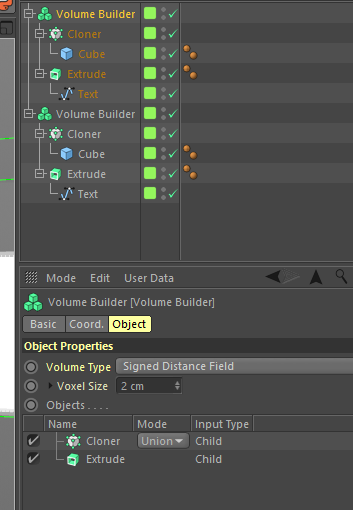
    @r_gigante said in Copying / cloning a Volume Builder object.: AliasTrans Great news, I will try it. Thanks. Edit: Yes, everything is ok now! But to be honest, I do not fully understand the functionality. The manual says "Normally Cinema 4D provides an alias translator when needed, for example in NodeData.CopyTo(). However, to copy objects manually use: ..." So, the advise is to use this functionality when copying objects? I see the functionality is here since R17, but this is the first time I came across this issue and this solution.
  • 0 Votes
    4 Posts
    1k Views
    jochemdkJ
    OK, I feel pretty stupid now... I was so busy with the specific way I used the script in the past, I forgot about the animation part So, I'll try to find some time soon to get the code up and running for animation. So my main function will be larger than "pass"
  • Calling Bevel tool and setting parametrs

    Cinema 4D SDK python r19 sdk
    9
    0 Votes
    9 Posts
    2k Views
    M
    settings[c4d.MDATA_BEVEL_RADIUS] = 0.5 Works fine here.
  • Modifying or Adding Script Directory?

    Cinema 4D SDK r20 python
    5
    0 Votes
    5 Posts
    1k Views
    M
    This issue is now fixed in R21. Cheers, Maxime.
  • retrieve data from multiple cloners in python

    Moved Cinema 4D SDK
    10
    0 Votes
    10 Posts
    3k Views
    P
    Thank you @m_adam it's really helpful! I was going to a wrong direction. I chose to do a project that has every new aspect to explore :)) I will for sure disturb you in future with my questions. I appreciate your suggestions. Parvin
  • 0 Votes
    3 Posts
    898 Views
    B
    Thanks @m_adam Works as expected. Have a great day ahead!
  • Get a simple polygonal version of any object

    General Talk
    4
    0 Votes
    4 Posts
    1k Views
    S
    Hello, Polygonize() is just using SendModelingCommand() with MCOMMAND_CURRENTSTATETOOBJECT. You can actually see the C++ source in c4d_basedocument.cpp in the cinema.framework. But I don't think that this commands merges all objects into one polygon object. best wishes, Sebastian
  • Tag plugin and Dirty check

    Cinema 4D SDK r20 python
    5
    1
    0 Votes
    5 Posts
    916 Views
    P
    I create a workaround that is working. I think, like you say, that the Subdivision Surface is not ok, when I initially load the scene. I now get the polygon object under the sss and that works.
  • Tag used on multiple objects.

    Cinema 4D SDK python r20
    6
    0 Votes
    6 Posts
    1k Views
    P
    Read() and Write() works. Thanks.
  • Find C4D's directory without C4D

    Cinema 4D SDK python
    9
    0 Votes
    9 Posts
    5k Views
    merkvilsonM
    Thanks, buddy! But the problem is that the most current one is not a way to go. If the user installed the plugin for R16, then the installer should open R16 itself. I'm trying to find and open it by the name, but the name is always different. It can be Cinema 4D / Cinema 4D R16 / Cinema 4D R16 Demo / Cinema 4D Demo / etc. Well. This is considerably easier on windows since I can check if it exists by using os.path.exists() function, but I have no Idea how to do this on Mac.
  • Problems of copying position keyframs to another obj

    Cinema 4D SDK
    5
    0 Votes
    5 Posts
    2k Views
    Q
    @m_adam Thank you for another detailed answer !
  • Retrieve the World Rotation of a Selected Edge?

    Cinema 4D SDK r20 python
    4
    0 Votes
    4 Posts
    1k Views
    ManuelM
    hello, To answer this question if someone want to do it by code. import c4d from c4d import gui # Welcome to the world of Python # Main function def main(): #get the selected object op = doc.GetActiveObject() if not op: raise TypeError("there's no object selected") if not op.IsInstanceOf(c4d.Opolygon): raise TypeError("obj should be a polygon object") #setup neighbor nbr = c4d.utils.Neighbor() nbr.Init(op) #get the selected edge bs = op.GetSelectedEdges(nbr,c4d.EDGESELECTIONTYPE_SELECTION) #maximum number of edge should be number of polygon * 4 sel = bs.GetAll(op.GetPolygonCount() * 4) #get all polygon vadr = op.GetAllPolygons() #init point a and b index to -1 for error check a = b = -1 #initialise a counter to check in sel array. countEdge = 0 #we can check now every edge to find the corresponding points. So for each polygon for i in xrange(op.GetPolygonCount()): #get the polygon information pli = nbr.GetPolyInfo(i) for side in xrange(4): # Test all 4 sides of a polygon # Only proceed if edge is marked # and edge really exists (for triangles side 2 from c..d does not exist as c==d) if pli["mark"][side] or (side==2 and vadr[i].c == vadr[i].d): continue #if the edge is marked as selected in our sel array if sel[countEdge]: if side==0: a=vadr[i].a; b=vadr[i].b elif side==1: a=vadr[i].b; b=vadr[i].c elif side==2: a=vadr[i].c; b=vadr[i].d elif side==3: a=vadr[i].d; b=vadr[i].a countEdge +=1 if a == -1 or b == -1: raise ValueError("points index can't be negatives") #get all points array points = op.GetAllPoints() #Get the direction of the edge in global coordinate (multiply the points'vector by the matrix of the object) opmg = op.GetMg() #i've picked a direction from point a to point b so the angle could need to be reverted. dirVector = points[b]*opmg - points[a]*opmg #normalize a vector is often a good idea. dirVector.Normalize() #transform the vector to hpb note the result is in radian hpb = c4d.utils.VectorToHPB(dirVector) #transform radian to degree hpb.x = c4d.utils.RadToDeg(hpb.x) hpb.y = c4d.utils.RadToDeg(hpb.y) hpb.z = c4d.utils.RadToDeg(hpb.z) print "the edge is poiting to",dirVector,"the corresponding angle is", hpb # Execute main() if __name__=='__main__': main() Cheers Manuel
  • Data Dump Python Function

    Cinema 4D SDK
    9
    0 Votes
    9 Posts
    2k Views
    ManuelM
    hello, if you don't have anything else to add, i'll mark this topic as "solved" Cheers Manuel
  • Saving & Loading User Preset

    Cinema 4D SDK
    3
    0 Votes
    3 Posts
    732 Views
    P
    Hi Maxime, thank you very much! Good to know. I would otherwise searched forever. Cheers, PdZ
  • c4dpy crashes

    Cinema 4D SDK python r20 windows
    4
    1
    0 Votes
    4 Posts
    779 Views
    P
    Ok, I will give it a try and let you know. Thanks.
  • Make Objects Editable (Streamlined)?

    Cinema 4D SDK r20 python
    5
    0 Votes
    5 Posts
    2k Views
    ManuelM
    Just to add some side notes : SendModelingCommand is waiting for a list of objects in case you want to execute that command on several objects. In your case, you only got one element in your list. You can have more informations about list here