• Check if Cinema window is active

    Cinema 4D SDK python windows r20
    3
    0 Votes
    3 Posts
    754 Views
    B
    Ok, that's a shame. Would have been useful. Thanks anyway.
  • (Again) adding python external modules

    Cinema 4D SDK r20 python
    5
    0 Votes
    5 Posts
    2k Views
    M
    Sorry if I wasn't clear. Cinema 4D Python does not come with setuptools or pip installed you have to do it. My point was, PyCharm automatically do it as long as the defined Project Interpreter is c4dpy. Just a quick overview: In Pycharm go to File -> Setting (CTRL+ALT+S) [image: 1547561831227-01.jpg] Then Project Interpreter [image: 1547561878261-02-resized.jpg] In the top, click on the bolt button and Add [image: 1547561922410-03-resized.jpg] Make sure to rename c4dpy.exe to python.exe (Pycharm do not support something not called python) Then define the interpreter as python.exe (our c4dpy.exe located in our Cinema 4D installation) [image: 1547562066435-04-resized.jpg] Click Ok, Select it in the dropDown list, it should load a bit (installation process for pip and setuptools) Then click apply and pip/setuptools is available. You can also search for any package available from pip which is compatible with our version of Cinema 4D by clicking on the Green addition sign. With regards o your question, yes python installation directory is C:\Program Files\MAXON\CINEMA 4D R20.038\resource\modules\python\libs\python27 but you should never modify these files. And we are not responsible for any issues related to any modification of these files. Cheers, Maxime.
  • CSO from virtual objects

    Cinema 4D SDK python
    5
    0 Votes
    5 Posts
    1k Views
    M
    Hey @pyr, the tracer object is inserted, only under the null object, which is stored nowhere. That means at the end of the function, the Python Garbage collect actually free memory and all useless stuff it doesn't need anymore. And since the null which holds everything is stored nowhere else, the null is deleted and all its children even your tracer. That's lead to return a no-valid BaseObject. So the best way is to get a clone (aka object not inside any hierarchy) from a cache of the Tracer. With that's said there is no way to make the Python Generator returning a spline since it's not registered with OBJECT_ISSPLINE flag. So the only way will be to make a plugin. Here the code it's already looking very nice! Nice idea indead! import c4d, os PYOUTLINE_ID = 1000001 #Plugin ID class Ooutline(c4d.plugins.ObjectData): def createOutline(self, spline, invert): bc = c4d.BaseContainer() bc.SetData(c4d.MDATA_SPLINE_OUTLINE, invert) bc.SetData(c4d.MDATA_SPLINE_OUTLINESEPARATE, True) res = c4d.utils.SendModelingCommand(command=c4d.MCOMMAND_SPLINE_CREATEOUTLINE, list=[spline], mode=c4d.MODELINGCOMMANDMODE_ALL, bc=bc) if not res: return False return res[0] def GetContour(self, op, doc, lod, bt): # Get a clone of the spline spline = op[c4d.ID_USERDATA,1].GetClone() # Create a null used to define our hierarchy null = c4d.BaseObject(c4d.Onull) # Execute the CreateOutline Function in the created document. newSpline = self.createOutline(spline, op[c4d.ID_USERDATA,2] * -1) if not newSpline: return # Insert it into the Tracer and set up a hierarchy to get things done newSpline.InsertUnder(null) matrix = c4d.BaseObject(1018545) matrix.InsertUnder(newSpline) matrix[c4d.ID_MG_MOTIONGENERATOR_MODE] = 0 matrix[c4d.MG_SPLINE_MODE] = 1 matrix[c4d.MG_SPLINE_STEP] = op[c4d.ID_USERDATA,3] matrix [c4d.MG_OBJECT_LINK] = newSpline tracer = c4d.BaseObject(1018655) tracer.InsertUnder(matrix) inexclude = c4d.InExcludeData() inexclude.InsertObject(matrix,1) tracer[c4d.MGTRACEROBJECT_OBJECTLIST] = inexclude tracer[c4d.MGTRACEROBJECT_MODE] = 2 tracer[c4d.SPLINEOBJECT_TYPE] = 3 tracer[c4d.SPLINEOBJECT_SUB] = 6 tracer[c4d.SPLINEOBJECT_INTERPOLATION] = 1 # Create a temporary document to compute the cache of the tracer workDoc = c4d.documents.BaseDocument() workDoc.InsertObject(null) workDoc.ExecutePasses(bt, False, False, True, c4d.BUILDFLAGS_EXPORT) # Get the SplineObject from the tracer cache tracerSpline = tracer.GetCache() if not tracerSpline: return outSpline = tracerSpline.GetClone() # Close the spline outSpline[c4d.SPLINEOBJECT_CLOSED] = True return outSpline if __name__ == "__main__": bmp = c4d.bitmaps.BaseBitmap() dir, file = os.path.split(__file__) fn = os.path.join(dir, "res", "icon.tif") bmp.InitWith(fn) result = c4d.plugins.RegisterObjectPlugin( id = PYOUTLINE_ID, str = "Test", g = Ooutline, description = "Ooutline", info = c4d.OBJECT_GENERATOR | c4d.OBJECT_ISSPLINE, icon = None) [image: verycool.gif] Cheers, Maxime.
  • Blocking interaction like a modal dialog

    Cinema 4D SDK python r20 windows
    4
    0 Votes
    4 Posts
    1k Views
    B
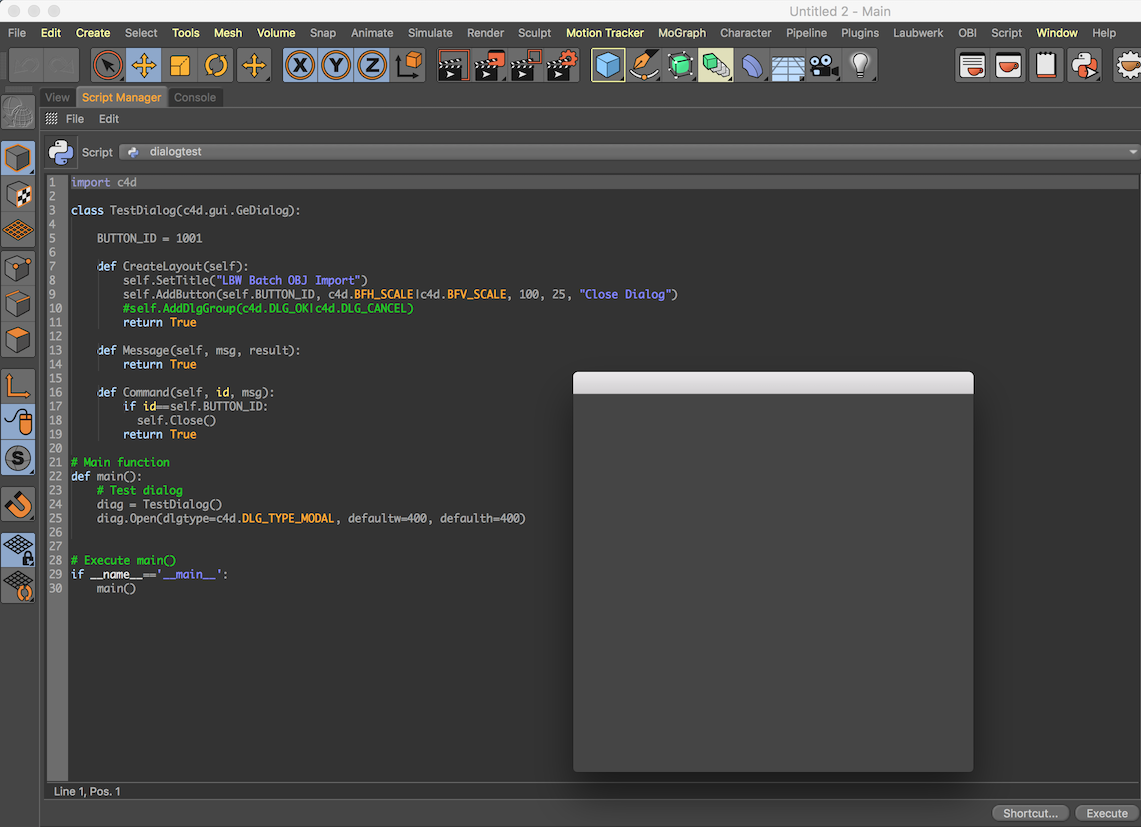
    Just to follow up, what Maxime suggested worked perfectly. No more cheating, basically just c4d.StopAllThreads() dialogThread.Start() dialogThread.Wait(True)
  • UVCOMMAND question?

    Cinema 4D SDK python r19
    4
    0 Votes
    4 Posts
    1k Views
    .
    Thank you for the guidance. I'll dig into that info.
  • 0 Votes
    9 Posts
    2k Views
    M
    @mp5gosu, that's true I didn't think about this possibility as well. Just for your information, an IcustomGui can only be done with C++ an implementation example can be found in customdata_customgui.cpp. Cheers, Maxime.
  • MatrixToHPB Negative values

    Cinema 4D SDK python r20
    4
    0 Votes
    4 Posts
    1k Views
    r_giganteR
    Hi @owen, thanks for following up. As @m_adam has already pointed out there's actually no difference in the values defininig a matrix representing a rotation on -30, -390, 330 or 690 on a certain axis. The lifesafer in this case is to use the already mentioned GetOptimalAngle which actually provides you with the HPB vector that would minimize the rotation given the previous HPB and the current HPB. For the sake of completeness let's assume that at frame 0 H = 0 whilst at frame 1 H = -5. Running the following code just returns the "expected" HPB vector def main(): # set the lastHPB to the previous frame value (in this case zero) lastHPB = c4d.Vector(0,0,0) # retrieve the current rotation order rotOrder = op.GetRotationOrder() # convert from matrix to HPB representation currentHPB = c4d.utils.MatrixToHPB(op.GetMg(), rotOrder) # get the optimal HPB vector optimalHPB = c4d.utils.GetOptimalAngle(lastHPB, currentHPB, rotOrder) print optimalHPB Now using this strategy and knowing the HPB of a clone at the previous frame, you are able to obtain a meaningful HPB representing of the matrix describing the rotation at the current frame of a certain clone (or object). Best, Riccardo
  • How to copy (and remove) userdata via python ?

    Cinema 4D SDK r19 python
    8
    0 Votes
    8 Posts
    2k Views
    M
    Seems I also forget to mention but please use About Tags and Tagging like so you can mark a specific version.
  • Using c4dpy to show Class Documentation?

    Cinema 4D SDK
    3
    2
    0 Votes
    3 Posts
    1k Views
    dskeithD
    Hi Maxime - thank you very much for the response, and I'm glad to hear you're considering it for the future.
  • 0 Votes
    3 Posts
    1k Views
    eZioPanE
    Hi, @m_adam Thank you for your kindness and the inspiring answer! It's a GREAT Christmas present for me! So sorry asking XPresso related questions in this forum. The problem I faced is a little bit complex than this: I need sample Effectors' total Output Strengths in the position from a Polygon Object's Points, and store the result into a Vertex Color Map attached for further use. This problem bothers me for months, and I didn't find any clue until your post. I have never think about using Python Node with global variable in XPresso Network can keep the data as I need and do the magic! From the bottom of my heart, I want to say THANK YOU. The answer you give not only solve this problem, but also inspire me re-thinking of ObjectList Node and Python Node, and how these nodes executed in an XPresso Network. Just let me THANK YOU AGAIN! Best wishes for you to have a wonderful holiday!
  • Slow Python in R20 ?

    Cinema 4D SDK r19 r20 python
    4
    0 Votes
    4 Posts
    1k Views
    M
    After a reboot, I'm able to reproduce it again... I will create a bug report and more testing after Season's Greetings & SDK Team Vacation. Anyway thanks a lot. Cheers, Maxime.
  • 0 Votes
    3 Posts
    1k Views
    M
    @m_adam wow! I did what you say,it works!! you are so cool!! thank you very much!!! yeah!!
  • How to get spline offset by spline point index ?

    Cinema 4D SDK python
    13
    0 Votes
    13 Posts
    3k Views
    ferdinandF
    Hi @everyone, as a little disclaimer, this is my private take on this topic. Cinema does calculate the length of a spline (at least with SplineHelp) in a rather unpretentious fashion as the sum of the Euclidean norms of the underlying LineObject segments, i.e., there is no fancy arc-length calculation going on. Which makes sense in Cinema, since the discrete LineObject is what does effectively count, and not the smooth SplineObject. Since you can get access to the LineObject of a SplineObject and also convert between SplineObject and LineObject vertex indices with SplineHelp.SplineToLineIndex() , this also means that you can both calculate the length of spline as a total and up to a specific vertex. Which then should mean that you can calculate the relative offset for a spline vertex yourself. Practically you can cut out the SplineObject altogether when sampling a spline and just use its associated LineObject. The one nice thing that SplineHelp does for you is though, that it implements a parallel transport for the frames of spline points for you. I.e., realizes that the normals of spline points point into a direction humans would consider "correct" (mathematically these normals are not correct, due to them being modified by parallel transport, but they will look smoother, won't flip when then curvature of the spline flips). Cheers, Ferdinand
  • 0 Votes
    5 Posts
    2k Views
    D
    @s_bach i see. thx, nevertheless. well, as said, the only way to avoid that collision seems to be: put the plugins into the plugin-folder of the main application. while discussing the other part of my problem (see symbolcache-topic) on other forums (the german c4dnetwork, that is), it became apparent, that other ppl also do have those collision-messages with r20 - and they, too, do not experience those plugins to be not working. if at any time this "problem" should become of interest for you, let me know, if there's something that i could do/deliver/add any detail, to support you in your efforts. cheers, mesut.
  • 0 Votes
    10 Posts
    2k Views
    DunhouD
    @m_adam Thanks a lot for this example A big shout out !
  • Quit Cinema after SAVE_AFTER message

    Cinema 4D SDK r20 python
    3
    0 Votes
    3 Posts
    770 Views
    B
    Hi @m_adam! Thank you for your response. I looked for a way to mark the post as a question while submitting, I didn't think to look at the submitted post again for that option. I'll remember next time. KillDocument and Exiting were never ment to run consecutively, they were just two things I wanted to try for different scenarios. I should have clarified that. StopAllThreads() unfortunately wasn't enough, but adding in a small message plugin to trigger the exit from the CoreMessage() did the trick. I'm now changing a global boolean for the CoreMessage() to look for. Is that what you had in mind? Thank you for your help, everything works now. I'll make sure and try and find the "mark as solved" button on my way out Edit: I can't actually mark your comment as the solution, only this one...
  • Shortcuts for buttons from gui.GeDialog

    Cinema 4D SDK r20 python
    4
    0 Votes
    4 Posts
    2k Views
    FlavioDinizF
    Thanks a lot @C4DS @m_adam ! So I think it's better to create separate CommandDataplugins to perform the same action of each button, it's less complicated and allow the user to change the keyboard shortcuts and exclude the need of the GUI being always open. Although the m_adam suggestions may be useful for other plugins ideas I have. I'll try it later. Thanksss !
  • Bevel selection after a CSTO

    Cinema 4D SDK python r20
    2
    3
    0 Votes
    2 Posts
    573 Views
    a_blockA
    Hi Pim, no, I don't think so. Basically the Selection tag reacts to MSG_POINTS_CHANGED and MSG_POLYGONS_CHANGED, in the end adding or removing the needed amount of points or polygons in the selection array. But there's no information, what to do with for example additional points. And so it heavily depends on where the new points/polygons are added and also which tool does so, what the outcome for those selected entities will be. Something that will probably be addressed in future with the CustomDataTag introduced in R20. Cheers, Andreas
  • Checknames option

    Cinema 4D SDK python r20
    3
    0 Votes
    3 Posts
    961 Views
    P
    Works great, thanks. -Pim
  • 0 Votes
    2 Posts
    892 Views
    M
    Hi @pyr, In Python, there is a GIL which do not allow Python by design to execute something in parallel. In Cinema 4D all our functions (so everything which is in the c4d python module) is "GIL safe" in order to avoid any issue with Python memory. So in Cinema 4D thread are designed for doing GUI, or background stuff. Moreover, keep in mind creating a Thread have a cost in term of time (to create, execute, delete them). Finally, I would like to point you to multiprocessing vs multi-threading. Note that since it's more an algorithm problem than an issue related to our API, we can only provide you hints. btw, I also turned your topic as a question. See Q&A New Functionality. Cheers, Maxime.