• 0 Votes
    5 Posts
    58 Views
    chuanzhenC
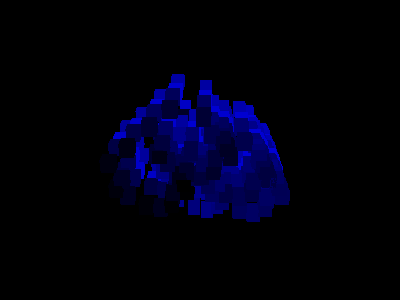
    @ferdinand Hi,The simple demo I made: 1:Create a standard cube (with 8 vertices), 2:Create 8 joint (point_id 1 -> joint 1 ),bind it,then offset all joints (x:10000,y:10000,z:10000 cm) 3:Each point is 100% bound to a bone, 4: Then, apply smooth 1-2 times to all bones and points to obtain a result where each point is influenced by all bones (facilitating the observation of the code execution results) 5: normalize weights 6:Then execute the code 2-3 times, and you can clearly see the result code: import c4d doc: c4d.documents.BaseDocument # The currently active document. op: c4d.BaseObject | None # The primary selected object in `doc`. Can be `None`. def main() -> None: tag = op.GetTag(c4d.Tweights) if not tag: return j_cnt = tag.GetJointCount() p_cnt = op.GetPointCount() for i in range(10): weights = [tag.GetWeightMap(j_id,p_cnt) for j_id in range(j_cnt)] for j_id in range(j_cnt): tag.SetWeightMap(j_id,weights[j_id]) tag.WeightDirty() c4d.EventAdd() if __name__ == '__main__': main() [image: 1786374040504-01aff503-a8c0-4521-8b99-3c094189c490-image.png] video: bandicam 2026-08-10 23-05-00-584.mp4
  • 0 Votes
    3 Posts
    51 Views
    chuanzhenC
    @ferdinand Thanks for your detailed explanation and the implementation of the sorting function. It's very helpful!
  • 0 Votes
    3 Posts
    97 Views
    A
    Thanks Anlv It looks like its adding the emitter into a null is what's causing it. Fixed with deferred CallCommand(1062577) (no sub-id (1067510) silently no-ops). Emitter fields greys if the emitter/group are parented under the setup null or generator. Sibling placement below plugin object + rename works fine.
  • 0 Votes
    3 Posts
    120 Views
    ThomasBT
    @ferdinand Yes, thanks, that indirect answer is enough for me. I was mainly wondering whether a check performed on both the client and the server is robust enough, or if it could be bypassed using Python, for instance. I’m well aware that it can be cracked somehow. I’m also already using ExportLicenses() for my node-locking system in combination. Thanks a lot for your help.
  • 0 Votes
    17 Posts
    800 Views
    ferdinandF
    I tried with a Cube where the only way to change colour is to use the display colour in the basic tab. At first sight this doesn't cause the problem, but in fact it does. Yes, that was what I meant. Thanks for confirming. The issue likely already has vanished in the current alpha, because there I could not reproduce it. But in 2026.3.2 I can. What is a bit odd is that no one seems to have touched the relevant code in the last months. But that is something for the GUI team to figure out.
  • 0 Votes
    16 Posts
    1k Views
    ferdinandF
    This is not common knowledge, otherwise I would have spotted that earlier. So, you are not really expected to know this as a third party dev. You can look at the geometry_caches_s26.py example and there at this line, under [2] I mention that the cache of that object is muted. But that is of course only very indirect information and not enough to deduce this. I think we also talked about it a couple of times on the forum. The flag BIT_CONTROLOBJECT is set on input objects of generators, e.g., the to be extruded spline of an Extrude object, the profile and rail spine of a Loft object, the to be cloned cube and sphere objects of a MoGraph cloner, etc. As shown in the caching example, Cinema will mute the caches of input objects. To be very formal, they are actually built but then again deleted. BIT_CONTROLOBJECT marks such input objects. Your light in that scene should not have that flag, as it is not the input for some generator. But it somehow got it anyway, there is probably somewhere a bug. For normal scene evaluation that bug is also not really a problem (because as you saw from your own test, the light still converted correctly when you inserted it on its own outside of caches). The problems start when that irregularly as BIT_CONTROLOBJECT marked object is part of a cache. 'Make Editable' then incorrectly collapses the cache. Not only does it not stop at nested generators which are incorrectly marked like this, it also seems to apply the cache muting logic for input objects (resulting in the empty null object instead of the content of the cache of the collapsed generator). I already told the relevant devs that I consider this borderline buggy but they do not seem very inclined to do anything about this. What is effectively missing somewhere in cache resolvement is the evaluation if the flag BIT_CONTROLOBJECT 'makes sense on an object'. That is of not so easy to do, as generator - input object relations can be quite complex in Cinema. Which is probably also why the modelling team does not want to touch this. Cheers, Ferdinand

  • GetWorkplaneMatrix is broken in Cinema 4D 2026.3

    Moved Bugs c++ 2026
    5
    0 Votes
    5 Posts
    701 Views
    ferdinandF
    This will be fixed in the next upcoming hotfix.
  • TimeLine DopeSheet not update

    Moved Bugs 2026 python
    5
    0 Votes
    5 Posts
    761 Views
    ferdinandF
    Hey, good news, this is fixed in the upcoming hotfix (2026.3.2).
  • 0 Votes
    1 Posts
    285 Views
    No one has replied
  • 0 Votes
    17 Posts
    2k Views
    ferdinandF
    @ThomasB That is not a misunderstanding. I am aware that MRDs can only see their own tickets. But we still needed that crash reported, so I did it. I would have done the same if you would not have been an MRD. I usually mention ticket IDs here so that I can come back and close bugs. As you might have noticed, I have moved this into the Bugs forum. You do not have to do anything regarding that ticket, it it inaccessible for non-Maxonians. But we are still very much interested in a version of your plugin or a workflow which caused the crash. Otherwise we will not be able to reproduce and fix the issue. When you cannot provide it, this is also not a biggie (please do not waste time on this), then we have at least documented that there is somewhere a problem with audio tracks and how they handle memory while post-processing audio; in case we run into the same issue in the future in another context. Cheers, Ferdinand To share plugins with us, you can either use a chat on backstage or send us a mail to sdk_support(at)maxon(dot)net. There is a good chance that when you use a binary data attachment in a mail, that our mail system will filter out that attachment. When you use backstage (and upload the plugin there in a chat) that data would be permanently in the assets of that forum. When you just give us a link, we will delete your data once we do not need them anymore for debugging.
  • How to export icons of asset

    Cinema 4D SDK python 2026 2024
    8
    0 Votes
    8 Posts
    1k Views
    DunhouD
    Hey @ferdinand , Sorry I forgot click Submit button well, that is the info I need, I use same tech to get icons for CMD, and now waiting for svg part in the future. Cheers~ DunHou
  • How to draw svg to bitmaps?

    Cinema 4D SDK windows python 2026
    4
    0 Votes
    4 Posts
    752 Views
    ferdinandF
    I started to work last Friday on a BaseBitmap.InitWithVectorImage. It will for sure not make it into the next release of Cinema 4D, as we are too close to that, and I cannot make any promises when or if it will arrive. But I see value in this especially since I realized that you cannot even really use this in C++, as VectorImageInterface requires access to some internal components to be rasterized.
  • 0 Votes
    3 Posts
    620 Views
    rndm_cgR
    @ferdinand thanks so much, problem solved!
  • Can we draw alpha image in viewport

    Cinema 4D SDK windows python 2026
    4
    0 Votes
    4 Posts
    736 Views
    ferdinandF
    I do not think that DRAW_ALPHA_FROM_IMAGE should not work. I just picked DRAW_ALPHA_NORMAL because it is the "most default one" out of the DRAW_ALPHA flags. I will have a look later. But you can for now probably just use DRAW_ALPHA_NORMAL.
  • How to add tabs to tool plugins.

    Cinema 4D SDK windows python 2026
    6
    0 Votes
    6 Posts
    945 Views
    ferdinandF
    You very likely have not unpacked your resources. The resource folder found in an installation only contains a part of the application resources (we are doing this since release 2023 if I remember correctly). A good portion of the resources sits inside resource.zip for performance reasons and is unpacked on demand. You can just unpack the resource.zip into you resource folder without an performance or stability issues. [image: 1779175199591-b8e8db94-ae20-42b4-9a5d-e92ac928e89d-image.png] You as an MRD can also look at the Bugslife client, as it is probably the better example, as it uses more features of the quick tab GUI. But my answer above was targeted at a general audience who can see the resources for Bugslife but not Bugslife itself, and it therefore is not a good example for them. Just grep the resource folder as I did in my screen for files that match the path dialogs/*.res (i.e., are res files for dialogs) and contain the word QUICKTAB. Cheers, Ferdinand
  • 0 Votes
    6 Posts
    1k Views
    AnlvA
    Another small tip: you can simply use a single <br> for line breaks — there’s no need to use <b> or </b>. Also, just like in the script example, scripts can support localized language strings as well: """ Name-US:Example Name-CN:示例 Description-US:Example line 1.<br>Example line 2.<br>Example line 3. Description-CN:示例第 1 行。<br>示例第 2 行。<br>示例第 3 行。 """
  • Executing a Redshift texture bake from Python

    Cinema 4D SDK python 2026
    2
    0 Votes
    2 Posts
    546 Views
    ferdinandF
    Hello @mplec1, Welcome to the Maxon developers forum and its community, it is great to have you with us! Getting Started Before creating your next postings, we would recommend making yourself accustomed with our forum and support procedures. You did not do anything wrong, we point all new users to these rules. Forum Overview: Provides a broad overview of the fundamental structure and rules of this forum, such as the purpose of the different sub-forums or the fact that we will ban users who engage in hate speech or harassment. Support Procedures: Provides a more in detail overview of how we provide technical support for APIs here. This topic will tell you how to ask good questions and limits of our technical support. Forum Features: Provides an overview of the technical features of this forum, such as Markdown markup or file uploads. It is strongly recommended to read the first two topics carefully, especially the section Support Procedures: How to Ask Questions. About your First Question The bake tag and by extension cinema::BakeTexture (and its Python equivalent c4d.utils.BakeTexture) unfortunately do not support Redshift, even for the older Xpresso based materials. Redshift uses the tools found in Redshift/Tools/Texture Baking for baking. And while you can programmatically create a bake set and then programmatically click the 'Bake' button in it (which both would also work in a headless version of Cinema 4D, such as c4dpy), the following dialog which opens to set baking details and actually start the rendering is sealed, i.e., you cannot interact with it from the public API. And opening such dialog would also fail in a headless Cinema 4D instance. So, I am afraid there is currently no solution for your problem. You can technically export the whole scene to a format such FBX or USD, and use the builtin baking output (which would also work in a headless environment, as long as you do NOT pass SAVEDOCUMENTFLAGS_DIALOGSALLOWED to the save/export operation). But the output of that automated baking is often of poor quality compared to manually baking object(s) via bake sets. Cheers, Ferdinand
  • 0 Votes
    6 Posts
    1k Views
    ferdinandF
    Your approach is not necessarily worse, one could even argue that it is better. I personally would always avoid manually binding to an OS DLL via ctypes, but that is more a personal preference.
  • 0 Votes
    2 Posts
    545 Views
    ferdinandF
    Hello @vaishhg, Thank you for reaching out to us and your comprehensive yet sparse problem description, this really makes things easier for us. The problem is a bit that you somewhat forgot a crucial part: The scene data :). You provided this: Create a Cinema 4D scene with a Main take (frame range 0-6) Create child takes (V, E, R, A) and override the render data's frame range on each (e.g., V: 0-9, E: 0-23, R: 0-13, A: 0-17) But I cannot recreate a scene with these instructions, unless you meant the second step in a rather metaphorical way (switching the render data itself via takes). I also talked with some of our support specialists, and the consensus seems to be that what you claim to be the case - a scene with take overwritten FROM/TO values - is not possible. What you can do, is create multiple render settings and then activate them via takes. But Takes are a tricky subject, and I would not rule out that you somehow found a way to create take overrides for parameters of a render data instance. If so, please share the scene. Find also a scene attached which demonstrates what I discussed above: A scene that switches the active render data based on takes. It will print this with your script: Take 'Main': FRAMEFROM=0, FRAMETO=90 Take '0_45': FRAMEFROM=0, FRAMETO=45 Take '0_90': FRAMEFROM=0, FRAMETO=90 take_renderdata.c4d So, to formally answer your main question: When my assumptions above are true, your scene is printing the same values because each take does have the same values, as these two parameters are not directly overridable. Cheers, Ferdinand
  • NETWORK_CONNECTTIMEOUT with SSL

    Cinema 4D SDK 2024 c++ 2025 2026
    5
    0 Votes
    5 Posts
    756 Views
    R
    For now I am good. If I need further help, I will send the endpoint and function by email.