The Maxon SDK Team is currently short staffed due to the winter holidays. No forum support is being provided between 15/12/2025 and 5/1/2026. For details see Maxon SDK 2025 Winter Holidays.
  • OBJ loading polygon order

    c++ r20
    9
    0 Votes
    9 Posts
    2k Views
    kbarK
    It could be. I never got around to investigating it any further. But if/when I do I will have a look at that flag for sure. Since in my tests there was definitely something going on with the polygon indices. Thanks for investigating this further and also for reporting your findings. Really helpful.
  • Xpresso Python Node . "Code" field

    8
    1
    0 Votes
    8 Posts
    1k Views
    esanE
    @Cairyn Ah youre right, the Return was the cause of the errors, not the triple quotes. Got it all working now! (after taking a few tries to get the "indents" with the strings right) Thanks a ton!
  • OperatorSetData for "Lists"?

    python r20
    5
    0 Votes
    5 Posts
    861 Views
    r_giganteR
    @esan said in OperatorSetData for "Lists"?: Another quick question. is there still a bug on c4d.GV_OBJECT_OPERATOR_OBJECT_OUT? Yes it's still there and being R20 maintenance ended it's likely to remain. Best, R
  • Unexpected Margin/Padding on AddCustomGui

    r21 python
    12
    0 Votes
    12 Posts
    1k Views
    B
    You are right. self.width = c4d.gui.SizePix(w) self.height = c4d.gui.SizePix(h) self.color = color wasn't actually used. Will close this thread now and crawl to my little cave of shame. lol
  • How to create splitted dialog window

    5
    1
    0 Votes
    5 Posts
    706 Views
    mikeudinM
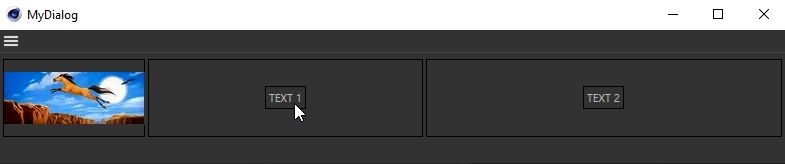
    @m_adam said in How to create splitted dialog window: But in any case, here it's how it works. Thank you very much, Maxime! Great example!
  • Creating Keyframes with AutoKey

    python sdk
    4
    0 Votes
    4 Posts
    991 Views
    M
    Hi @blastframe this is also the behavior of AutoKey in the Editor, so I would say is not an API issue. But you can use BaseDocument.Record to simulate the click of AddKeyFrame (but of course correct parameter have to be checked). Cheers, Maxime.
  • Create BaseBitmap() from Text?

    r21 python
    5
    0 Votes
    5 Posts
    522 Views
    B
    @m_adam Thanks for the response. For some reason, the return value is not accepted by the SetFont. It does not error out. It just uses the default font. In addition, how were you able to determine that the [508] is for the font name? I can't seem to see such reference in the documentation. You can check the working code here: import c4d from c4d import gui # Welcome to the world of Python def GetSegoeUiBoldFont(): bcFonts = c4d.bitmaps.GeClipMap.EnumerateFonts(c4d.GE_CM_FONTSORT_HIERARCHICAL) for familyId, familyBc in bcFonts: for fontDescriptionId, fontDescription in familyBc: if fontDescription[508] == "SegoeUI-Bold": return fontDescription print fontDescription def main(): w = 50 h = 50 image_with_text = c4d.bitmaps.GeClipMap() image_with_text.Init(w=w,h=h,bits=32) image_with_text.BeginDraw() image_with_text.SetColor(125,255,255) image_with_text.FillRect(x1=0,y1=0,x2=50,y2=50) image_with_text.SetColor(0,0,0) font_bc = GetSegoeUiBoldFont() print font_bc font_size = 15 image_with_text.SetFont(font_bc,font_size) image_with_text.TextAt(x=10,y=15,txt='head') image_with_text.EndDraw() bmp = image_with_text.GetBitmap() c4d.bitmaps.ShowBitmap(bmp) # Execute main() if __name__=='__main__': main()
  • Dialog generates EVMSG_CHANGE messages

    4
    0 Votes
    4 Posts
    622 Views
    P
    I found the problem this is not the issue.
  • Drawing on MultipassBitmap's GeClipMap crashes in R16.050

    c++ r19
    10
    0 Votes
    10 Posts
    2k Views
    C4DSC
    Just for future reference ... The topic's tag indicates this to be "solved" when it definitely isn't. But as this is a R16 issue only I guess no further time will be taken to figure out why this issue exists in R16 and not in newer releases. Also, there is currently no workaround as far as I know. The only thing one can do is check for the current C4D version running and avoid writing to a MultipassBitmap.
  • Dialog Freezes when checking for Message()

    r21 python
    12
    0 Votes
    12 Posts
    1k Views
    B
    Thanks @m_adam. First time using the c4d.DrawViews(). It works as expected. Thanks for the introduction.
  • R21 Windows System Error

    r21 c++ windows
    4
    0 Votes
    4 Posts
    1k Views
    S
    Hello, as Riccardo has pointed out, AdditionalIncludeDirectories has nothing to do with DLLs. It is used to define search paths for header files. See Additional include directories. It was never valid. Also, looking at the error, the plugin was installed into the C:/Program Files folder. In R21, there is no reason to install plugins there; one can install plugins at any location and just tell Cinema 4D the plugin path. best wishes, Sebastian
  • Issue with registering a ToolData

    3
    0 Votes
    3 Posts
    642 Views
    a_blockA
    Hi Maxime, thanks a lot! Both are valid solutions for me. Very helpful. Cheers
  • Undo for GeDialog (GUI)?

    r21 python
    4
    0 Votes
    4 Posts
    509 Views
    B
    @blastframe @m_magalhaes Thanks for the response and the confirmation that Undo is not included in the GeDialog(GUI). That said the supplied code works on my use case. Thanks again!
  • Quick Tab Radio for GeDialog?

    r21 python
    4
    0 Votes
    4 Posts
    690 Views
    B
    @r_gigante Thank you for the response and especially for the alternative code (first time to see a line with msg[c4d.BFM_ACTION_VALUE]. Both code works as expected.
  • Creating Class for Buttons Returns None

    r21 python
    5
    0 Votes
    5 Posts
    535 Views
    B
    @m_adam Ah. Gotcha. Thanks for the clarification and link.
  • 0 Votes
    13 Posts
    3k Views
    M
    SaveDocument is already present in the original code in the extended threading class "ExportThread" TO not make it happens in a thread. So to directly execute it in ExecuteConversion. The use of SendCoreMessage is a way, from a thread (and it's the case for you in ExportThread::Main) to send a message, that Cinema 4D will process on the Main thread (I didn't use in my code because in my case I'm in the main thread). So you can react to this message and do something (in your case SaveDocument). It was just for your information, regarding what's your thread is doing (only calling SaveDocument) I would say that using a thread here make no sense, and you should directly call SaveDocument in your ExecuteConversion function. Hope it's more clear. Cheers, Maxime.
  • Dragging an object from a treeview

    r20 python
    4
    1
    0 Votes
    4 Posts
    638 Views
    P
    Thanks, sounds a bit complicated, so I have to give it some thoughts. For now, it is enough. -Pim
  • Get mode (object, face, edge, point) with python

    python
    4
    1
    0 Votes
    4 Posts
    764 Views
    W
    Thanks Sebastian.
  • Command() does not honor Dynamic Lists/Variable

    r21 python
    9
    0 Votes
    9 Posts
    921 Views
    B
    When you presented the order of execution of __init__(), CreateLayout and InitValues. That makes total sense especially the 2.2.1 when it resets to an empty list. Thanks for the clarification!
  • Cant select newly created Instance

    python
    7
    0 Votes
    7 Posts
    1k Views
    esanE
    @blastframe Ok was able to retrofit your version to get what I wanted, a bit of guesswork in here, but got the result im after lol import c4d from c4d import gui def createInstance(): obj = op.GetDown() inst = c4d.BaseObject(c4d.Oinstance) # created Instance with Base Object inst[c4d.INSTANCEOBJECT_LINK] = obj # set Instance's reference link # set the name using the object passed to the function inst[c4d.ID_BASELIST_NAME] = "%s Instance"%obj[c4d.ID_BASELIST_NAME] return inst # return the Instance instance def AddLongDataType(obj): # create User Data Container named Picker if obj is None: return bc = c4d.GetCustomDataTypeDefault(c4d.DTYPE_LONG) bc[c4d.DESC_NAME] = "Picker" doc.AddUndo(c4d.UNDO_CHANGE, obj) obj.AddUserData(bc) c4d.EventAdd() def setQuickTab(obj, inst, data): # change User Date container to type Cycle, populate with Children Names descid = data[0][0] bc = data[0][1] children = obj.GetChildren() # Build new cycle options container dynamically cycle = c4d.BaseContainer() for i,child in enumerate(children): cycle.SetData(i, child.GetName()) bc[c4d.DESC_CYCLE] = cycle doc.AddUndo(c4d.UNDO_CHANGE, obj) # Set modified description data container inst.SetUserDataContainer(descid, bc) def main(doc): obj = doc.GetActiveObject() if (obj == None): gui.MessageDialog("Please select the Root of the Assets you wish to Instance.") return doc.StartUndo() inst = createInstance() doc.InsertObject(inst) AddLongDataType(inst) data = inst.GetUserDataContainer() setQuickTab(obj, inst, data) doc.AddUndo(c4d.UNDO_NEW, inst) doc.EndUndo() c4d.EventAdd() if __name__=='__main__': main(doc)