

c4d.BaseObject
-
class
c4d.BaseObject¶ The base class of objects.
Here is an example how to create and edit objects.
import c4d

obj = c4d.BaseObject(c4d.Ocube) # Create new cube
obj.SetRelPos(c4d.Vector(20))   # Set position of cube
doc.InsertObject(obj)           # Insert object in document
c4d.EventAdd()                  # Send global event message
Parent Class:
Children Classes:
Overview
Absolute Transform |
|
Returns the absolute position of the object. |
|
Returns the absolute HPB rotation of the object relative to any parent object. |
|
Returns the absolute scale of the object. |
|
Sets the absolute local position of the object within its parent. |
|
Sets the absolute HPB rotation of the object relative to any parent object. |
|
Sets the absolute scale of the object relative to its parent object if it has one. |
|
Bounding Geometry |
|
Bounding box center (vector), in local space. |
|
This is the bounding box radius (x/y/z) of the object, this works for all objects and is faster than manually finding the bounds of even polygon objects, the radius is internally cached. |
|
Cache Management |
|
Check if cache is built, if it matches the requirements (polygonized/isoparm, level of detail etc.). |
|
Get the object from the previously built cache. |
|
A cache/deform object has no |
|
Gets the previously built cache that has been deformed by an active deformer. |
|
Change Tracking |
|
Check if the object has been changed since the last time the object was touched. |
|
Check if the object has been changed since the last time the object was touched. |
|
Mark object to be used by a generator; automatically resets ‘dirty’. |
|
Deformation State |
|
Returns the state of the deformation/generator tick. |
|
Set the state of the deformation/generator tick. |
|
Dependency Tracking |
|
Add a child object to the dependence list. |
|
Compares if anything in the dependence list has changed. |
|
Start a new dependence list. |
|
Mark all the objects in the dependence list that they will be replaced by the generator. |
|
Display And Visibility |
|
Returns the state of the editor dot for this object. |
|
Checks if a highlight handle has been hit, by returning the ID previously returned by |
|
Returns the state of the render dot for this object. |
|
The object’s visibility depends upon its parent, if it has no visibility track this will return the parent’s visibility which is passed. |
|
Set the state of the editor dot for this object. |
|
Set the render state for this object. |
|
Frozen Transform |
|
Returns the frozen position of the object. |
|
Returns the frozen HPB rotation of the object. |
|
Returns the frozen scale of the object. |
|
Sets the frozen position of the object. |
|
Sets the frozen HPB rotation of the object. |
|
Sets the frozen scale of the object. |
|
Geometry Representation |
|
Gets the previously built isoparm representation of the object. |
|
Get a real spline representation of a primitive spline object. |
|
Sets the isoparm representation of the object. |
|
Set the phong smoothing for the object. |
|
Hierarchy Cloning |
|
Check and generate a clone of the child objects of a parent generator. |
|
Generate a clone of the child objects of a parent generator. |
|
Check if the object is a child of op. |
|
Magic Methods |
|
Initialize a new |
|
Matrix Operations |
|
Copy the matrix to another object. |
|
Returns the frozen and normalized matrix of the object. |
|
Get the world (global) matrix that represents the objects position, scale and rotation. |
|
Get the global normalized matrix that represents the objects position, scale and rotation. |
|
Get the local matrix that represents the objects position, scale and rotation. |
|
Get the local normalized matrix that represents the objects position, scale and rotation. |
|
Returns the relative matrix of the object. |
|
Returns the relative and normalized matrix of the object. |
|
Get the global matrix of the parent object that represents the objects position, scale and rotation. |
|
Set the world (global) matrix that represents the objects position, scale and rotation. |
|
Set the local matrix that represents the objects position, scale and rotation. |
|
Sets the relative matrix of the object. |
|
Modeling Axis |
|
Gets the internal matrix for the modeling axis. |
|
Sets the internal matrix for the modeling axis. |
|
Object Identity |
|
Returns a unique ID for any object in a document. |
|
Get the ip of the object. |
|
Set the ip of the object. |
|
Relative Transform |
|
Returns the relative position of the object. |
|
Returns the relative HPB rotation of the object. |
|
Returns the relative scale of the object. |
|
Set the relative position of the object. |
|
Sets the relative HPB rotation of the object. |
|
Sets the relative scale of the object. |
|
Rotation Animation |
|
Forces an evaluation of all rotation tracks and considers quaternion interpolation. |
|
Tries to find the best Euler angle according to the previous key. |
|
Returns each component curve for the given curve. |
|
Returns each component track for the given id. |
|
Makes sure that the track Curves components are synchronized (keys on each component). |
|
Rotation Configuration |
|
Gets the rotation order of the object. |
|
Checks if object rotation is interpolated in quaternion mode. |
|
Sets the quaternion rotation mode of the object. |
|
Sets the rotation order of the object. |
|
Tag Management |
|
Copy the tags of the object to another object. |
|
Returns the first tag of the object. |
|
Returns the last tag of the object. |
|
Get a tag of a certain type associated with this object. |
|
Get the variable tag data count. |
|
Returns all tags in a list. |
|
Attach a |
|
Removes a tag from the object and free its resources. |
|
Create and insert a tag for this object. |
|
Create a variable tag for this object. |
|
Members
Absolute Transform
-
BaseObject.GetAbsPos(self)¶ Returns the absolute position of the object. These will be absolute local coordinates within its parent object.
See also
See also Freezing Transformations.
- Return type
- Returns
The absolute object position.
-
BaseObject.GetAbsRot(self)¶ Returns the absolute HPB rotation of the object relative to any parent object.
See also
See also Freezing Transformations.
- Return type
- Returns
The absolute object rotation.
-
BaseObject.GetAbsScale(self)¶ Returns the absolute scale of the object. These will be relative to the objects parent if it has one.
See also
See also Freezing Transformations.
- Return type
- Returns
The absolute object scale.
-
BaseObject.SetAbsPos(self, v)¶ Sets the absolute local position of the object within its parent. If the object has no parent then these will be world coordinates.
See also
See also Freezing Transformations.
- Parameters
v (c4d.Vector) – The absolute object position.
-
BaseObject.SetAbsRot(self, v)¶ Sets the absolute HPB rotation of the object relative to any parent object.
See also
See also Freezing Transformations.
- Parameters
v (c4d.Vector) – The absolute object rotation.
-
BaseObject.SetAbsScale(self, v)¶ Sets the absolute scale of the object relative to its parent object if it has one.
See also
See also Freezing Transformations.
- Parameters
v (c4d.Vector) – The absolute object scale.
Bounding Geometry
-
BaseObject.GetMp(self)¶ Bounding box center (vector), in local space.
- Return type
- Returns
The bounding box center.
-
BaseObject.GetRad(self)¶ This is the bounding box radius (x/y/z) of the object, this works for all objects and is faster than manually finding the bounds of even polygon objects, the radius is internally cached.
- Return type
- Returns
The bounding box width, height and depth.
Cache Management
-
BaseObject.CheckCache(self, hh)¶ - Check if cache is built, if it matches the requirements (polygonized/isoparm, level of detail etc.).It returns the dirty status of the cache.
Note
This function must only be called from within
ObjectData.GetVirtualObjects()/main() of a generator object.- Parameters
hh (c4d.plugins.HierarchyHelp) –
A hierarchy helper for the operation.Usually passed through from a calling function, for example fromObjectData.GetVirtualObjects()or a Python generator main().- Return type
bool
- Returns
True if the cache is dirty, False if it is valid.
-
BaseObject.GetCache(self, hh=None)¶ Get the object from the previously built cache.
Note
Situations can be quite complex in Cinema 4D. For instanceGetCache()could return a list of objects.For example the default Sweep Generator internally has some built-in caches for the sweep surface and for the caps.The following helper routine can be used to make things easier. It browses through this rather complex hierarchy of objects and caches recursivelydef DoRecursion(op): tp = op.GetDeformCache() if tp is not None: DoRecursion(tp) else: tp = op.GetCache() if tp is not None: DoRecursion(tp) else: if not op.GetBit(c4d.BIT_CONTROLOBJECT): if op.IsInstanceOf(c4d.Opolygon): ... tp = op.GetDown() while tp is not None: DoRecursion(tp) tp = tp.GetNext()
Warning
Use the above routine only if the caches are already built.It is for instance not safe to use it in a command plugin since the user can have stopped the scene redraw and the building of caches.- Parameters
hh (Optional[c4d.plugins.HierarchyHelp]) –
An optional hierarchy helper for the operation. Only for some special cases a hierarchy help must be passed.Usually passed through from a calling function, for example fromObjectData.GetVirtualObjects()or a Python generator main().- Return type
Optional[c4d.BaseObject]
- Returns
The object’s previously built cache. May return None if the cache is not available or is not yet built.
-
BaseObject.GetCacheParent(self)¶ - A cache/deform object has no
GetUplink.Instead this method can be called to detect the cache building parent.- Return type
Optional[c4d.BaseObject]
- Returns
The cache parent or None.
-
BaseObject.GetDeformCache(self)¶ - Gets the previously built cache that has been deformed by an active deformer.It is important to understand the concept how the deformer cache operates.For each object in the hierarchy that generates a polygonal cache a deformer cache could also have been created by an active deformer object.
A simple example will help to see how this works:
 Take the simple hierarchy shown above, the array generator object creates a virtual hierarchy in the cache, this can be retrieved using
GetCache().This hierarchy is: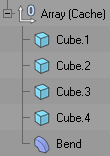
From each of the Cube objects a further cache is generated, this time polygonal:

From these the deformer object generates a deformed polygon cache:

So the final hierarchy is:
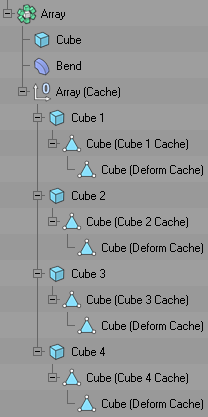 When a deformer becomes active every object/cache object gets a deform cache (if it was a polygonal object).The deformer cache is always polygonal and is only ever a single object.
Note
The caches are always built after all plugins and expressions have been called.If the virtual objects have to be accessed to obtain a polygonal based object it is generally advised to callSendModelingCommand()with MCOMMAND_CURRENTSTATETOOBJECT.This will rebuild the cache for the passed object if needed, and then clone the polygonal objects.- Return type
Optional[c4d.BaseObject]
- Returns
The objects previously built deformed cache. May return None if the cache is not available or is not yet built.
Change Tracking
-
BaseObject.IsDirty(self, flags)¶ Check if the object has been changed since the last time the object was touched.
- Parameters
flags (int) –
The object part to check:
Expresses dirty state categories for a single scene element. Unlike
HDIRTYFLAGS, these flags only track changes on the element itself.DIRTYFLAGS_NONE
Signals no state.
DIRTYFLAGS_MATRIX
Signals that the matrix of a
BaseObjecthas changed.DIRTYFLAGS_DATA
Signals that container or parameter data of a scene element has changed.
DIRTYFLAGS_SELECT
Signals that a point, edge, or polygon selection of a
BaseObjecthas changed.DIRTYFLAGS_CACHE
Signals that the cache of a
BaseObjecthas changed or been rebuilt.DIRTYFLAGS_CHILDREN
Signals that owned child data of a scene element, such as animation keys, has changed.
DIRTYFLAGS_DESCRIPTION
Signals that the description of a scene element has changed.
DIRTYFLAGS_VISIBILITY
Signals that the visibility state of a scene element has changed.
DIRTYFLAGS_SELECTION_OBJECTS
Signals that the object selection of a
BaseDocumenthas changed.DIRTYFLAGS_SELECTION_TAGS
Signals that the tag selection of a
BaseDocumenthas changed.DIRTYFLAGS_SELECTION_MATERIALS
Signals that the material selection of a
BaseDocumenthas changed.DIRTYFLAGS_ALL
Signals all states.
- Return type
bool
- Returns
True if the object is dirty, otherwise False.
-
BaseObject.SetDirty(self, flags)¶ Check if the object has been changed since the last time the object was touched.
- Parameters
flags (int) – See parameters at
IsDirty().
-
BaseObject.Touch(self)¶ Mark object to be used by a generator; automatically resets ‘dirty’.
Deformation State
-
BaseObject.GetDeformMode(self)¶ Returns the state of the deformation/generator tick.
- Return type
bool
- Returns
True if the generator/deformer object is enabled.
-
BaseObject.SetDeformMode(self, mode)¶ Set the state of the deformation/generator tick.
- Parameters
mode (bool) – True to enable the generator/deformer object.
Dependency Tracking
-
BaseObject.AddDependence(self, op, dirtyflags=6)¶ - Add a child object to the dependence list.Usually this will be child objects that are used by a generator object.
- Parameters
op (c4d.BaseObject) – The child object to add to the dependence list.
dirtyflags (Optional[int]) –
New in version R19.024.
The dirty flags stored within the dependence list:
Expresses dirty state categories for a single scene element. Unlike
HDIRTYFLAGS, these flags only track changes on the element itself.DIRTYFLAGS_NONE
Signals no state.
DIRTYFLAGS_MATRIX
Signals that the matrix of a
BaseObjecthas changed.DIRTYFLAGS_DATA
Signals that container or parameter data of a scene element has changed.
DIRTYFLAGS_SELECT
Signals that a point, edge, or polygon selection of a
BaseObjecthas changed.DIRTYFLAGS_CACHE
Signals that the cache of a
BaseObjecthas changed or been rebuilt.DIRTYFLAGS_CHILDREN
Signals that owned child data of a scene element, such as animation keys, has changed.
DIRTYFLAGS_DESCRIPTION
Signals that the description of a scene element has changed.
DIRTYFLAGS_VISIBILITY
Signals that the visibility state of a scene element has changed.
DIRTYFLAGS_SELECTION_OBJECTS
Signals that the object selection of a
BaseDocumenthas changed.DIRTYFLAGS_SELECTION_TAGS
Signals that the tag selection of a
BaseDocumenthas changed.DIRTYFLAGS_SELECTION_MATERIALS
Signals that the material selection of a
BaseDocumenthas changed.DIRTYFLAGS_ALL
Signals all states.
-
BaseObject.CompareDependenceList(self)¶ Compares if anything in the dependence list has changed.
- Return type
bool
- Returns
True if the list has not changed (are the same).
-
BaseObject.NewDependenceList(self)¶ Start a new dependence list. These enable you to keep track of changes made to any children.
Note
The object must be children of your object.
-
BaseObject.TouchDependenceList(self)¶ Mark all the objects in the dependence list that they will be replaced by the generator.
Display And Visibility
-
BaseObject.GetEditorMode(self)¶ Returns the state of the editor dot for this object.
- Return type
int
- Returns
The editor mode:
MODE_ON
The object is enabled regardless of the state of any parent object.
MODE_OFF
The object is disabled regardless of the state of any parent object.
MODE_UNDEF
The object is enabled by default, but the state of any parent object is used if it is enabled or disabled.
-
BaseObject.GetHighlightHandle(self, bd)¶ - Checks if a highlight handle has been hit, by returning the ID previously returned by
ObjectData.DetectHandle().The handle can then be drawn in the highlight mode.- Parameters
bd (c4d.BaseDraw) – A base draw.
- Return type
int
- Returns
The handle ID.
-
BaseObject.GetRenderMode(self)¶ Returns the state of the render dot for this object.
- Return type
int
- Returns
The render mode:
MODE_ON
The object is enabled regardless of the state of any parent object.
MODE_OFF
The object is disabled regardless of the state of any parent object.
MODE_UNDEF
The object is enabled by default, but the state of any parent object is used if it is enabled or disabled.
-
BaseObject.GetVisibility(self, parent)¶ The object’s visibility depends upon its parent, if it has no visibility track this will return the parent’s visibility which is passed.
Note
The range of values are 0.0<=visibility<=1.0.
Note
In the editor only a visibility of 0.0 can be noticed but all other intermediate values are visualized in the renderer only.
- Parameters
float – The parent objects visibility.
- Return type
float
- Returns
The visibility.
-
BaseObject.SetEditorMode(self, mode)¶ Set the state of the editor dot for this object.
- Parameters
mode (int) –
The editor mode:
MODE_ON
The object is enabled regardless of the state of any parent object.
MODE_OFF
The object is disabled regardless of the state of any parent object.
MODE_UNDEF
The object is enabled by default, but the state of any parent object is used if it is enabled or disabled.
-
BaseObject.SetRenderMode(self, mode)¶ Set the render state for this object.
- Parameters
mode (int) –
The render mode:
MODE_ON
The object is enabled regardless of the state of any parent object.
MODE_OFF
The object is disabled regardless of the state of any parent object.
MODE_UNDEF
The object is enabled by default, but the state of any parent object is used if it is enabled or disabled.
Frozen Transform
-
BaseObject.GetFrozenPos(self)¶ Returns the frozen position of the object.
See also
See also Freezing Transformations.
- Return type
- Returns
The frozen object position.
-
BaseObject.GetFrozenRot(self)¶ Returns the frozen HPB rotation of the object.
See also
See also Freezing Transformations.
- Return type
- Returns
The frozen object rotation.
-
BaseObject.GetFrozenScale(self)¶ Returns the frozen scale of the object.
See also
See also Freezing Transformations.
- Return type
- Returns
The frozen object scale.
-
BaseObject.SetFrozenPos(self, v)¶ Sets the frozen position of the object.
See also
See also Freezing Transformations.
- Parameters
v (c4d.Vector) – The frozen object position.
-
BaseObject.SetFrozenRot(self, v)¶ Sets the frozen HPB rotation of the object.
See also
See also Freezing Transformations.
- Parameters
v (c4d.Vector) – The frozen object rotation.
-
BaseObject.SetFrozenScale(self, v)¶ Sets the frozen scale of the object.
See also
See also Freezing Transformations.
- Parameters
v (c4d.Vector) – The frozen object scale.
Geometry Representation
-
BaseObject.GetIsoparm(self)¶ Gets the previously built isoparm representation of the object.
Note
May return None if the isoparm is not available or is not yet built.
- Return type
Optional[c4d.LineObject]
- Returns
The LineObject representing isoparam.
-
BaseObject.GetRealSpline(self)¶ - Get a real spline representation of a primitive spline object.This can for example be used to calculate the length of the spline.If the object is a real spline it returns this. Otherwise None.
Note
The matrix of the returned object must not be used.Use the matrix of the original primitive spline object instead.- Return type
Optional[c4d.SplineObject]
- Returns
The created spline object.
Warning
The returned object is owned by the host object and therefore should be cloned when inserted somewhere else.Ignoring this would lead to a crash if the original object is deleted.To safely insert a real spline representation of a primitive spline object, it should be cloned beforehand.
# The real spline representation.
realSpline = op.GetRealSpline()

if realSpline is not None:
    # The clone is inserted into the document.
    clone = realSpline.GetClone()
    doc.InsertObject(clone)

    # Update Cinema 4D.
    c4d.EventAdd()
-
BaseObject.SetIsoparm(self, l)¶ Sets the isoparm representation of the object.
Warning
Must only be called from within
ObjectData.GetVirtualObjects()of a generator object.- Parameters
l (c4d.LineObject) – The isoparm representation of the object to set.
-
BaseObject.SetPhong(self, on, anglelimit, angle)¶ Set the phong smoothing for the object.
Note
This function will delete any existing Phong tag.If on is set to True it will create a new Phong tag.- Parameters
on (bool) – False removes the phong tag from the object.
anglelimit (bool) – True if angle should be used.
angle (float) – The phong angle.
- Return type
bool
- Returns
Success of changing the smoothing.
Hierarchy Cloning
-
BaseObject.GetAndCheckHierarchyClone(self, hh, op, flags, allchildren, dirty=False, trans=None)¶ - Check and generate a clone of the child objects of a parent generator.This is similar to
GetHierarchyClone()except that it will check if the hierarchy is dirty and if not it will not need to generate a new clone.- Parameters
hh (c4d.plugins.HierarchyHelp) –
A hierarchy helper for the operation.Usually passed through from a calling function, for example fromObjectData.GetVirtualObjects()or a Python generator main() function.op (c4d.BaseObject) – The object to start the clone from, usually the first child of the parent object.
flags (int) –
The flags for the generation of the cloned chain, the values are:
HIERARCHYCLONEFLAGS_NONE
None.
HIERARCHYCLONEFLAGS_ASIS
Objects unchanged. (Used by e.g. Oarray.)
HIERARCHYCLONEFLAGS_ASPOLY
Objects cloned as polygons. (Used by e.g. HyperNURBS.)
HIERARCHYCLONEFLAGS_ASLINE
Objects cloned as line objects.
HIERARCHYCLONEFLAGS_ASSPLINE
Objects cloned as splines.
allchildren (bool) – True if all children should be used in the check.
dirty (bool) –
New in version R18.057.
Has to be set to None (or left unset) for the cloning to take place. Set to True if some part of the child objects in the chain has changed, or False if nothing has changed.
trans (Optional[c4d.AliasTrans]) –
New in version R18.057.
An optional alias translator for the operation.
- Return type
Dict[clone:
BaseObject, dirty: bool]- Returns
The cloned object and a dirty flag: True if some part of the child objects in the chain has changed, or False if nothing has changed.
-
BaseObject.GetHierarchyClone(self, hh, op, flags, dirty=None, trans=None, dirtyflags=6)¶ Generate a clone of the child objects of a parent generator.
The result returned byGetAndCheckHierarchyClone()will be a chain of objects with various types. Passing HIERARCHYCLONEFLAGS_ASLINE e.g. will force all splines to be converted, but not every object in the chain will be of type Oline.Some objects likePolygonObjectcannot be converted, also there are Onull.- Parameters
hh (c4d.plugins.HierarchyHelp) –
A hierarchy helper for the operation.Usually passed through from a calling function, for example fromObjectData.GetVirtualObjects()or a Python generator main() function.op (c4d.BaseObject) – The object to start the clone from, usually the parent object itself.
flags (int) –
The flags for the generation of the cloned chain, the values are:
HIERARCHYCLONEFLAGS_NONE
None.
HIERARCHYCLONEFLAGS_ASIS
Objects unchanged. (Used by e.g. Oarray.)
HIERARCHYCLONEFLAGS_ASPOLY
Objects cloned as polygons. (Used by e.g. HyperNURBS.)
HIERARCHYCLONEFLAGS_ASLINE
Objects cloned as line objects.
HIERARCHYCLONEFLAGS_ASSPLINE
Objects cloned as splines.
dirty (Optional[bool]) –
New in version R18.057.
Has to be set to None (or left unset) for the cloning to take place. Set to True if some part of the child objects in the chain has changed, or False if nothing has changed.
trans (Optional[c4d.AliasTrans]) –
New in version R18.057.
An optional alias translator for the operation.
dirtyflags (int) –
New in version R19.024.
The dirty flags stored within the dependence list:
Expresses dirty state categories for a single scene element. Unlike
HDIRTYFLAGS, these flags only track changes on the element itself.DIRTYFLAGS_NONE
Signals no state.
DIRTYFLAGS_MATRIX
Signals that the matrix of a
BaseObjecthas changed.DIRTYFLAGS_DATA
Signals that container or parameter data of a scene element has changed.
DIRTYFLAGS_SELECT
Signals that a point, edge, or polygon selection of a
BaseObjecthas changed.DIRTYFLAGS_CACHE
Signals that the cache of a
BaseObjecthas changed or been rebuilt.DIRTYFLAGS_CHILDREN
Signals that owned child data of a scene element, such as animation keys, has changed.
DIRTYFLAGS_DESCRIPTION
Signals that the description of a scene element has changed.
DIRTYFLAGS_VISIBILITY
Signals that the visibility state of a scene element has changed.
DIRTYFLAGS_SELECTION_OBJECTS
Signals that the object selection of a
BaseDocumenthas changed.DIRTYFLAGS_SELECTION_TAGS
Signals that the tag selection of a
BaseDocumenthas changed.DIRTYFLAGS_SELECTION_MATERIALS
Signals that the material selection of a
BaseDocumenthas changed.DIRTYFLAGS_ALL
Signals all states.
- Return type
dict{clone:
BaseObject, dirty: bool}- Returns
The cloned object and a dirty flag: True if some part of the child objects in the chain has changed, or False if nothing has changed.
-
BaseObject.SearchHierarchy(self, op)¶ Check if the object is a child of op.
- Parameters
op (c4d.BaseObject) – Check within this object’s hierarchy.
- Return type
bool
- Returns
True if the object is a child of op, otherwise False.
Magic Methods
-
BaseObject.__init__(self, type)¶ Initialize a new
BaseObjectin memory.- Parameters
type (int) – The object type : Object Types.
Matrix Operations
-
BaseObject.CopyMatrixTo(self, dst)¶ Copy the matrix to another object.
- Parameters
dst (c4d.BaseObject) – The destintation object.
-
BaseObject.GetFrozenMln(self, m)¶ Returns the frozen and normalized matrix of the object. See also Freezing Transformations.
- Parameters
m (c4d.Matrix) – The object’s frozen and normalized matrix.
-
BaseObject.GetMg(self)¶ Get the world (global) matrix that represents the objects position, scale and rotation.
Note
This will only work if the object is attached to a document.Virtual objects in caches and deform caches are not attached to a document, so this function cannot be used for those objects.- Return type
- Returns
The object’s world matrix.
-
BaseObject.GetMgn(self)¶ Get the global normalized matrix that represents the objects position, scale and rotation.
- Return type
- Returns
The object’s normalized world matrix.
-
BaseObject.GetMl(self)¶ Get the local matrix that represents the objects position, scale and rotation.
- Return type
- Returns
The object’s local matrix.
-
BaseObject.GetMln(self)¶ Get the local normalized matrix that represents the objects position, scale and rotation.
- Return type
- Returns
The object’s normalized local matrix.
-
BaseObject.GetRelMl(self)¶ Returns the relative matrix of the object. See also Freezing Transformations.
- Return type
- Returns
The object’s relative matrix.
-
BaseObject.GetRelMln(self)¶ Returns the relative and normalized matrix of the object. See also Freezing Transformations.
- Return type
- Returns
The object’s relative and normalized matrix.
-
BaseObject.GetUpMg(self)¶ - Get the global matrix of the parent object that represents the objects position, scale and rotation.If the object has no parent object then this matrix will be a unit matrix.
- Return type
- Returns
The parent object’s world matrix.
-
BaseObject.SetMg(self, m)¶ Set the world (global) matrix that represents the objects position, scale and rotation.
- Parameters
m (c4d.Matrix) – The object’s new world matrix.
-
BaseObject.SetMl(self, m)¶ Set the local matrix that represents the objects position, scale and rotation.
- Parameters
m (c4d.Matrix) – The object’s new local matrix.
-
BaseObject.SetRelMl(self, m)¶ Sets the relative matrix of the object. See also Freezing Transformations.
- Parameters
m (c4d.Matrix) – The object’s new relative matrix.
Modeling Axis
-
BaseObject.GetModelingAxis(self, doc)¶ Gets the internal matrix for the modeling axis.
New in version R19.
Note
To access the axis type, and other axis options, use the IDs defined in toolmodelingaxis.h.
See also
BaseObject.SetModelingAxis()- Parameters
doc (c4d.documents.BaseDocument) – The document for the operation.
- Return type
- Returns
The modeling axis.
-
BaseObject.SetModelingAxis(self, m)¶ Sets the internal matrix for the modeling axis.
New in version R19.
Note
To access the axis type, and other axis options, use the IDs in toolmodelingaxis.h.Here is a code sample:import c4d def SetToolData(doc, toolID, paramID, data): plug = c4d.plugins.FindPlugin(toolID, c4d.PLUGINTYPE_TOOL) if plug is None: return plug[paramID] = data SetToolData(doc, c4d.ID_MODELING_LIVESELECTION, c4d.MDATA_AXIS_MODE, c4d.MDATA_AXIS_MODE_FREE)
- Parameters
m (c4d.Matrix) – The new modeling axis to set.
Object Identity
-
BaseObject.GetGUID(self)¶ - Returns a unique ID for any object in a document.This works for generated objects in a cache (e.g. clones generated by a MoGraph cloner) and also for ‘real’ objects in the document (this is special, because
GetUniqueIP()does not do this).New in version R14.014.
Note
The ID generation for cache objects is based on
GetUniqueIP(), so if two cache objects have the same IP, they will probably also get the same GUID (unless they are point objects or polygon objects with different point or poly count).Note
The ID generation for ‘real’ objects is based on the object’s marker, so if an object has no marker it will not return a GUID.
- Return type
int
- Returns
A checksum for the object.
-
BaseObject.GetUniqueIP(self)¶ Get the ip of the object.
- Return type
int
- Returns
The object IP number.
-
BaseObject.SetUniqueIP(self, ip)¶ Set the ip of the object.
- Parameters
ip (int) – The object IP number.
Relative Transform
-
BaseObject.GetRelPos(self)¶ Returns the relative position of the object.
See also
See also Freezing Transformations.
- Return type
- Returns
The relative object position.
-
BaseObject.GetRelRot(self)¶ Returns the relative HPB rotation of the object.
See also
See also Freezing Transformations.
- Return type
- Returns
The relative object rotation.
-
BaseObject.GetRelScale(self)¶ Returns the relative scale of the object.
See also
See also Freezing Transformations.
- Return type
- Returns
The relative object scale.
-
BaseObject.SetRelPos(self, v)¶ Set the relative position of the object.
See also
See also Freezing Transformations.
- Parameters
v (c4d.Vector) – The relative object position.
-
BaseObject.SetRelRot(self, v)¶ Sets the relative HPB rotation of the object.
See also
See also Freezing Transformations.
- Parameters
v (c4d.Vector) – The relative object rotation.
-
BaseObject.SetRelScale(self, v)¶ Sets the relative scale of the object.
See also
See also Freezing Transformations.
- Parameters
v (c4d.Vector) – The relative object scale.
Rotation Animation
-
BaseObject.EvaluateSynchronizedRotation(self, time, flags, applyRotation=True)¶ Forces an evaluation of all rotation tracks and considers quaternion interpolation.
New in version R18.020.
- Parameters
time (c4d.BaseTime) – The evaluation time.
flags (c4d.BaseTime) –
The animate flags:
Key
Description
ANIMATEFLAGS_NONE
None.
ANIMATEFLAGS_NO_PARTICLES
Ignore particles.
ANIMATEFLAGS_NO_CHILDREN
Do not animate children.
ANIMATEFLAGS_INRENDER
Prepare to render scene.
ANIMATEFLAGS_NO_MINMAX
Private.
ANIMATEFLAGS_NO_NLA
Private.
ANIMATEFLAGS_NLA_SUM
Private.
ANIMATEFLAGS_PARAMETER_TRACKS
New in version 2024.5: Private
applyRotation (bool) –
New in version R18.039.
Pass False to return rotation result instead of updating attributes.
- Return type
bool or Tuple[bool, c4d.Vector]
- Returns
- If applyRotation is True, a bool giving the evaluation result.If applyRotation is False, a tuple with the following information:bool: True if evaluation was a success, otherwise False.
c4d.Vector: The rotation vector result.
-
BaseObject.FindBestEulerAngle(self, rotationTrackID, adjustTangent, undo, startRange=<_custom_c4d.BaseTime object at 0x0000012D9D127860>, endRange=<_custom_c4d.BaseTime object at 0x0000012D9D12A020>)¶ Tries to find the best Euler angle according to the previous key.
Note
The object must have keys on each component.
New in version R18.020.
- Parameters
rotationTrackID (int) – Rotation Track ID to manage (relative, global, absolute, frozen).
adjustTangent (bool) – Try to adjust the tangent with new value, if False auto is used.
undo (int) – Add undo to value changed (need to manage start and end externally).
startRange (c4d.BaseTime) – Optionally start operation at given time.
endRange (c4d.BaseTime) – Optionally end operation at given time.
- Return type
bool
- Returns
True if rotation synchronization was successful, otherwise False.
-
BaseObject.GetVectorCurves(self, curveToSearch)¶ Returns each component curve for the given curve.
New in version R18.020.
- Parameters
curveToSearch (c4d.CCurve) – The curve component of desired vector.
- Return type
Tuple[bool, Optional[c4d.CCurve], Optional[c4d.CCurve], Optional[c4d.CCurve]]
- Returns
A tuple with the following information:
bool: True if successful, otherwise False.c4d.CCurve: The X curve of vector, or None if not found.c4d.CCurve: The Y curve of vector, or None if not found.c4d.CCurve: The Z curve of vector, or None if not found.
-
BaseObject.GetVectorTracks(self, id)¶ Returns each component track for the given id.
New in version R18.020.
- Parameters
id (c4d.DescID) – ID of desired vector.
- Return type
Tuple[bool, Optional[c4d.CTrack], Optional[c4d.CTrack], Optional[c4d.CTrack]]
- Returns
A tuple with the following information:
bool: True if successful, otherwise False.c4d.CTrack: The X track of vector, or None if not found.c4d.CTrack: The Y track of vector, or None if not found.c4d.CTrack: The Z track of vector, or None if not found.
-
BaseObject.SynchronizeVectorTrackKeys(self, vectorTrackID, bUndo, startRange=<_custom_c4d.BaseTime object at 0x0000012D9D1334A0>, endRange=<_custom_c4d.BaseTime object at 0x0000012D9D132C60>)¶ Makes sure that the track Curves components are synchronized (keys on each component).
If a component track is found, the other track components will be synchronized.
New in version R18.020.
- Parameters
vectorTrackID (int) – ID of the vector track to synchronize.
undo (int) – Add undo to value changed (need to manage start and end externally).
startRange (c4d.BaseTime) – Optionally start operation at given time.
endRange (c4d.BaseTime) – Optionally end operation at given time.
- Return type
bool
- Returns
True if track synchronization was successful, otherwise False.
Rotation Configuration
-
BaseObject.GetRotationOrder(self)¶ Gets the rotation order of the object.
New in version R14.014.
- Return type
int
- Returns
The rotation order:
ROTATIONORDER_YXZGLOBAL
Global YXZ order.
ROTATIONORDER_YZXGLOBAL
Global YZX order.
ROTATIONORDER_ZYXGLOBAL
Global ZYX order.
ROTATIONORDER_ZXYGLOBAL
Global ZXY order.
ROTATIONORDER_XZYGLOBAL
Global XZY order.
ROTATIONORDER_XYZGLOBAL
Global XYZ order.
ROTATIONORDER_YXZLOCAL
Local YXZ order.
ROTATIONORDER_YZXLOCAL
Local YZX order.
ROTATIONORDER_ZYXLOCAL
Local ZYX order.
ROTATIONORDER_ZXYLOCAL
Local ZXY order.
ROTATIONORDER_XZYLOCAL
Local XZY order.
ROTATIONORDER_XYZLOCAL
Local XYZ order.
ROTATIONORDER_HPB
HPB order.
ROTATIONORDER_DEFAULT
Default order. ROTATIONORDER_HPB.
-
BaseObject.IsQuaternionRotationMode(self)¶ Checks if object rotation is interpolated in quaternion mode.
New in version R18.020.
- Return type
bool
- Returns
True if rotation interpolation is quaternion, otherwise False.
-
BaseObject.SetQuaternionRotationMode(self, active, undo)¶ Sets the quaternion rotation mode of the object.
New in version R18.020.
- Parameters
active (bool) – Enable/Disable the quaternion rotation mode for the object.
undo (bool) –
Add undo for the change of quaternion rotation mode.The caller has to to manage start/end of undo actions withBaseDocument.StartUndo()/EndUndo().
-
BaseObject.SetRotationOrder(self, order)¶ Sets the rotation order of the object.
New in version R14.014.
- Parameters
order (int) –
The new rotation order:
ROTATIONORDER_YXZGLOBAL
Global YXZ order.
ROTATIONORDER_YZXGLOBAL
Global YZX order.
ROTATIONORDER_ZYXGLOBAL
Global ZYX order.
ROTATIONORDER_ZXYGLOBAL
Global ZXY order.
ROTATIONORDER_XZYGLOBAL
Global XZY order.
ROTATIONORDER_XYZGLOBAL
Global XYZ order.
ROTATIONORDER_YXZLOCAL
Local YXZ order.
ROTATIONORDER_YZXLOCAL
Local YZX order.
ROTATIONORDER_ZYXLOCAL
Local ZYX order.
ROTATIONORDER_ZXYLOCAL
Local ZXY order.
ROTATIONORDER_XZYLOCAL
Local XZY order.
ROTATIONORDER_XYZLOCAL
Local XYZ order.
ROTATIONORDER_HPB
HPB order.
ROTATIONORDER_DEFAULT
Default order. ROTATIONORDER_HPB.
Tag Management
-
BaseObject.CopyTagsTo(self, dest, visible, variable, hierarchical)¶ Copy the tags of the object to another object.
- Parameters
dest (c4d.BaseObject) – The destination object.
visible (bool) – True if the tags must be visible, False if it must not be visible or NOTOK if it can be either (if this property does not need to be checked).
variable (bool) – True if the tags must be variable, False if it must not be variable or NOTOK if it can be either (if this property does not need to be checked).
hierarchical (bool) – True if the tags must be hierarchical, False if it must not be hierarchical or NOTOK if it can be either (if this property does not need to be checked).
- Returns
True if the object’s tags were copied successfully, otherwise False.
-
BaseObject.GetFirstTag(self)¶ Returns the first tag of the object.
- Return type
Optional[c4d.BaseTag]
- Returns
The first tag of the object, or None if the object has no tags.
-
BaseObject.GetLastTag(self)¶ Returns the last tag of the object.
New in version R19.024.
- Return type
Optional[c4d.BaseTag]
- Returns
The last tag of the object, or None if the object has no tags.
-
BaseObject.GetTag(self, type, nr=0)¶ Get a tag of a certain type associated with this object.
- Parameters
type (int) – The type of tag to fetch from the object. See Tag Types.
nr (int) – The starting tag index to find of this type.
- Return type
Optional[c4d.BaseTag]
- Returns
The requested tag, or None if no tags of the requested type are available.
Note
If you request a specific number that is not available then None will be returned even if there is a tag of that type with a different index.
-
BaseObject.GetTagDataCount(self, type)¶ Get the variable tag data count.
- Parameters
type (int) –
The type of tag:
The table lists the supported variable tags by
VariableTag.GetAllHighlevelData()/SetAllHighlevelData()and their corresponding data.Tag
Data
Description
Tpoint
list of
c4d.VectorThe points.
Tpolygon
list of
c4d.CPolygonThe polygons.
Ttangent
list of (
c4d.Vector,c4d.Vector)The tangents left and right interpolation.
Tsegment
list of dict{cnt: int, closed: bool}
The segments number of points and closed state.
Tline
list of dict{pos: float, t: float}
The line points percentage position and original spline point.
Tvertexmap
list of float
The vertex map values.
Tnormal
List[int]eger
The normals. Note: Contains 12 times more elements than
VariableTag.GetDataCount()returns.Tvertexcolor
list of dict{a, b, c, d:
c4d.Vector4d}The vertex colors for a polygon.
Tsoftselection
list of float
The soft selection values.
- Return type
int
- Returns
The number of elements in the variable tag.
-
BaseObject.GetTags(self)¶ Returns all tags in a list.
- Return type
List[c4d.BaseTag]
- Returns
The list of all tags.
-
BaseObject.InsertTag(self, tp, pred=None)¶ Attach a
BaseTagtoBaseObject.Warning
If the tag type was not registered with TAG_MULTIPLE, any existing old tag of same type will be implicitly removed.Any previous reference to the old tag will be invalid afterwards.- Parameters
tp (c4d.BaseTag) – The tag which will be attached.
pred (Optional[c4d.BaseTag]) – tp will insert after pred.
-
BaseObject.KillTag(self, type, nr=0)¶ Removes a tag from the object and free its resources.
- Parameters
type (int) – The type of tag to fetch from the object. See Tag Types.
nr (int) – The starting tag index to find of this type.
-
BaseObject.MakeTag(self, x, pred=None)¶ Create and insert a tag for this object.
- Parameters
x (int) – The type of tag to create. See Tag Types.
pred (Optional[c4d.BaseTag]) – The tag will insert after pred.
- Return type
- Returns
The new tag.
-
BaseObject.MakeVariableTag(self, x, count, pred=None)¶ Create a variable tag for this object.
- Parameters
x (int) –
The type of tag to create:
The table lists the supported variable tags by
VariableTag.GetAllHighlevelData()/SetAllHighlevelData()and their corresponding data.Tag
Data
Description
Tpoint
list of
c4d.VectorThe points.
Tpolygon
list of
c4d.CPolygonThe polygons.
Ttangent
list of (
c4d.Vector,c4d.Vector)The tangents left and right interpolation.
Tsegment
list of dict{cnt: int, closed: bool}
The segments number of points and closed state.
Tline
list of dict{pos: float, t: float}
The line points percentage position and original spline point.
Tvertexmap
list of float
The vertex map values.
Tnormal
List[int]eger
The normals. Note: Contains 12 times more elements than
VariableTag.GetDataCount()returns.Tvertexcolor
list of dict{a, b, c, d:
c4d.Vector4d}The vertex colors for a polygon.
Tsoftselection
list of float
The soft selection values.
count (int) – The size of the variable tags data.
pred (Optional[c4d.BaseTag]) – The tag will insert after pred.
- Return type
- Returns
The new tag.