

c4d.bitmaps.BaseBitmap
-
class
c4d.bitmaps.BaseBitmap¶ - The bitmap class can be used to load, read, draw and save bitmap pictures of various formats.Be sure to call
BaseBitmap.Init()before you attempt to use a newly allocated bitmap.Note
Bitmaps are organized so that x = y = 0 is the top left corner.
Note
Though the bitmap class can work with other bit depths than 24 and 32, please note that only these function support other bit depths:
BaseBitmap.GetBw(),BaseBitmap.GetBh(),BaseBitmap.GetBt(),BaseBitmap.GetBpz(),BaseBitmap.Init(),BaseBitmap.GetPixelCnt(),BaseBitmap.SetPixelCnt(),BaseBitmap.SetCMAP(),BaseBitmap.AddChannel(),BaseBitmap.RemoveChannel(),BaseBitmap.GetAlphaPixel(),BaseBitmap.SetAlphaPixel(),BaseBitmap.GetChannelCount(),BaseBitmap.GetChannelNum()(to use higher bit depths or multiple channels, seeMultipassBitmap).
Child Class:
Overview
Bitmap Lifecycle |
|
Resets the bitmap to its initial state and frees allocated memory. |
|
Initializes the bitmap to the given dimensions and depth. |
|
Initializes the bitmap by copying pixel data from an image reference. |
|
Loads a file into the bitmap. |
|
Initializes the bitmap by rasterizing a vector image file. |
|
Channel Management |
|
Adds a new alpha channel to the image. |
|
Get the alpha value at (x,y). |
|
Returns the number of alpha channels in the bitmap, including the internal channel. |
|
Returns the channel ID from the channel index. |
|
Get the internal read-only alpha channel. |
|
Removes the specified channel from the bitmap. |
|
Sets the alpha value at (x,y) to val. The valid range of val is 0 to 255. |
|
Cloning |
|
Clones the Bitmap and returns a new instance. |
|
Clones a part of the bitmap, specified by the rectangle (x,y) to (x+w,y+h). |
|
Color Configuration |
|
Get a new color profile instance of the bitmap. |
|
If the image in the bitmap has 8 bit indexed color, this function can be used to set the palette entries. |
|
Copy the color profile to the bitmap. |
|
Data Transfer And Storage |
|
Copies a part of the image to dst. |
|
Copies the image to dst. |
|
Gets bitmap data. |
|
Saves the bitmap to a file. |
|
Sets bitmap data. |
|
Deprecated |
|
Use |
|
Format Information |
|
Returns the number of bytes per line. |
|
Returns the number of bits per pixel. |
|
Returns the color mode of the bitmap. |
|
Geometry And Dimensions |
|
Returns the height of the bitmap in pixels. |
|
Returns the width of the bitmap in pixels. |
|
Returns the size of the bitmap in pixels. |
|
Checks if a position is in the bitmap. |
|
Magic Methods |
|
This is similar to |
|
Check if two references point to the same bitmap. |
|
This is similar to |
|
Pixel Access |
|
Retrieves the color at (x,y). Similar to the |
|
Reads cnt pixels from (x, y) in the bitmap to the buffer with mode dstmode, incrementing inc bytes for each pixel. |
|
Retrieves the color at (x,y). |
|
Sets the pixel at (x, y) to the color specified by (r,g,b) (0 <= r/g/b <= 255). |
|
Sets cnt pixels at (x, y) in the bitmap from buffer with mode srcmode, incrementing inc bytes for each pixel. |
|
Scaling |
|
Scales the bitmap rectangle (src_xmin, src_ymin, src_xmax, src_ymax) to fit in the destination bitmap rectangle (dst_xmin, dst_ymin, dst_xmax, dst_ymax) and copies it there. |
|
Scales the bitmap to fit in the destination bitmap and copies it there. |
|
State And Diagnostics |
|
Private. |
|
Get the size of the memory used by the bitmap. |
|
Get the updated region of a bitmap. |
|
Checks if the image is a |
|
Makes the bitmap dirty. |
|
Members
Bitmap Lifecycle
-
BaseBitmap.FlushAll(self)¶ Resets the bitmap to its initial state and frees allocated memory.
Warning
Requires a call to
Init()before the bitmap can be used again.
-
BaseBitmap.Init(self, x, y, depth=24, flags=0)¶ Initializes the bitmap to the given dimensions and depth.
Warning
Any previous data in the bitmap object is lost.
Note
The bitmap class only supports up to 4 channels.Also, most image loaders will only load one alpha channel.- Parameters
x (int) – The requested width in pixels. (Max 16000 pixels.).
y (int) – The requested width in pixels. (Max 16000 pixels.).
depth (int) –
The requested bit depth (24 default).The possible values are {1,4,8,16,24,32}.On some platforms 32 bits will be used even if 24 is requested, to allow for padding.flags (int) –
Flags:
INITBITMAPFLAGS_NONE
None.
INITBITMAPFLAGS_GRAYSCALE
Initializes as grayscale bitmap.
INITBITMAPFLAGS_SYSTEM
Private.
- Return type
int
- Returns
The result:
IMAGERESULT_OK
Image loaded/created.
IMAGERESULT_NOTEXISTING
Image does not exist.
IMAGERESULT_WRONGTYPE
Image has the wrong type.
IMAGERESULT_OUTOFMEMORY
Not enough memory.
IMAGERESULT_FILEERROR
File error.
IMAGERESULT_FILESTRUCTURE
Invalid file structure.
IMAGERESULT_MISC_ERROR
Unknown error.
IMAGERESULT_PARAM_ERROR
Parameter error.
IMAGERESULT_THREADCANCELED
Thread canceled while working.
-
BaseBitmap.InitFromImageRef(self, image)¶ Initializes the bitmap by copying pixel data from an image reference.
Note
Only the
RGB::U8,RGBA::U8,RGB::U16,RGBA::U16,RGB::F32andRGBA::F32pixel formats are supported.- Parameters
image (
maxon.ImageRef) – The image reference to copy into the bitmap.- Return type
int
- Returns
The result:
IMAGERESULT_OK
Image loaded/created.
IMAGERESULT_NOTEXISTING
Image does not exist.
IMAGERESULT_WRONGTYPE
Image has the wrong type.
IMAGERESULT_OUTOFMEMORY
Not enough memory.
IMAGERESULT_FILEERROR
File error.
IMAGERESULT_FILESTRUCTURE
Invalid file structure.
IMAGERESULT_MISC_ERROR
Unknown error.
IMAGERESULT_PARAM_ERROR
Parameter error.
IMAGERESULT_THREADCANCELED
Thread canceled while working.
-
BaseBitmap.InitWith(self, name, frame=-1)¶ - Loads a file into the bitmap. The file can be either a movie or a picture.The file format is automatically detected
result, isMovie = bmp.InitWith(path)
if result == c4d.IMAGERESULT_OK: #int check
    # picture loaded

    if isMovie: #bool check
        pass # file is a movie
    else:
        pass # file is no movie
Note
The bitmap class only supports up to 4 channels.Also, most image loaders will only load one alpha channel.- Parameters
name (Union[str, c4d.storage.MemoryFileStruct]) – The file.
frame (Optional[int]) – The frame number to load in a movie.
- Return type
Tuple[int, bool]
- Returns
The result for first element:
IMAGERESULT_OK
Image loaded/created.
IMAGERESULT_NOTEXISTING
Image does not exist.
IMAGERESULT_WRONGTYPE
Image has the wrong type.
IMAGERESULT_OUTOFMEMORY
Not enough memory.
IMAGERESULT_FILEERROR
File error.
IMAGERESULT_FILESTRUCTURE
Invalid file structure.
IMAGERESULT_MISC_ERROR
Unknown error.
IMAGERESULT_PARAM_ERROR
Parameter error.
IMAGERESULT_THREADCANCELED
Thread canceled while working.
The second element is True if the loaded picture was a movie.
-
BaseBitmap.InitWithVectorFile(self, name, preferredHeight=0)¶ Initializes the bitmap by rasterizing a vector image file.
Note
The vector image is rasterized to its intrinsic dimensions unless preferredHeight is specified. The bitmap is initialized as an 8-bit RGB image. If the vector image contains transparency, an internal alpha channel is created.
- Parameters
name (Union[str, c4d.storage.MemoryFileStruct]) – The vector image file, such as an SVG file.
preferredHeight (int) – The preferred rasterized height in pixels. Must be between 8 and 16384, or 0 to use the intrinsic height.
- Return type
int
- Returns
The result:
IMAGERESULT_OK
Image loaded/created.
IMAGERESULT_NOTEXISTING
Image does not exist.
IMAGERESULT_WRONGTYPE
Image has the wrong type.
IMAGERESULT_OUTOFMEMORY
Not enough memory.
IMAGERESULT_FILEERROR
File error.
IMAGERESULT_FILESTRUCTURE
Invalid file structure.
IMAGERESULT_MISC_ERROR
Unknown error.
IMAGERESULT_PARAM_ERROR
Parameter error.
IMAGERESULT_THREADCANCELED
Thread canceled while working.
Channel Management
-
BaseBitmap.AddChannel(self, internal, straight)¶ Adds a new alpha channel to the image.
- Parameters
internal (bool) –
Should only be True for the first alpha.The internal alpha will be stored within an image if the image format supports alphas.straight (bool) –
Should be True if the image has to be interpreted as straight.For information about straight alphas please take a look at the corresponding option in the render settings of Cinema 4D and the Cinema 4D manual.
- Return type
int
- Returns
The new channel.
-
BaseBitmap.GetAlphaPixel(self, channel, x, y)¶ Get the alpha value at (x,y).
Note
Currently this method does no range check of x and y.This might be added in the future.Please do the check on your own.- Parameters
bmp (c4d.bitmaps.BaseBitmap) – The alpha channels to use. Has to be an alpha bitmap.
x (int) – X coordinate.
y (int) – Y coordinate.
- Return type
int
- Returns
The alpha value. Range is 0 to 255.
-
BaseBitmap.GetChannelCount(self)¶ Returns the number of alpha channels in the bitmap, including the internal channel.
- Return type
int
- Returns
Number of alpha channels.
-
BaseBitmap.GetChannelNum(self, num)¶ Returns the channel ID from the channel index.
- Parameters
num (int) – A number between 0 and
GetChannelCount().- Return type
- Returns
The requested channel.
-
BaseBitmap.GetInternalChannel(self)¶ - Get the internal read-only alpha channel.The internal alpha channel is the one that’s saved together with the picture, with those formats that support this.
Note
If no internal alpha is available, None is returned.
- Return type
Optional[c4d.bitmaps.BaseBitmap]
- Returns
The internal alpha channel.
-
BaseBitmap.RemoveChannel(self, channel)¶ Removes the specified channel from the bitmap.
- Parameters
channel (c4d.bitmaps.BaseBitmap) – The alpha channels to use.
-
BaseBitmap.SetAlphaPixel(self, channel, x, y, val)¶ Sets the alpha value at (x,y) to val. The valid range of val is 0 to 255.
Note
Currently this method does no range check of x and y.This might be added in the future.Please do the check on your own.- Parameters
bmp (c4d.bitmaps.BaseBitmap) – The alpha channels to use. Has to be an alpha bitmap.
x (int) – X coordinate.
y (int) – Y coordinate.
val (int) – The alpha value. Range is 0 to 255.
Cloning
-
BaseBitmap.GetClone(self)¶ Clones the Bitmap and returns a new instance.
- Return type
- Returns
The clone.
-
BaseBitmap.GetClonePart(self, x, y, w, h)¶ Clones a part of the bitmap, specified by the rectangle (x,y) to (x+w,y+h).
- Parameters
x (int) – The upper X coordinate of the rectangle.
y (int) – The upper Y coordinate of the rectangle.
w (int.) – The width of the rectangle.
h (int) – The height of the rectangle.
- Return type
Optional[c4d.bitmaps.BaseBitmap]
- Returns
The cloned bitmap, or None if an error occured.
Color Configuration
-
BaseBitmap.GetColorProfile(self, index=0)¶ Get a new color profile instance of the bitmap.
- Parameters
index (int) –
Index of the colorprofile to retrieve.
New in version 2025.2.0.
Symbol ID
Description
COLORPROFILE_INDEX_IMAGE
Index of the image color profile.
COLORPROFILE_INDEX_RENDERSPACE
Index of the renderspace color profile.
COLORPROFILE_INDEX_VIEW_TRANSFORM
Index of the view transform.
COLORPROFILE_INDEX_DISPLAYSPACE
Index of the displayspace color profile.
- Return type
- Returns
The profile.
-
BaseBitmap.SetCMAP(self, i, r, g, b)¶ - If the image in the bitmap has 8 bit indexed color, this function can be used to set the palette entries.All four parameters must be between 0 and 255.
- Parameters
i (int) – The index.
r (int) – The red component.
g (int) – The green component.
b (int) – The blue component.
-
BaseBitmap.SetColorProfile(self, profile, index=0)¶ Copy the color profile to the bitmap.
- Parameters
profile (c4d.bitmaps.ColorProfile) – The profile.
index (int) –
Index of the colorprofile to set.
New in version 2025.2.0.
Symbol ID
Description
COLORPROFILE_INDEX_IMAGE
Index of the image color profile.
COLORPROFILE_INDEX_RENDERSPACE
Index of the renderspace color profile.
COLORPROFILE_INDEX_VIEW_TRANSFORM
Index of the view transform.
COLORPROFILE_INDEX_DISPLAYSPACE
Index of the displayspace color profile.
- Return type
bool
- Returns
True on success, otherwise False.
Data Transfer And Storage
-
BaseBitmap.CopyPartTo(self, dst, x, y, w, h)¶ Copies a part of the image to dst.
- Parameters
dst (c4d.bitmaps.BaseBitmap) – The bitmap to copy the image to.
x (int) – The X position of the part to be copied from the source image.
y (int) – The Y position of the part to be copied from the source image.
w (int.) – The width of the part to be copied.
h (int) – The height of the part to be copied.
- Return type
bool
- Returns
Success of copying the image.
-
BaseBitmap.CopyTo(self, dst)¶ Copies the image to dst.
- Parameters
dst (c4d.bitmaps.BaseBitmap) – The bitmap to copy the image to.
- Return type
bool
- Returns
Success of copying the image.
-
BaseBitmap.GetData(self, id, default)¶ Gets bitmap data. Private.
- Parameters
id (int) – The data ID to get.
default (any) – Returned if data is not set.
- Return type
Any
- Returns
The retrieved data, or default.
-
BaseBitmap.Save(self, name, format, data=None, savebits=0)¶ Saves the bitmap to a file. Valid formats are:
FILTER_TIF
TIFF.
FILTER_TGA
TGA.
FILTER_BMP
BMP.
FILTER_IFF
IFF.
FILTER_JPG
JPEG.
FILTER_PICT
PICT.
FILTER_PSD
PSD.
FILTER_RLA
RLA.
FILTER_RPF
RPF.
FILTER_B3D
BodyPaint 3D.
FILTER_TIF_B3D
TIFF BodyPaint 3D.
FILTER_PSB
PSB.
FILTER_AVI
AVI Movie.
FILTER_MOVIE
Quicktime Movie.
FILTER_QTVRSAVER_PANORAMA
QTVR Panorama.
FILTER_QTVRSAVER_OBJECT
QTVR Object.
FILTER_HDR
HDR.
FILTER_EXR_LOAD
EXR (Load).
FILTER_EXR
EXR.
FILTER_PNG
PNG.
FILTER_IES
IES.
FILTER_B3DNET
BodyPaint 3D NET. Private.
FILTER_DPX
DPX.
FILTER_DDS
New in version R19: DDS.
- Parameters
name (Union[str, c4d.storage.MemoryFileStruct]) – A file.
format (int) – The image format.
data (Optional[c4d.BaseContainer]) – The data.
savebits (Optional[int]) –
Can be a combination of the following flags:
Symbol ID
Description
SAVEBIT_NONE
None.
SAVEBIT_ALPHA
Save the alpha channel(s) in the file. (For filter plugins, do not save an alpha channel if this is not set.)
SAVEBIT_MULTILAYER
Save multiple layers.
SAVEBIT_USESELECTEDLAYERS
Use selected layers.
SAVEBIT_USE16BITCHANNELS
Use 16-bit channels.
SAVEBIT_GREYSCALE
Save in grayscale mode.
SAVEBIT_INTERNALNET
Private.
SAVEBIT_DONTMERGE
Avoid merging of layers in BodyPaint 3D files.
SAVEBIT_USE32BITCHANNELS
Use 32-bit channels.
SAVEBIT_SAVERENDERRESULT
Private.
SAVEBIT_FIRSTALPHA_ONLY
Private.
SAVEBIT_KEEP_COLOR_MODE
Private.
- Return type
int
- Returns
True if
BaseBitmapis not empty, otherwise False.IMAGERESULT_OK
Image loaded/created.
IMAGERESULT_NOTEXISTING
Image does not exist.
IMAGERESULT_WRONGTYPE
Image has the wrong type.
IMAGERESULT_OUTOFMEMORY
Not enough memory.
IMAGERESULT_FILEERROR
File error.
IMAGERESULT_FILESTRUCTURE
Invalid file structure.
IMAGERESULT_MISC_ERROR
Unknown error.
IMAGERESULT_PARAM_ERROR
Parameter error.
IMAGERESULT_THREADCANCELED
Thread canceled while working.
-
BaseBitmap.SetData(self, id, data)¶ Sets bitmap data. Private.
- Parameters
id (int) – The data ID to set.
data (any) – The data to set.
- Return type
bool
- Returns
True if the data could be set, otherwise False.
Deprecated
-
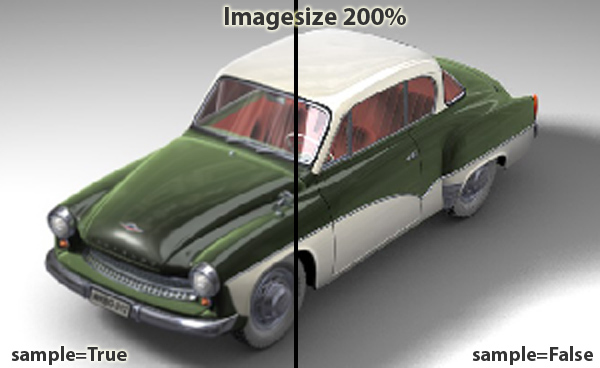
BaseBitmap.Scale(self, dst, intens, sample, nprop)¶ Deprecated since version R18: Use
BaseBitmap.ScaleIt()instead.Scales the bitmap to fit in the destination bitmap and copies it there.
Note
The destination needs to be initialized with the destination size before calling this function.
- Parameters
dst (c4d.bitmaps.BaseBitmap) – The destination image. Must be initiated already with the destination size.
intens (int) – Lets you change brightness of the image (128 = 50% brightness, 256 = unchanged).
sample (bool) – If True a better scaling algorithm is used, which results in a better quality but is a bit slower.
nprop (bool) – Must be True if non-proportional scaling is wanted.
Format Information
-
BaseBitmap.GetBpz(self)¶ Returns the number of bytes per line.
- Return type
int
- Returns
Number of bytes per line.
-
BaseBitmap.GetBt(self)¶ Returns the number of bits per pixel.
- Return type
int
- Returns
The number of bits.
-
BaseBitmap.GetColorMode(self)¶ Returns the color mode of the bitmap.
- Return type
int
- Returns
Color mode
COLORMODE_ILLEGAL
Illegal 8-bit mode.
COLORMODE_ALPHA
Only 8-bit alpha channel.
COLORMODE_GRAY
8-bit grayscale channel.
COLORMODE_AGRAY
8-bit grayscale channel with 8-bit alpha.
COLORMODE_RGB
8-bit RGB channels.
COLORMODE_ARGB
8-bit RGB channels with 8-bit alpha.
COLORMODE_CMYK
8-bit CMYK channel.
COLORMODE_ACMYK
8-bit CMYK channel with 8-bit alpha.
COLORMODE_MASK
8-bit grayscale map as mask.
COLORMODE_AMASK
8-bit grayscale map as mask with 8-bit alpha.
COLORMODE_ILLEGALw
Illegal 16-bit mode.
COLORMODE_GRAYw
16-bit grayscale channel.
COLORMODE_AGRAYw
16-bit grayscale channel with 16-bit alpha.
COLORMODE_RGBw
16-bit RGB channels.
COLORMODE_ARGBw
16-bit RGB channels with 16-bit alpha.
COLORMODE_MASKw
16-bit grayscale map as mask with 16-bit alpha.
COLORMODE_ILLEGALf
Illegal 32-bit mode.
COLORMODE_GRAYf
32-bit floating point grayscale channel.
COLORMODE_AGRAYf
32-bit floating point grayscale channel with floating point alpha.
COLORMODE_RGBf
32-bit floating point RGB channels.
COLORMODE_ARGBf
32-bit floating point RGB channels with floating point alpha.
COLORMODE_MASKf
32-bit floating point grayscale map as mask.
Geometry And Dimensions
-
BaseBitmap.GetBh(self)¶ Returns the height of the bitmap in pixels.
- Return type
int
- Returns
Bitmap height in pixels.
-
BaseBitmap.GetBw(self)¶ Returns the width of the bitmap in pixels.
Note
If the bitmap hasn’t been initialized the return value is 0. (This is the only way to see if a bitmap has been initialized.)
- Return type
int
- Returns
Bitmap width in pixels, or 0 if the bitmap is not initialized.
-
BaseBitmap.GetSize(self)¶ Returns the size of the bitmap in pixels.
Note
If the bitmap hasn’t been initialized the return values are 0. (This is the only way to see if a bitmap has been initialized.)
#bmp is a BaseBitmap instance
x, y = bmp.GetSize()
- Return type
List[int]
- Returns
Bitmap width and height in pixels, or 0 if the bitmap is not initialized.
-
BaseBitmap.Within(self, x, y)¶ Checks if a position is in the bitmap.
- Parameters
x (int) – The X Coordinate
y (int) – The Y Coordinate
- Return type
bool
- Returns
True if the coordinate is in the bitmap.
Magic Methods
-
BaseBitmap.__eq__(self, other)
-
BaseBitmap.__getitem__(self, key)¶ This is similar to
GetPixel().r, g, b = bmp[5, 5] #returns the color of a pixel at position x(5), y(5)
-
BaseBitmap.__init__(self)
-
BaseBitmap.__ne__(self, other)¶ Check if two references point to the same bitmap.
Note
Does not compare if two references are equal.
-
BaseBitmap.__setitem__(self, key, value)¶ This is similar to
GetPixel().bmp[5, 5] = (50, 255, 50) #returns the color of a pixel at position x(5), y(5)
Note
TheVectorobjects does not support item deletion.For instance by calling del(bmp[5,5]).
Pixel Access
-
BaseBitmap.GetPixel(self, x, y)¶ Retrieves the color at (x,y). Similar to the
__getitem__().Note
Currently this method does no range check of x and y.This might be added in the future.Please do the check on your own.- Parameters
x (int) – The X coordinate.
y (int) – The Y coordinate.
- Return type
List[int]
- Returns
The color of the pixel. Range between 0-255.
-
BaseBitmap.GetPixelCnt(self, x, y, cnt, buffer, inc, dstmode, flags, conversion=None)¶ Reads cnt pixels from (x, y) in the bitmap to the buffer with mode dstmode, incrementing inc bytes for each pixel.
- Parameters
x (int) – X coordinate of the first pixel to set.
y (int) – Y coordinate of the first pixel to set.
cnt (int) – Number of pixels to set.
buffer (Union[bytearray, memoryview]) – The destination buffer.
inc (int) – The byte increment per pixel in the buffer.
dstmode (int) –
The destination mode:
COLORMODE_ILLEGAL
Illegal 8-bit mode.
COLORMODE_ALPHA
Only 8-bit alpha channel.
COLORMODE_GRAY
8-bit grayscale channel.
COLORMODE_AGRAY
8-bit grayscale channel with 8-bit alpha.
COLORMODE_RGB
8-bit RGB channels.
COLORMODE_ARGB
8-bit RGB channels with 8-bit alpha.
COLORMODE_CMYK
8-bit CMYK channel.
COLORMODE_ACMYK
8-bit CMYK channel with 8-bit alpha.
COLORMODE_MASK
8-bit grayscale map as mask.
COLORMODE_AMASK
8-bit grayscale map as mask with 8-bit alpha.
COLORMODE_ILLEGALw
Illegal 16-bit mode.
COLORMODE_GRAYw
16-bit grayscale channel.
COLORMODE_AGRAYw
16-bit grayscale channel with 16-bit alpha.
COLORMODE_RGBw
16-bit RGB channels.
COLORMODE_ARGBw
16-bit RGB channels with 16-bit alpha.
COLORMODE_MASKw
16-bit grayscale map as mask with 16-bit alpha.
COLORMODE_ILLEGALf
Illegal 32-bit mode.
COLORMODE_GRAYf
32-bit floating point grayscale channel.
COLORMODE_AGRAYf
32-bit floating point grayscale channel with floating point alpha.
COLORMODE_RGBf
32-bit floating point RGB channels.
COLORMODE_ARGBf
32-bit floating point RGB channels with floating point alpha.
COLORMODE_MASKf
32-bit floating point grayscale map as mask.
flags (int) –
Flags:
PIXELCNT_NONE
None.
PIXELCNT_DITHERING
Allow dithering.
PIXELCNT_B3DLAYERS
Merge BodyPaint 3D layers (
MultipassBitmap).PIXELCNT_APPLYALPHA
Apply alpha layers to the result (
PaintLayerBmp).PIXELCNT_INTERNAL_SETLINE
Internal SetLine indicator. Private.
PIXELCNT_INTERNAL_ALPHAVALUE
Get also the alpha value (RGBA 32-bit). Private.
conversion (Optional[c4d.bitmaps.ColorProfileConvert]) –
New in version R17.032.
This should be normally set to None. Pass a color profile only if a conversion is wanted before retrieving the pixel data.This only works if either the bitmap is 32-bit per component (so no 8/16-bit images) or the dstmode is 32-bit per component.The conversion is done before color reduction (e.g. if dstmode is 16-bit the profile is first applied and then the data resampled to 16-bit).
- Return type
bool
- Returns
True if successful, otherwise False.
-
BaseBitmap.GetPixelDirect(self, x, y)¶ Retrieves the color at (x,y).
New in version S22.
Note
The range of the assigned parameters are 0.0 to 255.0, regardless of the bit depth of the image where (255.0, 255.0, 255.0) is white.The range returns float value, so 8, 16 and 32 bit precision is supported.- Parameters
x (int) – The X coordinate.
y (int) – The Y coordinate.
- Returns
Color as form of a 3D Vector.
- Return type
-
BaseBitmap.SetPixel(self, x, y, r, g, b)¶ - Sets the pixel at (x, y) to the color specified by (r,g,b) (0 <= r/g/b <= 255).Similar to the
__setitem__().Note
Currently this method does no range check of x and y.This might be added in the future.Please do the check on your own.- Parameters
x (int) – The X coordinate.
y (int) – The Y coordinate.
r (int) – The red component.
g (int) – The green component.
b (int) – The blue component.
- Return type
bool
- Returns
True if successful, otherwise False.
-
BaseBitmap.SetPixelCnt(self, x, y, cnt, buffer, inc, srcmode, flags)¶ Sets cnt pixels at (x, y) in the bitmap from buffer with mode srcmode, incrementing inc bytes for each pixel.
"""Copies the internal data of a 32 bit per-channel image to a new one.

Topics:
    * BaseBitmap.SetPixelCnt()
    * BaseBitmap.GetPixelCnt()

Note:
- BaseBitmap.GetClone could be used for doing the exact same purpose, bu
"""
__author__ = "Ferdinand Hoppe"
__copyright__ = "Copyright (C) 2026 MAXON Computer GmbH"
__license__ = "Apache-2.0 License"
__version__ = "R23"

import c4d


def main():
    # Opens a Dialog to choose a picture file
    path = c4d.storage.LoadDialog(type=c4d.FILESELECTTYPE_IMAGES, title="Please Choose a 32-bit Image:")

    # If the user cancels, leaves
    if not path:
        return

    # Creates a BaseBitmap that will be used for loading the selected picture
    orig = c4d.bitmaps.BaseBitmap()
    if orig is None:
        raise RuntimeError("Failed to create the bitmap.")

    # Initializes the BaseBitmap with the selected picture
    if orig.InitWith(path)[0] != c4d.IMAGERESULT_OK:
        raise RuntimeError("Cannot load image \"" + path + "\".")

    # Checks if channel depth is really 32 bit
    if orig.GetBt()/3 != 32:
        raise RuntimeError("The image \"" + path + "\" is not a 32 bit per-channel image.")

    # Gets selected image information
    width, height = orig.GetSize()
    bits = orig.GetBt()

    # Creates a BaseBitmap that will be ued for making a copy copy and initialize it
    copy = c4d.bitmaps.BaseBitmap()
    if copy is None:
        raise RuntimeError("Failed to create the bitmap.")

    copy.Init(width, height, bits)
    if orig.InitWith(path)[0] != c4d.IMAGERESULT_OK:
        raise RuntimeError("Cannot load image \"" + path + "\".")

    # Calculates the number of bytes per pixel
    # Each pixel has RGB bits, so we need an offset of 'inc' bytes per pixel
    # the image has 32 bits per-channel : (32*3)/8 = 12 bytes per pixel (1 byte = 8 bits)
    # the image has 3 channels per pixel (RGB) : 12/3 = 4 bytes per component = 1 float
    inc = orig.GetBt() // 8
    bytesArray = bytearray(width * height * inc)
    memoryView = memoryview(bytesArray)
    for row in range(height):
        memoryViewSlice = memoryView[row*(width*inc):]
        orig.GetPixelCnt(0, row, width, memoryViewSlice, inc, c4d.COLORMODE_RGBf, c4d.PIXELCNT_0)

    for row in range(height):
        memoryViewSlice = memoryView[row * (width * inc):]
        copy.SetPixelCnt(0, row, width, memoryViewSlice, inc, c4d.COLORMODE_RGBf, c4d.PIXELCNT_0)

    # Show original and copied image in the picture viewer
    c4d.bitmaps.ShowBitmap(orig)
    c4d.bitmaps.ShowBitmap(copy)


if __name__ == '__main__':
    main()
- Parameters
x (int) – X coordinate of the first pixel to set.
y (int) – Y coordinate of the first pixel to set.
cnt (int) – Number of pixels to set.
buffer (Union[bytearray, memoryview]) – The source buffer.
inc (int) – The byte increment per pixel in the buffer.
srcmode (int) –
The source mode.
Note
None of the alpha modes are supported.
COLORMODE_ILLEGAL
Illegal 8-bit mode.
COLORMODE_ALPHA
Only 8-bit alpha channel.
COLORMODE_GRAY
8-bit grayscale channel.
COLORMODE_AGRAY
8-bit grayscale channel with 8-bit alpha.
COLORMODE_RGB
8-bit RGB channels.
COLORMODE_ARGB
8-bit RGB channels with 8-bit alpha.
COLORMODE_CMYK
8-bit CMYK channel.
COLORMODE_ACMYK
8-bit CMYK channel with 8-bit alpha.
COLORMODE_MASK
8-bit grayscale map as mask.
COLORMODE_AMASK
8-bit grayscale map as mask with 8-bit alpha.
COLORMODE_ILLEGALw
Illegal 16-bit mode.
COLORMODE_GRAYw
16-bit grayscale channel.
COLORMODE_AGRAYw
16-bit grayscale channel with 16-bit alpha.
COLORMODE_RGBw
16-bit RGB channels.
COLORMODE_ARGBw
16-bit RGB channels with 16-bit alpha.
COLORMODE_MASKw
16-bit grayscale map as mask with 16-bit alpha.
COLORMODE_ILLEGALf
Illegal 32-bit mode.
COLORMODE_GRAYf
32-bit floating point grayscale channel.
COLORMODE_AGRAYf
32-bit floating point grayscale channel with floating point alpha.
COLORMODE_RGBf
32-bit floating point RGB channels.
COLORMODE_ARGBf
32-bit floating point RGB channels with floating point alpha.
COLORMODE_MASKf
32-bit floating point grayscale map as mask.
flags (int) –
Flags:
PIXELCNT_NONE
None.
PIXELCNT_DITHERING
Allow dithering.
PIXELCNT_B3DLAYERS
Merge BodyPaint 3D layers (
MultipassBitmap).PIXELCNT_APPLYALPHA
Apply alpha layers to the result (
PaintLayerBmp).PIXELCNT_INTERNAL_SETLINE
Internal SetLine indicator. Private.
PIXELCNT_INTERNAL_ALPHAVALUE
Get also the alpha value (RGBA 32-bit). Private.
- Return type
bool
- Returns
True if successful, otherwise False.
Scaling
-
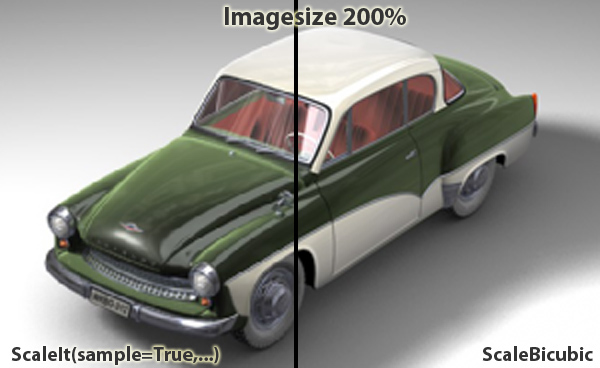
BaseBitmap.ScaleBicubic(self, dst, src_xmin, src_ymin, src_xmax, src_ymax, dst_xmin, dst_ymin, dst_xmax, dst_ymax)¶ - Scales the bitmap rectangle (src_xmin, src_ymin, src_xmax, src_ymax) to fit in the destination bitmap rectangle (dst_xmin, dst_ymin, dst_xmax, dst_ymax) and copies it there.The scaling, if necessary, is done using bicubic interpolation.The destination needs to be initialized before calling this function.
bmp.ScaleBicubic(dst, 0, 0, bmp.GetBw()-1, bmp.GetBh()-1, 0, 0, dst.GetBw()-1, dst.GetBh()-1)
Note
This function can currently only scale down, i.e. the destination needs to be smaller to the source in size.
- Parameters
dst (c4d.bitmaps.BaseBitmap) – The destination bitmap.
src_xmin (int) – Source top left X coordinate.
src_ymin (int) – Source top left Y coordinate.
src_xmax (int) – Source bottom right X coordinate.
src_ymax (int) – Source bottom right Y coordinate.
dst_xmin (int) – Destination top left X coordinate.
dst_ymin (int) – Destination top left Y coordinate.
dst_xmax (int) – Destination bottom right X coordinate.
dst_ymax (int) – Destination bottom right Y coordinate.
-
BaseBitmap.ScaleIt(self, dst, intens, sample, nprop)¶ Scales the bitmap to fit in the destination bitmap and copies it there.
Note
The destination needs to be initialized with the destination size before calling this function.
- Parameters
dst (c4d.bitmaps.BaseBitmap) – The destination image. Must be initiated already with the destination size.
intens (int) – Lets you change brightness of the image (128 = 50% brightness, 256 = unchanged).
sample (bool) – If True a better scaling algorithm is used, which results in a better quality but is a bit slower.
nprop (bool) – Must be True if non-proportional scaling is wanted.
State And Diagnostics
-
BaseBitmap.GetDirty(self)¶ Private.
- Return type
int
- Returns
Dirty count, incremented when the bitmap changes.
-
BaseBitmap.GetMemoryInfo(self)¶ Get the size of the memory used by the bitmap.
- Return type
int
- Returns
Memory size of the bitmap.
-
BaseBitmap.GetUpdateRegionBitmap(self)¶ Get the updated region of a bitmap.
- Return type
- Returns
The updated region.
-
BaseBitmap.IsMultipassBitmap(self)¶ Checks if the image is a
MultipassBitmap.- Return type
bool
- Returns
True if the image is a
MultipassBitmap, otherwise False
-
BaseBitmap.SetDirty(self)¶ Makes the bitmap dirty.