

Scene Structure
Explains how a Cinema 4D scene is organized with hierarchies and branches, and how to traverse it.
In the Object Manager, a scene looks like a simple tree of objects. But a c4d.documents.BaseDocument stores much
more than objects: materials, render settings, layers, scene hooks, and, attached to the objects themselves, tags and
animation tracks. All of this is not stored in one big tree, but is organized with just two concepts which are both
realized by c4d.GeListNode: hierarchies and branches. This manual explains both, and how to navigate and
traverse them.
The examples use the scene below, which consists of eight objects in two hierarchies, five materials, and two layers.
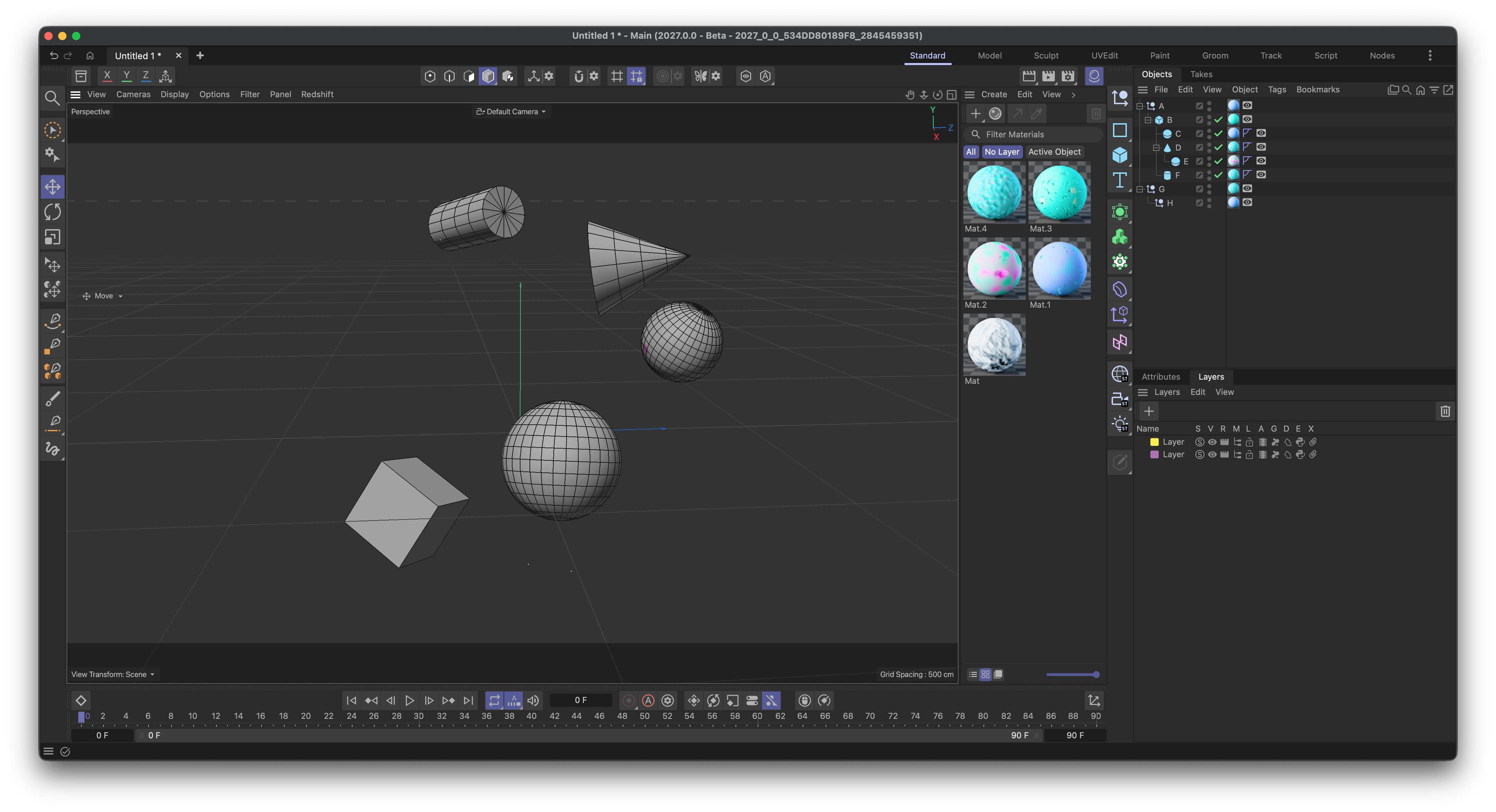
Fig. 1: The example scene. Objects A to H in the Object Manager, materials in the Material Manager, and
layers in the Layer Manager.
Hierarchies
c4d.GeListNode is the base type of almost everything a scene is made of: documents, objects, tags, materials,
shaders, tracks, and more. Its purpose is to link nodes into lists and trees. A node knows its parent, its first child,
and its previous and next sibling. A hierarchy is a set of nodes that are linked in this manner:
Fig. 2: The objects of the example scene as linked nodes.
Navigating a hierarchy means following these links:
a: c4d.BaseObject = doc.GetFirstObject() # A, the first object of the document.
b: c4d.BaseObject = a.GetDown()          # B, the first child of A.
g: c4d.BaseObject = a.GetNext()          # G, the next sibling of A.

print(b.GetUp().GetName())               # A, the parent of B.
print(g.GetPred().GetName())             # A, the previous sibling of G.
print([c.GetName() for c in b.GetChildren()]) # ['C', 'D', 'F'], the direct children of B.
A node can only be a part of one hierarchy at a time, and a hierarchy only holds nodes of one kind: an object hierarchy contains objects and nothing else.
Branches
A hierarchy cannot hold everything a scene consists of. Objects, materials, render settings, and layers are different kinds of nodes, and a tag or a track is not a child of the object it belongs to. To relate such nodes, a node can expose additional hierarchies of other nodes. These are called branches.
Branches are not a fixed structure. They are arbitrary extra relations which a node type decides to offer: which
branches a node has, how they are named, and what they contain is up to the node. The only thing they have in common is
how they are exposed, a call to GeListNode.GetBranchInfo(). A branch is rooted in a c4d.GeListHead,
a special node that does not represent any scene element, but only carries the hierarchy below it. The node which holds
the heads of its branches is the owner of the branches.
A document is the owner of the branches Objects, Materials, Render Settings, and others. But the concept is
not limited to documents. Almost every node can own branches, and the nodes in these branches can own further branches.
An object owns for example a branch for its tags and one for its animation tracks. This makes a scene a tree of trees,
which is what is commonly called a scene graph:
Fig. 3: The structure of the example scene. Branch heads are shown as orange pills.
The most important branches are:
Owner |
Branch |
Contains |
|---|---|---|
Document |
Objects ( |
The object hierarchy, e.g., the objects |
Document |
Materials ( |
The materials. |
Document |
Render Settings ( |
The render data, i.e., the render settings. |
Document |
Layers ( |
The layers. |
Document |
Scene Hooks ( |
The scene hooks, i.e., hidden helper nodes with which features such as the take system or the simulation store their data in a scene. |
Object |
Tags ( |
The tags of the object. |
Object, Tag, Material, Shader, … |
Tracks ( |
The animation tracks of the object. |
Track |
Sequences ( |
The curve of the track. |
Material, Object |
Shaders ( |
The shaders of the material or object. |
The ID of a branch is the base type of the nodes that it contains in the branches above, e.g., Obase for objects.
Every owner can be asked for its branches with GeListNode.GetBranchInfo(), which returns a list of
dictionaries with the keys head, name, id, and flags:
for branch in doc.GetBranchInfo(c4d.GETBRANCHINFO_NONE):
    print(f"{branch['name']!r}: {branch['id']}")

# 'Objects': 5155
# 'Materials': 5702
# 'Render Settings': 110304
# 'Layers': 100004801
# 'Scene Hooks': 110065
# '': 110305
As the output shows, a branch does not need to have a name, the last branch of a document has none. Passing
GETBRANCHINFO_ONLYWITHCHILDREN instead only returns the branches that are in use. A scene contains many more nodes
than the ones the user created. A new, empty document holds already dozens of them, most of them scene hooks.
Everything the user creates, e.g., the objects in Fig. 1, is only a small part of the scene graph.
Moving Between Branches
Since a branch head is a node, it can be navigated like any other node. A node can find its head with
GeListNode.GetListHead(), and its owner with BaseList2D.GetMain():
def GetBranchHead(node: c4d.GeListNode, branchId: int) -> c4d.GeListHead | None:
    """Returns the head of the branch with the ID #branchId of #node.
    """
    branches: list[dict] = node.GetBranchInfo(c4d.GETBRANCHINFO_NONE) or []
    return next((b["head"] for b in branches if b["id"] == branchId), None)

objectHead: c4d.GeListHead = GetBranchHead(doc, c4d.Obase)
a: c4d.BaseObject = objectHead.GetDown() # A, the first object. Same as doc.GetFirstObject().
b: c4d.BaseObject = a.GetDown()          # B

print(a.GetListHead() == objectHead)     # True, both objects are in the same branch.
print(b.GetListHead() == objectHead)     # True

print(a.GetUp())                         # None, the head is not a parent.
print(b.GetUp().GetName())               # A, the parent of B in the hierarchy.
print(b.GetMain() == doc)                # True, the owner of the branch which holds B.
The difference between the parent and the owner is important. The parent of B is the object A, as it is a part
of the hierarchy. The owner of B is the document, as it is the node which owns the branch that the hierarchy of
B lives in. The owner of a tag is the object it is attached to, and the owner of a shader is its material.
Many branches are also reachable without a call to GetBranchInfo, as most owners offer shortcuts for their most
important branches:
Shortcut |
Branch |
|---|---|
The |
|
|
The |
The |
|
The head of the |
|
The |
|
The |
|
The |
Caches
Besides hierarchies and branches, there is a third relationship between nodes: the cache. A generator object such as
a Cube, an Array, or a Cloner does not contain any polygons itself, it only describes how to build them. When the scene
is executed, the generator builds its output and stores it as its cache, which is reachable with
BaseObject.GetCache(). The cache is neither a child of the generator, nor a node in one of its branches. It
is not found by GetDown or GetBranchInfo, and its GetUp returns None. The way back from a cache to its
generator is BaseObject.GetCacheParent().
Fig. 4: The caches of two generators. Caches are drawn in teal, as they are not part of the scene hierarchy.
A cache is not necessarily a single object, which is shown by the right side of the figure:
The cache of a generator which produces a single shape, e.g., a Cube, is one polygon object.
The cache of a generator which produces multiple objects, e.g., an Array, is a Null object with a hierarchy below it. The clones in that hierarchy can be generators themselves, which have caches of their own. Caches can therefore be nested arbitrarily deep. The input objects of the generator, here the Cylinder, are not part of this cache, they stay in the Object Manager.
Deformers do not change the cache of a generator. They store their result in a second object, the deform cache. It is attached to the object that has been deformed, here the polygon object of the Cube, and not to the generator itself, so
cube.GetDeformCache()isNonebutcube.GetCache().GetDeformCache()is the bent Cube. It is reachable withBaseObject.GetDeformCache().Caches are nodes like any other, they can for example own a
Tagsbranch, which holds the UVW and normal data of the polygon object.Caches are created and updated by the scene execution, see Scene Execution. A generator has no cache before the document has been executed for the first time, e.g., with
BaseDocument.ExecutePasses().
# Cube > Bend (child)
doc.ExecutePasses(None, True, True, True, c4d.BUILDFLAGS_NONE) # Build the caches.

cube: c4d.BaseObject = doc.GetFirstObject()
cache: c4d.PolygonObject = cube.GetCache()           # The polygon object of the Cube.
deformed: c4d.PolygonObject = cache.GetDeformCache() # The same polygon object, but bent.

print(cache.GetCacheParent() == cube)                # True, the way back to the generator.
print(cache.GetUp(), cube.GetDeformCache())          # None None

def PrintCaches(obj: c4d.BaseObject, depth: int = 0) -> None:
    """Prints the hierarchy of #obj together with all caches below it."""
    print(f"{'  ' * depth}{obj.GetName()} ({obj.GetTypeName()})")
    for cache in (obj.GetCache(), obj.GetDeformCache()):
        if cache:
            PrintCaches(cache, depth + 1)
    for child in obj.GetChildren():
        PrintCaches(child, depth + 1)

# Array > Cylinder (child)
PrintCaches(doc.GetFirstObject().GetNext())

# Array (Array)
#   Array (Null)            <- The cache of the Array.
#     Cylinder.8 (Cylinder) <- The clones, each of them a generator.
#       Cylinder.8 (Polygon)<- Their caches.
#     ...
#   Cylinder (Cylinder)     <- The input object, a child of the Array.
Traversing a Scene
Navigating with the methods of GeListNode is sufficient for simple tasks, such as walking over the top level objects
of a document:
node: c4d.BaseObject | None = doc.GetFirstObject()
while node:
    print(node.GetName())   # A, G
    node = node.GetNext()
For everything more elaborate, the module mxutils offers functions which implement common traversals. They also
avoid the pitfalls of manual navigation, such as accidentally using recursion for deep hierarchies, or stepping onto
None in a chain of calls.
Finding Nodes
mxutils.GetNodeFromPath() follows a path of navigation characters from a node. The characters are d for
down, u for up, n for next, p for previous, f for the first sibling, and r for the root. A path that
cannot be followed returns None, or raises an error when raisePathErrors is passed. The functions
mxutils.GetRootNode() and mxutils.GetFirstSiblingNode() are the same as the paths r and f:
a: c4d.BaseObject = doc.GetFirstObject()

e: c4d.BaseObject = mxutils.GetNodeFromPath(a, "ddnd") # A > B > D > E
f: c4d.BaseObject = mxutils.GetNodeFromPath(a, "ddnn") # A > B > D > F
h: c4d.BaseObject = mxutils.GetNodeFromPath(a, "nd")   # A > G > H

print(mxutils.GetNodeFromPath(a, "dxd"))               # None, there is no such path.
print(mxutils.GetRootNode(e).GetName())                # A
print(mxutils.GetFirstSiblingNode(f).GetName())        # C
Walking Hierarchies
mxutils.IterateTree() yields a node and all its descendants. With yieldSiblings, it also yields the siblings
that follow the node, with rewindToFirstSibling and rewindToRoot, the traversal starts at the first sibling or
the root of the node instead. It supports three traversal orders:
# The default, depth-first: Parents before children, as a human would read the tree.
mxutils.IterateTree(a, yieldSiblings=True)
# A, B, C, D, E, F, G, H

# Inverse depth-first: Children before parents, useful to delete or flatten a hierarchy.
mxutils.IterateTree(a, yieldSiblings=True, traversalMode=mxutils.TRAVERSAL_INVERSE_DEPTH_FIRST)
# C, E, D, F, B, A, H, G

# Breadth-first: Level by level.
mxutils.IterateTree(a, yieldSiblings=True, traversalMode=mxutils.TRAVERSAL_BREADTH_FIRST)
# A, G, B, H, C, D, F, E
Because a branch head is a node, the same function also walks a whole branch. The head itself is the first node that is yielded, so it is easier to start at its first child:
for material in mxutils.IterateTree(GetBranchHead(doc, c4d.Mbase).GetDown(), yieldSiblings=True):
    print(material.GetName()) # The materials of the document.
Walking the Scene Graph
mxutils.IterateGraph() traverses all three kinds of relationships: hierarchies, branches, and caches. Each of them
must be enabled explicitly, as without any flag, the function yields nothing:
b: c4d.BaseObject = mxutils.GetNodeFromPath(doc.GetFirstObject(), "d")

# B, C, D, E, and F, i.e., what IterateTree() would yield.
mxutils.IterateGraph(b, yieldHierarchy=True)

# Additionally yields the polygon object caches of the objects.
mxutils.IterateGraph(b, yieldHierarchy=True, yieldCaches=True)

# Additionally yields everything in a branch of the objects, e.g., their tags and tracks.
mxutils.IterateGraph(b, yieldHierarchy=True, yieldBranches=True)
With complexYield, the function yields tuples (node, owner, depth, isBranch, isCache) instead of nodes. This
tells for each node in which relationship it has been found:
for node, owner, depth, isBranch, isCache in mxutils.IterateGraph(
        b, yieldHierarchy=True, yieldBranches=True, complexYield=True):
    print(f"{'  ' * depth}{node.GetName()} (owner: {owner.GetName() if owner else None}, branch: {isBranch})")

# B (owner: None, branch: False)
#   Material (owner: B, branch: True)
#   Display (owner: B, branch: True)
#   C (owner: None, branch: False)
#     Material (owner: C, branch: True)
#     Phong (owner: C, branch: True)
#     ...  (shortened, the tags depend on the scene)
Starting at the document traverses the whole scene graph, which is expensive for large scenes. The arguments
branchFilter, stopBranchingEarly, nodeFilter, and maxBranchingDepth reduce the work:
branchFilterlimits the branches from which nodes are yielded. By default, this does not stop the traversal from entering other branches. WithstopBranchingEarly, the traversal only enters the branches which are in the filter. Then, all branches that lead to the wanted nodes must be part of the filter.nodeFilterlimits the types of the yielded nodes, e.g., toc4d.Tphongor all tags withc4d.Tbase.maxBranchingDepthlimits how many branches deep the traversal goes. Tags can only be found with a depth of two or more from a document, as they are in a branch of an object which is in a branch of the document.
The following finds all Phong tags of the objects in a document, without entering any other branch than the ones of the objects and their tags:
for tag in mxutils.IterateGraph(
        doc, yieldHierarchy=True, yieldBranches=True, branchFilter=[c4d.Obase, c4d.Tbase],
        stopBranchingEarly=True, nodeFilter=[c4d.Tphong]):
    print(tag.GetObject().GetName()) # C, D, E, F
Warning
IterateGraph is relatively expensive. For a scene with thousands of nodes, expect multiple milliseconds per
call. Do not use it in code that runs often, such as a method which is called on every scene update. Use
stopBranchingEarly or write a traversal that is tailored to your needs in such cases.
Printing a Scene Graph
Reading a scene graph in code is hard, as it is mostly invisible in the user interface. The class
mxutils.DebugPrint prints it as a tree instead. DebugPrint.GetGraph()
builds the tree for any node, e.g., a document, an object, or a material, and
DebugPrint.PrintGraph() prints it directly. The tree contains the hierarchy
and marks caches with [Cache] and [Deform Cache], and branches with [Branch]. Each node is shown with its
name, its Python type, and its type ID:
doc.ExecutePasses(None, True, True, True, c4d.BUILDFLAGS_NONE) # Build the caches, so that they show up.

a: c4d.BaseObject = doc.GetFirstObject()
print(mxutils.DebugPrint.GetGraph(a).ToString()) # Same as mxutils.DebugPrint.PrintGraph(a)

# 'A' (BaseObject: Onull)
# ├── [Branch] 'Tags' (Tbase)
# │   └── 'Display' (BaseTag: Tdisplay)
# └── 'B' (BaseObject: Ocube)
#     ├── [Cache]
#     │   └── 'B' (PolygonObject: Opolygon)
#     │       └── [Branch] 'Tags' (Tbase)
#     │           ├── 'UVW' (UVWTag: Tuvw)
#     │           ├── '' (PolygonTag: Tpolygon)
#     │           └── '' (PointTag: Tpoint)
#     ├── [Branch] 'Tags' (Tbase)
#     │   └── 'Display' (BaseTag: Tdisplay)
#     └── 'C' (BaseObject: Osphere)
#         ├── [Cache]
#         │   └── ...                  (a polygon object with its tags, as for B)
#         └── [Branch] 'Tags' (Tbase)
#             └── 'Display' (BaseTag: Tdisplay)
The output shows everything that IterateGraph can yield, the hierarchy (B and C), the branches (Tags),
and the caches. Passing a document prints the whole scene, which is a lot of text, since even an empty document holds
dozens of nodes. DebugPrint.DiffGraph() compares the graphs of two nodes, e.g.,
of the same object before and after a change or in two documents, and returns the result as a unified diff:
clone: c4d.documents.BaseDocument = doc.GetClone(c4d.COPYFLAGS_NONE)
clone.GetFirstObject().GetDown().SetName("B2")
clone.ExecutePasses(None, True, True, True, c4d.BUILDFLAGS_NONE)

print(mxutils.DebugPrint.DiffGraph(doc.GetFirstObject(), clone.GetFirstObject()))

# --- first
# +++ second
# @@ -1,7 +1,7 @@
#  'A' (BaseObject: Onull)
# -└── 'B' (BaseObject: Ocube)
# +└── 'B2' (BaseObject: Ocube)
#      └── [Cache]
# -        └── 'B' (PolygonObject: Opolygon)
# +        └── 'B2' (PolygonObject: Opolygon)
#              └── [Branch] 'Tags' (Tbase)
#              ...