Table of Contents
Describes the technical requirements for building plugins with the Cinema 4D C++ SDK.
- Warning
- Never modify the frameworks of the SDK and always use the CMake build systems shipped with the SDK. Ignoring any of these rules may create plugins that are binary incompatible with Cinema 4D. We will refuse development support for any plugins that do not comply with these requirements.
- Warning
- The
stdlibrary is not supported in the Cinema and Maxon API projects. Cinema projects are by default compiled without exception handling, making the behavior of many std libraries undefined as they rely on exceptions. See the Misc Settings section in the build system manual for how to enable exception handling. Please note that we cannot offer support for problems arising from the use of thestdlibrary in Cinema 4D plugin projects, even when exception handling is enabled.
- Note
- The ABI version of Cinema 4D 2026.3.0 is
2026000. The ABI version of an API is also expressed via MAXON_API_ABI_VERSION. See the ABI Compatibility section for more information on ABI compatibility.
Build Systems
The Cinema 4D C++ SDK is not being shipped with a ready-to-use build system but with CMake configuration files which can be used to generate build systems for different platforms. The supported build systems are:
| Build System / IDE | OS | Architecture | Compiler | CMake Preset |
|---|---|---|---|---|
| Visual Studio 2022 | Windows 10/11 | x64 | MSVC v143 | Visual Studio 2022 x64 v143 |
| Visual Studio 2022 | Windows 10/11 | x64 | ClangCL | Visual Studio 2022 x64 ClangCL |
| Visual Studio 2022 | Windows 11 | ARM64 | MSVC v143 | Visual Studio 2022 ARM64 v143 |
| Visual Studio 2022 | Windows 11 | ARM64 | ClangCL | Visual Studio 2022 ARM64 ClangCL |
| Xcode 16 | macOS 15 | Universal | Clang | Xcode macOS Universal |
| Xcode 26 | macOS 26 | Universal | Clang | Xcode macOS Universal |
| Ninja | Rocky Linux 8 | x64 | GCC 11.2 | Linux Ninja |
- Warning
- Cinema and Maxon API projects target the C++ 20 standard. Our build presets are configured to use that standard and we strongly recommend to not change this. Using a different C++ standard can lead to various problems, including ABI incompatibilities, and we will not be able to offer support for such problems.
- Warning
- We strongly recommend to use exactly the listed OS and IDE combinations. Deviating from the listed versions can lead to various problems. Visual Studio is the least problematic in this regard and you can use newer versions of Visual Studio than listed, as long as you install the required toolset and make sure not to upgrade the project files when prompted by Visual Studio after loading a project for the first time (as this would change the used toolset). For MacOS and Linux we strongly recommend to use exactly the listed version combinations.
- Note
- All versions of Visual Studio - Community, Professional, and Enterprise - are supported.
The following additional dependencies are required to build with the respective build systems. Please make sure to install all of them.
| Build System | Additional Dependencies |
|---|---|
| MSVC v143 x64 | Windows 10 SDK 10.0.20348.0, CMake 3.30+, Python 3, MSVC v143 toolset (preinstalled in VS 2022) |
| ClangCL x64 | Windows 10 SDK 10.0.20348.0, CMake 3.30+, Python 3, Clang toolset for Visual Studio |
| MSVC v143 ARM64 | Windows 10 SDK 10.0.20348.0, CMake 3.30+, Python 3, MSVC v143 toolset (preinstalled in VS 2022) |
| ClangCL ARM64 | Windows 10 SDK 10.0.20348.0, CMake 3.30+, Python 3, Clang toolset for Visual Studio |
| Xcode Universal | CMake 3.30, Python 3 (see note below) |
| Ninja + GCC | CMake 3.30, Python 3, GCC 11.2.1+, glibc 2.28+ |
- Note
- The Windows 10 SDK, the Clang toolset for Visual Studio, and the MSVC v143 toolset are all available as optional components in the Visual Studio installer. Open the Start Menu, search for "Visual Studio Installer", open it, click on "Modify" for your Visual Studio installation, and then select the "Individual components" tab to find and install these dependencies. This subject is also covered in the video tutorial Setting up Visual Studio Build Systems guide.
- Note
- For macOS, your Python 3.X installation must be accessible via the
pythoncommand in the terminal, as our source processor relies on this to generate code. When such command is not available, you can create a symbolic link to your Python installation in/usr/local/binto make it accessible. The steps to do this are as follows:- Remove old symbolic link: sudo rm /usr/local/bin/python
- Find executable: Navigate to the place where you have installed Python 3.X (usually 'Applications'), right-click on the package and select 'Show Package Contents'. Then navigate to
Contents/MacOS/and copy the path to thepython3.Xexecutable. - Add new symbolic link: sudo ln -s /path/to/your/python-package/contents/macos/python3.X /usr/local/bin/python
- Remove old symbolic link:
Registering Identifiers
Identifiers to register modules, plugin hooks, and other data are a common occurrence in the Cinema and Maxon API. You will encounter them in various forms when realizing Cinema 4D plugin projects and it is crucial to provide unique identifiers when the API requires you to do so, as your plugins will otherwise malfunction or not even load. Generally, there are two types of identifiers to be found in Cinema 4D plugin projects, integer identifiers and string identifiers.
- Integer Identifiers
An integer identifier is just an Int32 integer which is usually also exposed as a symbol when issued by Maxon Computer. E.g., the symbol Ocube is the symbol for the value 5159 which itself is the plugin - and with that type - identifier of the parametric cube object in Cinema 4D. I.e., when you would call op->GetType() on a BaseObject that represents a parametric cube, it would return the value 5159, its plugin identifier.
But this does not apply only to tangible things like objects, tags, materials, and shaders, but all Cinema API plugin hooks require this form of identification. The example shown below for example registers a command, and the plugin identifier will here then become the command ID of that command which then could be invoked with CallCommand.
- Warning
- Integer plugin identifiers must be issued via developers.maxon.net. Never 'invent' plugin identifiers. Ignoring this rule can cause your plugins - or much worse other plugins - to not to load or otherwise malfunction. We reserve the right to blacklist developers and plugins ignoring this rule.
A more rare case for using integer identifiers is for writing values under alien parameter identifiers into BaseContainer instances; or by extension when writing am alien parameter on a BaseList2D. E.g., you write under the identifier ID_FOO = 123456789 into an Ocube instance although a parametric cube usually does not store any data there. Doing this is generally not advisable but sometimes not avoidable when scene data must be decorated with other data. When you do must do this, you must always register a plugin ID to be used as that alien parameter identifier.
- Warning
- Make sure that the node/container you write into does not dynamically issue parameter identifiers in a range which could collide with your plugin identifier.
- String Identifiers
String identifiers are used by the Maxon API and upon module registration. String identifiers must follow the reverse domain name notation derived from a web-domain you own. So, when the web-presence of your company is my.company.com, you would prefix all your string identifiers with com.company.{...} (the subdomain www is conventionally exclude in string identifiers but you could also include it).
- Note
- Other than for integer identifiers, string identifiers are currently not required to be registered.
- Warning
- Do not use string identifiers that start with
net.maxon., as this can lead to non-loading modules and other problems. Use only lower case letters, numbers, the underscore character, and the dot character for string identifiers. With Style Check Settings you can enforce identifier prefixes in a module.
- Note
- Do not use string identifier prefixes for which you do not own the domain. When you do not own any web domains, register an integer identifier on developers.maxon.net and use the pattern
user.{name}{pid}...". E.g.,user.alice123456789.module.foo, whereuser.alice123456789would be then the permanent prefix used for all your string identifiers.
You will encounter string identifiers when registering modules in projectdefinition.txt, e.g.:
And when declaring components, data types, attributes and other entities in the Maxon API; which are then later registered. Here for example, both an attribute and a component are being declared:
ABI Compatibility
Each SDK has an Application Binary Interface (ABI) which determines with which versions of Cinema 4D plugins are compatible with, depending on the SDK version they have been compiled against.
- Warning
- An SDK being ABI incompatible to a certain version of Cinema 4D cannot be circumvented by only using parts of an API which have not changed. A plugin compiled against an incompatible SDK will not be loaded by an unsupported version of Cinema 4D. Do not change any files in the
frameworksdirectory of an SDK, as plugins compiled against such SDK might otherwise become incompatible with Cinema 4D.
The Cinema 4D ABI will remain upwards compatible for one major version. This means for example that a plugin compiled with the Cinema 4D SDK for release 2023.1 will also work in the releases 2023.2 and 2023.3, etc. but not in 2024.0. The ABI version of an SDK is expressed by the define MAXON_API_ABI_VERSION. The ABI version of major releases is also expressed in the Build Systems table.
- Note
- In the old version scheme of Cinema 4D an R/S version pair counted as one major version. The Cinema 4D R25.000 SDK is for example ABI compatible up to Cinema 4D S26.110.
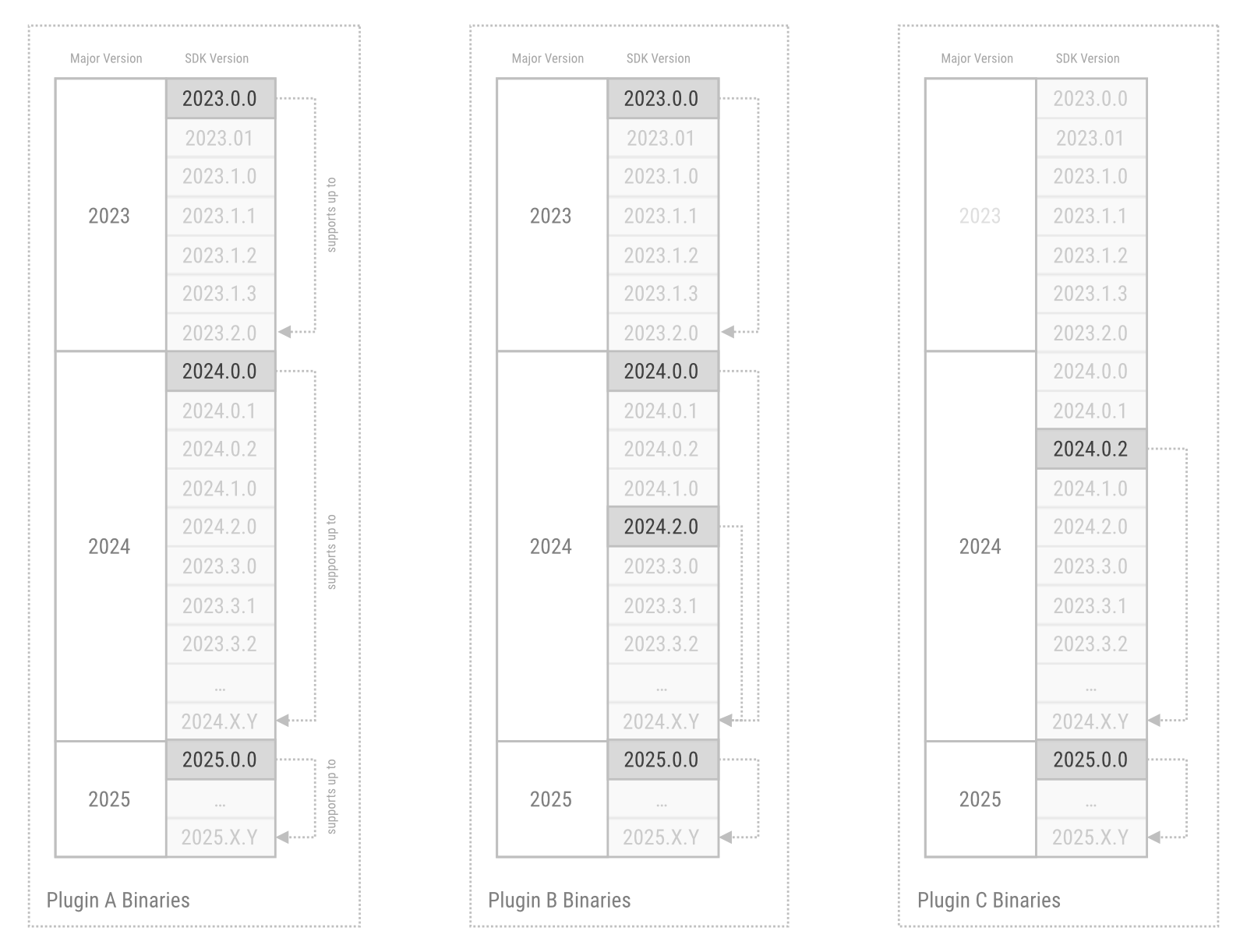
As an example and as shown in Fig. I, the developers of Plugin A always compile their plugin for the first version of a major Cinema 4D release. With plugin binaries compiled with for the 2023.0.0, 2024.0.0, and 2025.0.0 Cinema 4D SDKs, they can cover all Cinema 4D releases of 2023, 2024, and 2025.
The authors of Plugin B also compile for the first version of a major Cinema 4D release. But they also want to support a new feature of Cinema 4D 2024.2.0. To do that, they ship two plugin binaries for Cinema 4D 2024. One version which has been compiled for the Cinema 4D 2024.0.0 SDK. This plugin can be used with every version of Cinema 4D 2024. And another version which has been compiled for the Cinema 4D 2024.2.0 SDK. This plugin can be used with all Cinema 4D versions between 2024.2.0 and the last release of Cinema 4D 2024. Only the latter version of their 2024 plugin can support the new features of Cinema 4D 2024.2.0. But customers of Plugin B who do not want to update their installation to the 2024.2.0 SDK version of the plugin could still use it up to the end of the 2024 release cycle.
The authors of Plugin C have only compiled their plugin for Cinema 4D 2024.0.2 and 2025.0.0. The plugin binary for the 2025.0.0 SDK will be fully compatible with all 2025 releases. But the plugin binary compiled for the Cinema 4D 2024.0.2 SDK will not work in Cinema 4D 2024.0.0 or 2024.0.1. Cinema 4D 2023 is not supported at all by Plugin C as its authors have never compiled their plugin for any 2023 SDK.
- Note
- Plugins must be compiled separately for macOS, Windows, and Linux. The example lined out above ignores this for simplicity in its wording. Plugin A would require for example two binaries for each the major Cinema 4D releases it supports, if the authors wanted to support macOS and Windows.
Further Reading
- API Overview : Provides an overview of the Cinema 4D C++ SDK.
- Build Systems : Describes the project generation for Cinema 4D C++ API projects in more detail.