Maxon Developers Maxon Developers
    • Documentation
      • Cinema 4D Python API
      • Cinema 4D C++ API
      • Cineware API
      • ZBrush Python API
      • ZBrush GoZ API
      • Code Examples on Github
    • Forum
    • Downloads
    • Support
      • Support Procedures
      • Registered Developer Program
      • Plugin IDs
      • Contact Us
    • Categories
      • Overview
      • News & Information
      • Cinema 4D SDK Support
      • Cineware SDK Support
      • ZBrush 4D SDK Support
      • Bugs
      • General Talk
    • Recent
    • Tags
    • Users
    • Register
    • Login
    1. Maxon Developers Forum
    2. mfersaoui
    Offline
    • Profile
    • Following 0
    • Followers 0
    • Topics 46
    • Posts 152
    • Groups 0

    Mustapha FERSAOUI

    @mfersaoui

    3
    Reputation
    112
    Profile views
    152
    Posts
    0
    Followers
    0
    Following
    Joined
    Last Online
    Age 49
    Website www.mustaphafersaoui.fr
    Location France

    mfersaoui Unfollow Follow

    Best posts made by mfersaoui

    • RE: Create a download progress bar in python

      Hi,
      I found the solution.

      import urllib2
      
      class Update(c4d.gui.GeDialog):
          UPDATE_BTN = 1000
          PROGRESS = 1001
          PROGRESSBAR = 1002
          state = ""
      
          def CreateLayout(self) :
              self.AddButton(self.UPDATE_BTN, flags = c4d.BFH_LEFT, inith = 13, name = "Update")
              self.AddStaticText(self.PROGRESS, flags=c4d.BFH_SCALEFIT, initw=0, inith=0, name=self.state, borderstyle=0)
      
              # How to taking the percentage value from the function chunk_report() and apply it to the following CUSTOMGUI_PROGRESSBAR
              self.GroupBegin(id=0, flags=c4d.BFH_LEFT, cols=1, rows=0)
              self.GroupBorderNoTitle(c4d.BORDER_THIN_IN)
              self.AddCustomGui(self.PROGRESSBAR, c4d.CUSTOMGUI_PROGRESSBAR, "", c4d.BFH_SCALEFIT|c4d.BFV_SCALEFIT,200, 8)        
              self.GroupEnd()
      
          def chunk_read(self, response, chunk_size=8192):
              total_size = response.info().getheader('Content-Length').strip()
              total_size = int(total_size)
              bytes_so_far = 0
              
              progressMsg = c4d.BaseContainer(c4d.BFM_SETSTATUSBAR)
              progressMsg[c4d.BFM_STATUSBAR_PROGRESSON] = True
      
              while 1:
                  chunk = response.read(chunk_size)
                  bytes_so_far += len(chunk)
      
                  if not chunk:
                      break
      
                  percent = float(bytes_so_far) / total_size
                  percent = round(percent*100, 2)
      
                  progressMsg[c4d.BFM_STATUSBAR_PROGRESS] = percent/100
                  self.SendMessage(self.PROGRESSBAR, progressMsg)
                  self.SetString(self.PROGRESS, percent)
      
          def Command(self, id, msg):
      
              if id == self.UPDATE_BTN :
                  filedata = urllib2.urlopen('https://www.domainname.com/file.zip')
                  self.chunk_read(filedata)
      
      posted in Cinema 4D SDK
      mfersaouiM
      mfersaoui
    • RE: Placing a custom menu under the File Menu and on specific position

      @mfersaoui
      Hi,
      I found the following solution:

      FileMenu = c4d.BaseContainer()
      resource = c4d.plugins.GeResource()
      resource.InitAsGlobal()
      FileMenu.InsData(c4d.MENURESOURCE_SUBTITLE, resource.LoadString(12587))
      
      posted in Cinema 4D SDK
      mfersaouiM
      mfersaoui

    Latest posts made by mfersaoui

    • RE: How to detect Global Illumination state via Python API?

      @ferdinand
      Hey @ferdinand,

      Thank you again for the clarification — checking the Video Post list was indeed the right direction.

      Just to share what worked on my side (Standard/Physical renderer), I check the presence of the GI Video Post and use its BIT_VPDISABLED state to determine whether it’s enabled.

      Here’s the small helper function I’m using:

      def is_gi_active(doc):
          rd = doc.GetActiveRenderData()
          if not rd:
              return False
      
          # GI Video Post IDs (verified on C4D 2024)
          GI_IDS = [
              1021096,    # Global Illumination Video Post (C4D 2024)
              300001038,  # VPglobalillumination (older versions)
          ]
      
          vp = rd.GetFirstVideoPost()
          while vp:
              if vp.GetType() in GI_IDS:
                  return not vp.GetBit(c4d.BIT_VPDISABLED)
              vp = vp.GetNext()
      
          return False
      

      Thanks again for your help.

      Best regards,
      Mustapha

      posted in Cinema 4D SDK
      mfersaouiM
      mfersaoui
    • How to detect Global Illumination state via Python API?

      Hello,

      I'm developing a plugin and need to programmatically detect whether Global Illumination is enabled in the current render settings.

      I've tried several approaches but none seem to work reliably. Some constants like c4d.RDATA_GI or c4d.RDATA_GLOBILLUM_ENABLE don't appear to exist, and accessing VideoPost parameters returns unexpected values.

      My question is: what is the correct and recommended way to detect if Global Illumination is currently enabled? Is there a specific constant, parameter ID, or API method I should be using?

      Any guidance would be greatly appreciated!

      Thank you.

      posted in Cinema 4D SDK python 2024
      mfersaouiM
      mfersaoui
    • Dynamics Body Tag & GetVirtualObjects

      Hello,

      Is it possible that a Dynamics Body Tag added to GVO object can be assigned to all the child virtual objects. like on Fracture Object with Explode Segments mode.

      a code example and screenshot below:

      DynamicsBodyTag-GetVirtualObjects.jpg

      import c4d, os
      from c4d import bitmaps, plugins
      
      class Object(plugins.ObjectData):
          
          def GetVirtualObjects(self, op, hh):
              dirty = op.CheckCache(hh) or op.IsDirty(c4d.DIRTY_MATRIX | c4d.DIRTY_DATA)
      
              if not dirty:
                  return op.GetCache(hh)
      
              cloner = c4d.BaseObject(1018544)
              if cloner is None:
                  return c4d.BaseObject(c4d.Onull)
      
              cube = c4d.BaseObject(c4d.Ocube)
              if cube is None:
                  return c4d.BaseObject(c4d.Onull)
      
              cube[c4d.PRIM_CUBE_LEN] = c4d.Vector(20.0, 20.0, 20.0)
      
              cube.InsertUnder(cloner)
      
              return cloner
      
      if __name__ == "__main__":
          icon = bitmaps.BaseBitmap()
          icon.InitWith(os.path.join("res", "icons", "icon.tif"))
          plugins.RegisterObjectPlugin(1078197, 'Object', Object, 'Object', c4d.OBJECT_GENERATOR, icon)
      

      Thanks.

      posted in Cinema 4D SDK python
      mfersaouiM
      mfersaoui
    • RE: Placing a custom menu under the File Menu and on specific position

      @mfersaoui
      Hi,
      I found the following solution:

      FileMenu = c4d.BaseContainer()
      resource = c4d.plugins.GeResource()
      resource.InitAsGlobal()
      FileMenu.InsData(c4d.MENURESOURCE_SUBTITLE, resource.LoadString(12587))
      
      posted in Cinema 4D SDK
      mfersaouiM
      mfersaoui
    • RE: Placing a custom menu under the File Menu and on specific position

      Hi @m_adam,
      I found the solution below that allow to inject my custom menu just after the "IDM_SAVEALL" submenu of "File" menu, but the only problem now is with the following line:
      FileMenu.InsData(c4d.MENURESOURCE_SUBTITLE, "File")

      Because with this solution I must to rebuild all the "IDS_EDITOR_FILE" menu. and I'm searching how to grab the default sub-title of the "IDS_EDITOR_FILE" menu depending on the user interface language. So is there method to get the default subtitle of "IDS_EDITOR_FILE".
      Thanks.

      import c4d, os, sys
      
      def GetMenuContainer(name):
          mainMenu = c4d.gui.GetMenuResource("M_EDITOR")
      
          customMenu = c4d.BaseContainer()
          for bcMenuId, bcMenu in mainMenu:
              if bcMenu[c4d.MENURESOURCE_SUBTITLE] == "IDS_EDITOR_FILE":
                  customMenu = mainMenu.GetContainerInstance(bcMenuId)
                  break
      
          if customMenu is not None:
              customMenu.FlushAll()
      
      def AddsMenuToC4DMenu(MenuContainer):
          MainMenu = c4d.gui.GetMenuResource("M_EDITOR")
      
          FileMenu = c4d.BaseContainer()
          FileMenu.InsData(c4d.MENURESOURCE_SUBTITLE, "File")
      
          for bcMenuId, bcMenu in MainMenu:
              if bcMenu[c4d.MENURESOURCE_SUBTITLE] == "IDS_EDITOR_FILE":
                  for _bcMenuId, _bcMenu in bcMenu:
                      if _bcMenu == "IDM_SAVEALL":
                          cs_menu = c4d.BaseContainer()
                          cs_menu.InsData(c4d.MENURESOURCE_SUBTITLE, "My Menu")
                          cs_menu.InsData(c4d.MENURESOURCE_COMMAND, "PLUGIN_CMD_{}".format(menu_id1))
                          cs_menu.InsData(c4d.MENURESOURCE_COMMAND, "PLUGIN_CMD_{}".format(menu_id2))
                          cs_menu.InsData(c4d.MENURESOURCE_SEPERATOR, 1) # Append separator
                          cs_menu.InsData(c4d.MENURESOURCE_COMMAND, "PLUGIN_CMD_{}".format(menu_id3))
      
                          FileMenu.InsData(1, cs_menu)
                          FileMenu.InsData(c4d.MENURESOURCE_SEPERATOR, 1)
      
                      FileMenu.InsData(_bcMenuId, _bcMenu)
      
          MainMenu.InsDataAfter(c4d.MENURESOURCE_STRING, FileMenu, MenuContainer)
      
      def PluginMessage(id, data):
          if id == c4d.C4DPL_BUILDMENU:
              MenuContainer = c4d.gui.SearchPluginMenuResource("IDS_EDITOR_FILE")
              AddsMenuToC4DMenu(MenuContainer)
              GetMenuContainer("IDS_EDITOR_FILE")
              c4d.gui.UpdateMenus()
      
      posted in Cinema 4D SDK
      mfersaouiM
      mfersaoui
    • Placing a custom menu under the File Menu and on specific position

      Hello,

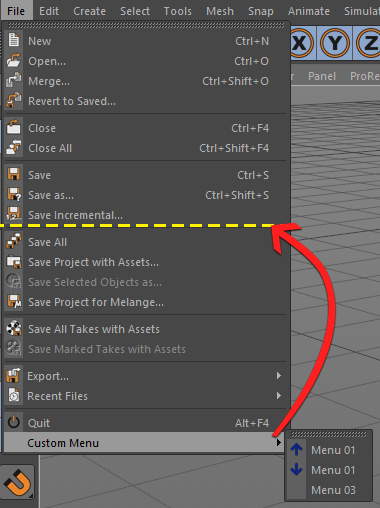
      Is it possible to placing a custom menu after specific submenu from the File menu, after the Save submenu for example .

      enhanceMainMenu.png

      The script bellow insert my custom menu at the bottom of the File menu:

      def enhanceMainMenu():
          mainMenu = c4d.gui.GetMenuResource("M_EDITOR")
      
          menu = c4d.BaseContainer()
          menu.InsData(c4d.MENURESOURCE_SUBTITLE, "Custom Menu")
          menu.InsData(c4d.MENURESOURCE_COMMAND, "PLUGIN_CMD_{}".format(ID_MENU_1))
          menu.InsData(c4d.MENURESOURCE_COMMAND, "PLUGIN_CMD_{}".format(ID_MENU_2))
          #menu.InsData(0, '') # Append separator
          menu.InsData(c4d.MENURESOURCE_COMMAND, "PLUGIN_CMD_{}".format(ID_MENU_3))
      
          filemenue = mainMenu.GetData(1)
          filemenue.InsData(c4d.MENURESOURCE_SUBMENU, menu)
      
          mainMenu.SetData(1, filemenue)
      
      def PluginMessage(id, data):
          if id == c4d.C4DPL_BUILDMENU:
              enhanceMainMenu()
      

      Thanks.

      posted in Cinema 4D SDK python
      mfersaouiM
      mfersaoui
    • External dependencies question

      Hello,

      I have a plugin that contain multiple subplugins (.pyp files) and want to know how to insert my lib modules to the system path and that affect all the plugin .pyp files. (I have already seen the post: External dependencies: The right way to do and I did not find an answer concerning this point )

      lib\n    module1.py, module2.py, module3.py,...
      res\n    <resource files>
      plugin_1.pyp
      plugin_2.pyp
      plugin_3.pyp
      ...
      

      Must I use the "sys.path.inser()" method on each of my subplugins?
      I noticed that the subplugins is loaded one by one and in alphabetical order. so, for a test I created a new file and I rename it "a.pyp" (to be loaded in the first) and then I put inside it the following code:

      import os
      import sys
        
      dirname = os.path.dirname(__file__)
      lib_path = os.path.join(dirname, 'lib')
      sys.path.insert(0, lib_path)
      

      This it works, and affect all the .pyp files of my plugin.

      Is there a right way to do that?

      Thanks.

      posted in Cinema 4D SDK python
      mfersaouiM
      mfersaoui
    • RE: TreeView Menu

      @mfersaoui said in TreeView Menu:

      GroupBegin

      For my second question I found this function to interact with the htmlViewer area.

      c4d.SpecialEventAdd(ACTION_ID)
      
      posted in Cinema 4D SDK
      mfersaouiM
      mfersaoui
    • RE: TreeView Menu

      Hi @m_adam ,

      Thank you so much, I have two questions:

      The first is What the right way to rewriting the following code and obtain same result:

      class ListView(c4d.gui.TreeViewFunctions):
      
          def __init__(self):
              self.listOfTexture = list() # Store all objects we need to display in this list
      
      def CreateLayout(self):
      
          self.GroupBegin(0, c4d.BFH_SCALEFIT | c4d.BFV_SCALEFIT, 2, 0)
          self.GroupBorderSpace(5, 5, 5, 5)
      
          self.GroupBegin(0, flags=c4d.BFH_LEFT | c4d.BFV_SCALEFIT, cols=1, rows=1, initw=400, inith=0)
      
          # Create the TreeView GUI.
          customgui = c4d.BaseContainer()
          customgui.SetBool(c4d.TREEVIEW_BORDER, c4d.BORDER_THIN_IN)
          customgui.SetBool(c4d.TREEVIEW_HAS_HEADER, False) # True if the tree view may have a header line.
          customgui.SetBool(c4d.TREEVIEW_HIDE_LINES, False) # True if no lines should be drawn.
          customgui.SetBool(c4d.TREEVIEW_MOVE_COLUMN, True) # True if the user can move the columns.
          customgui.SetBool(c4d.TREEVIEW_RESIZE_HEADER, True) # True if the column width can be changed by the user.
          customgui.SetBool(c4d.TREEVIEW_FIXED_LAYOUT, True) # True if all lines have the same height.
          customgui.SetBool(c4d.TREEVIEW_ALTERNATE_BG, False) # Alternate background per line.
          customgui.SetBool(c4d.TREEVIEW_CURSORKEYS, True) # True if cursor keys should be processed.
          customgui.SetBool(c4d.TREEVIEW_NOENTERRENAME, False) # Suppresses the rename popup when the user presses enter.
          customgui.SetBool(c4d.TREEVIEW_NO_MULTISELECT, True)
      
          self._treegui = self.AddCustomGui( 1000, c4d.CUSTOMGUI_TREEVIEW, "", c4d.BFH_SCALEFIT | c4d.BFV_SCALEFIT, 0, 0, customgui)
          if not self._treegui:
              print "[ERROR]: Could not create TreeView"
              return False
      
          self.GroupEnd()
      
          self.GroupBegin(0, flags=c4d.BFH_SCALEFIT | c4d.BFV_SCALEFIT, cols=1, rows=1)
          html_file = "file.html"
          htmlViewer = self.AddCustomGui(1000001, c4d.CUSTOMGUI_HTMLVIEWER, "Viewer", c4d.BFH_SCALEFIT | c4d.BFV_SCALEFIT, 0, 0)
          htmlViewer.SetUrl(html_file, c4d.URL_ENCODING_UTF16)
          self.GroupEnd()
      
          return True
          
      def InitValues(self):
          # Initialize the column layout for the TreeView.
          layout = c4d.BaseContainer()
          layout.SetLong(ID_NAME, c4d.LV_TREE)
          self._treegui.SetLayout(1, layout)
      
          mdata = {
              "Menu 01": {
                  "Item 01": ["sub-item 01", "sub-item 02", "sub-item 03"],
                  "Item 02": ["sub-item 01", "sub-item 02"],
                  "Item 03": [],
                  },
              "Menu 02": [],
              "Menu 03": ["sub-item 01", "sub-item 02"],
              "Menu 04": ["sub-item 01"]
          }
          res = []
          for m in m_data:
              m1 = TextureObject(m)
              res.append(m1)
              m1_items = m_data[m]
              if len(m1_items):
                  for m1_name in m1_items:
                      m1_item = TextureObject(m1_name)
                      m1.AddChild(m1_item)
                      if isinstance(m1_items, dict):
                          m2_items = m1_items[m1_name]
                          if len(m2_items):
                              for m2_name in m2_items:
                                  m2_item = TextureObject(m2_name)
                                  m1_item.AddChild(m2_item)
      
          self._listView.listOfTexture.extend(res)
      
          # Set TreeViewFunctions instance used by our CUSTOMGUI_TREEVIEW
          self._treegui.SetRoot(self._treegui, self._listView, None)
      
          return True
      

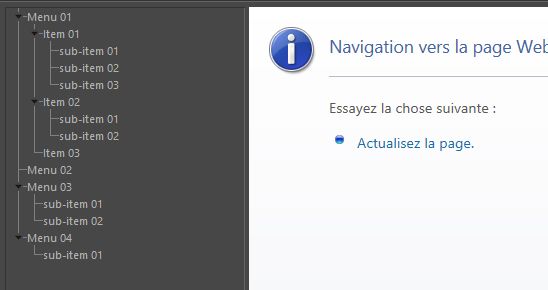
      Result:
      tree_view_menu.jpg

      The second question is How to interact with the htmlViewer area at the right of dialog from the my TreeView menu (Changing the htmlViewer file when clicking on a menu items).

      def Select(self, root, userdata, obj, mode):
          """
          Called when the user selects an element.
          """
          if mode == c4d.SELECTION_NEW:
              html_file = "file.html"
              #TestDialog()
              for tex in TextureObjectIterator(self.listOfTexture):
                  tex.Deselect()
              obj.Select()
      

      Thanks

      posted in Cinema 4D SDK
      mfersaouiM
      mfersaoui
    • TreeView Menu

      Hello,
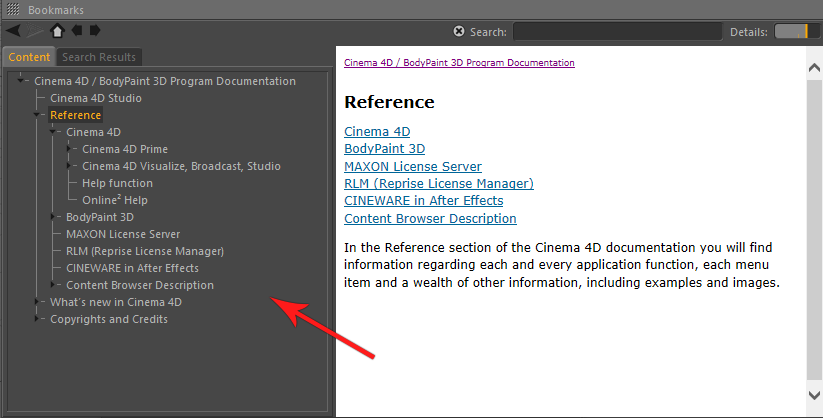
      Is there a TreeView example to create a similar tree view menu like as the Cinema 4D help dialog?

      tree_view.png
      Thanks.

      posted in Cinema 4D SDK python
      mfersaouiM
      mfersaoui