J
Offline
Posts
-
RE: Encrypt .pyp file to .pypv with script or command line?
Hi,
here is some code i used for create pypv
def call_c4dpy(C4D_PATH, cmd): # 需要把c4dpy.exe所在路径添加到环境变量 # C4D_PATH = r"~\Maxon Cinema 4D R26" if C4D_PATH not in os.environ["PATH"]: os.environ["PATH"]+=f"{C4D_PATH};" # cmd 也可以是脚本路径 cmd = r"~\c4dtest script.py" _cmd = f"c4dpy \"{cmd}\"" # 脚本路径必须是字符串 subprocess.call(_cmd) # 调用并且可以实时看到结果 def creat_pypv(C4D_PATH, plugin_path): # pyp 生成 pypv # c4dpy.exe g_encryptPypFile="G:\C4D JACK Plugins\G4Designer\G4Designer.pyp" cmd = f"c4dpy g_encryptPypFile=\"{plugin_path}\"" call_c4dpy(C4D_PATH, cmd) -
Documentation error? splineHelp.InitSpline(self, op, up=Vector(0) ) raise an error
Hi,
https://developers.maxon.net/docs/py/2024_3_0/modules/c4d.utils/SplineHelp/index.html#SplineHelp.InitSpline
SplineHelp.InitSpline(self, op, up=Vector(0)) in the documentation raise an error,
TypeError: 'up' is an invalid keyword argument for this function in 2024,
'upvector' seems to be the correct keyword argument. -
SendModelingCommand(CURRENTSTATETOOBJECT) Unable to get correct results
Hi,
I want to create a plane and spline and use the SplineWrap effector to wrap the plane around the spline and then return the cached polygon.
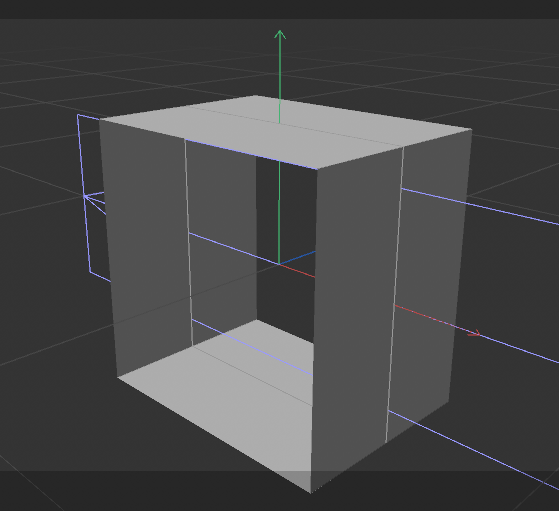
But the code doesn't return the correct result,
Did I write something wrong somewhere?import c4d def main(): height = 300 temp_doc = c4d.documents.BaseDocument() # spline spline = c4d.BaseObject(5186) temp_doc.InsertObject(spline) # plane plane = c4d.BaseObject(5168) temp_doc.InsertObject(plane) plane[c4d.PRIM_PLANE_WIDTH] = 1000 plane[c4d.PRIM_PLANE_HEIGHT] = height plane[c4d.PRIM_AXIS] = 4 # +z plane[c4d.PRIM_PLANE_SUBW] = int(plane[c4d.PRIM_PLANE_WIDTH]/10) plane[c4d.PRIM_PLANE_SUBH] = 1 spline_wrap = c4d.BaseObject(1019221) spline_wrap.InsertUnderLast(plane) spline_wrap[c4d.MGSPLINEWRAPDEFORMER_SPLINE] = spline spline_wrap[c4d.MGSPLINEWRAPDEFORMER_AXIS] = 1 # poly #c4d.documents.InsertBaseDocument(temp_doc) # Enabling this line will give different results temp_doc.ExecutePasses(bt=None, animation=True, expressions=True, caches=True, flags=0) bc = c4d.BaseContainer() bc[c4d.MDATA_CURRENTSTATETOOBJECT_INHERITANCE] = True bc[c4d.MDATA_CURRENTSTATETOOBJECT_BUILDFLAGS] = c4d.BUILDFLAGS_INTERNALRENDERER res = c4d.utils.SendModelingCommand(c4d.MCOMMAND_CURRENTSTATETOOBJECT, [plane], mode=c4d.MODELINGCOMMANDMODE_ALL, bc=bc, doc=temp_doc, flags=c4d.MODELINGCOMMANDFLAGS_NONE ) print(res) cache = res[0] doc.InsertObject(cache.GetClone(0)) if __name__ == '__main__': main() c4d.EventAdd() -
RE: ToolData.MouseInput() how to get right mouse click?
@i_mazlov
Hi,
thanks for letting me know that.cheers~
-
ToolData.MouseInput() how to get right mouse click?
Hi,
I am writing a ToolData plugin,'msg[c4d.BFM_INPUT_CHANNEL]' always returns 1 in MouseInput function, I would like to know how can i get mouse right button event?def MouseInput(self, doc, data, bd, win, msg): # Retrieves which clicks is currently clicked print(msg[c4d.BFM_INPUT_CHANNEL]) # -> 1Thanks~
-
how to close c4dpy inside a script?
I am using command-line to execute a C4D script through c4dpy.exe. I want to close c4dpy after the script execution completes. How can I do this?
def main():
    parser = argparse.ArgumentParser()
    parser.add_argument('--args', type=str, help='argument to be passed')

    args = parser.parse_args()
    if args.args:
        print(f'Received argument: {args.args}')

    # quit c4d?
    c4d.CallCommand(12104)
In addition, I am rendering a octane scene in this script, but sometimes the rendering process keeps running and it is unclear whether it is a bug in c4dpy or if I am using c4dpy incorrectly.
import c4d
import os

class RenderAgent:

    def __init__(self):
        self.progress = 0

    def render(self, doc, save_path=None, thread=None):
        self.progress = 0
        rd = doc.GetActiveRenderData()
        rd[c4d.RDATA_ALPHACHANNEL] = 1
        bmp = c4d.bitmaps.MultipassBitmap(int(rd[c4d.RDATA_XRES]), int(rd[c4d.RDATA_YRES]), c4d.COLORMODE_RGB)
        bmp.AddChannel(True, True)
        # Renders the document
        if thread:
            thread = thread.Get()

        if c4d.documents.RenderDocument(doc, rd.GetData(), bmp, c4d.RENDERFLAGS_EXTERNAL, thread, prog=self.PythonCallBack, wprog=self.PythonWriteCallBack) != c4d.RENDERRESULT_OK:
            #print("Failed to render the temporary document.")
            return False
        if save_path:
            bmp.Save(save_path, c4d.FILTER_PNG, data=None, savebits=c4d.SAVEBIT_ALPHA)
        return bmp

    def PythonCallBack(self, progress, progress_type):
        self.progress = float(int(progress*100))
        if self.progress>100:
            self.progress = 100
        print(self.progress)
        # !!
        # When i print self.progress  inside octane renderer scene (Actually, I am using a logging module. It can redirect the print output to an external log.txt file.)
        # it will still return 0 after it return 100
        # It seems that the renderer has entered an infinite loop.

    def PythonWriteCallBack(self, mode, bmp, fn, mainImage, frame, renderTime, streamnum, streamname):
        ...

# call this in c4dpy
# simple code
RA = RenderAgent()
save_path = r"..."
RA.render(doc, save_path)
my log file looks like this:
LEVEL:1 - 2023-05-06 16:10:23 rendering start LEVEL:1 - 2023-05-06 16:10:23 rendering:0.0 # ... (rendering LEVEL:1 - 2023-05-06 16:10:23 rendering:100.0 # it seems like render finished but LEVEL:1 - 2023-05-06 16:10:23 rendering:0.0 LEVEL:1 - 2023-05-06 16:10:23 rendering:0.0 ... # (it keeps output 0.0 -
I have developed an open-source user interface framework based on UserArea.
Dear Community,
I have been using c4d UserArea for a while and have always wanted to write a library to encapsulate UserArea for better usability by users. So I created this module called ualib .
The plugin ui in this following image is created using ualib.
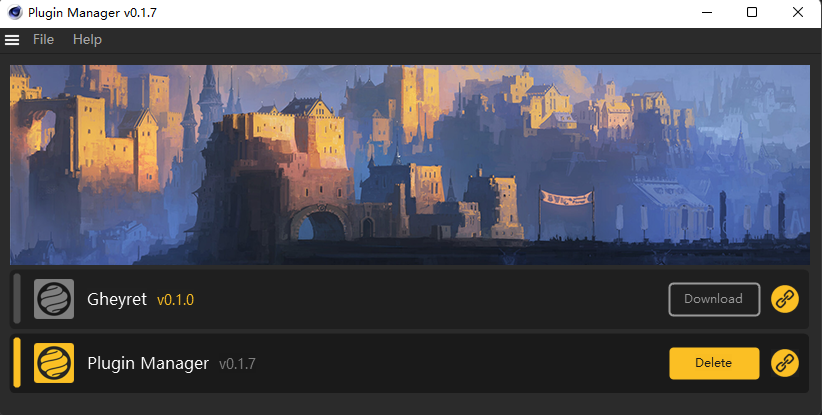
ualib is a user interface framework based on the C4D GeUserArea module, which allows for the convenient creation of various UI controls that are typically difficult to create within C4D. It's a bit like PyQt, but simpler. You can create and replicate interfaces quickly and easily.This is GitHub link. https://github.com/JACKADUX/c4d-ualib/wiki
Please feel free to download and use it. I will continue to optimize and improve this library. If you have any questions, please feel free to contact me or leave a comment.Cheers,
-
RE: How can i get full chinese characters using userarea BFM_INPUT_ASC
Hi @ferdinand ,
First of all, I apologize for my poor explanation.
I ran into an unexplainable situation, but your example solved my problem nicely.
I couldn't get consecutive characters because I mistakenly called the self.GetInputState(c4d.BFM_INPUT_MOUSE, msg.GetInt32(c4d.BFM_INPUT_CHANNEL), msg) method and it would interrupt getting the original input.now I have solved the problem. Thank you very much you guys are the best!
Cheers~ -
How can i get full chinese characters using userarea BFM_INPUT_ASC
Hi,
I am using GeUserArea to create a text editor in python.
but when I use BFM_ INPUT_ ASC, it will only return one character!
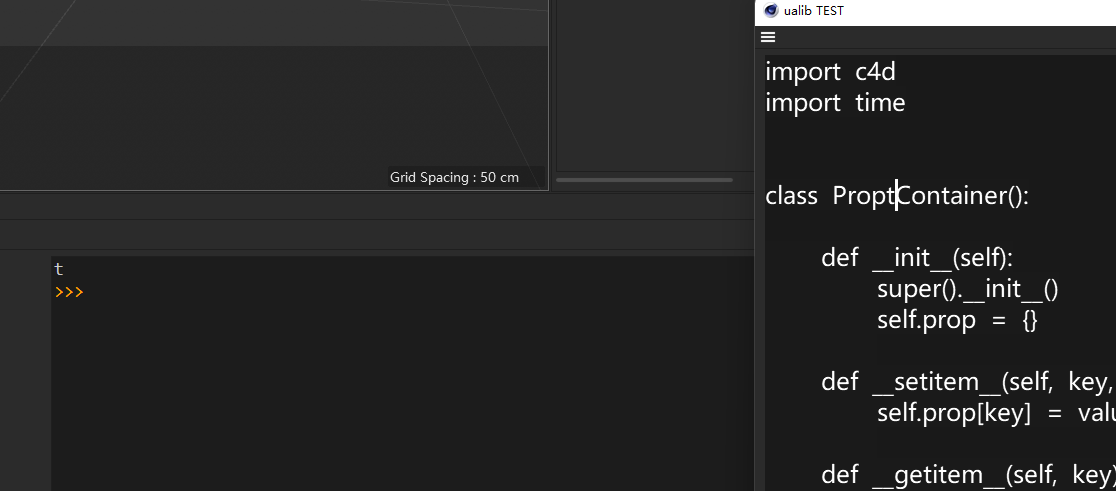
How can i get full input of characters? (Here is the simplified codedef InputEvent(self, msg): # i entered 'test' asc = msg[c4d.BFM_INPUT_ASC] print(asc) # >>> t # but i only get 't'i want to input 'test' here
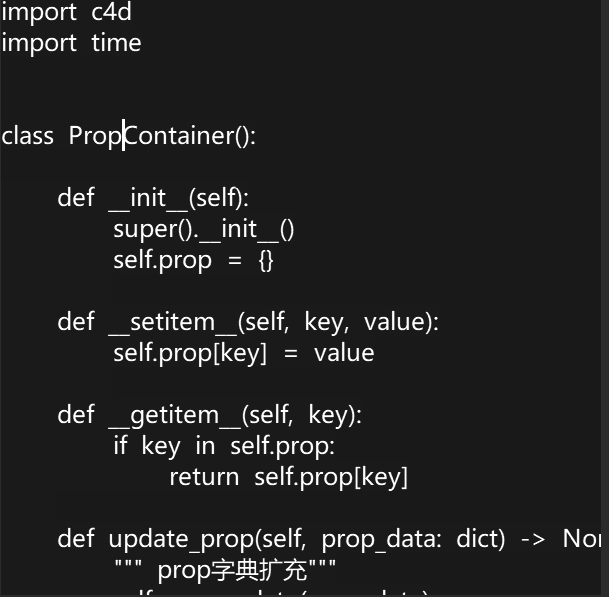
i write 'test' and pressed enter
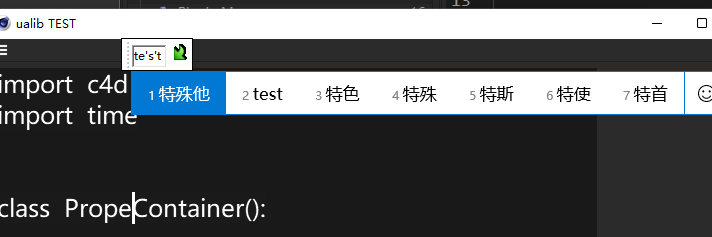
it will only return 't' , but i want to get fully return of 'test' at once
-
RE: It seems that the scroll group has a bug in the R26 version. When the doc is refreshed, it will automatically change its position?
@ferdinand hi, is that a bug or i did something wrong? (i used 'AddMultiLineEditText ' in your code )
-
RE: It seems that the scroll group has a bug in the R26 version. When the doc is refreshed, it will automatically change its position?
hi thanks for quick reply ! I'm sorry I didn't explain my problem clearly. I'm not a native English speaker.
By ‘’refresh doc‘’, I mean to add a new doc.
After some tests, I found that the problem was caused by: self.AddMultiLineEditText(self.ID_MultiText, c4d.BFH_SCALEFIT | c4d.BFV_SCALEFIT, initw=0, inith=80, style=0)"""Example for scroll groups in S26.1 and possible bugs in it. The example can be run from the script manager. """ import c4d import typing doc: c4d.documents.BaseDocument op: typing.Optional[c4d.BaseObject] class MyDialog (c4d.gui.GeDialog): """Provides the dialog containing the scroll group. """ ID_MENU: int = 1000 ID_GRP_SCROLL: int = 2000 ID_GRP_CONTAINER: int = 2001 ID_GDG_BASE: int = 3000 GADGET_COUNT: int = 100 def CreateLayout(self) -> bool: """Adds a menu with an item to refresh the scroll group, the scroll group and multiple gadgets to the dialog. """ self.MenuSubBegin("Menu") self.MenuAddString(MyDialog.ID_MENU, "Refresh") self.MenuSubEnd() defaultFlags: int = c4d.BFH_SCALEFIT | c4d.BFV_SCALEFIT scrollflags = c4d.SCROLLGROUP_VERT | c4d.SCROLLGROUP_HORIZ | c4d.SCROLLGROUP_AUTOHORIZ|c4d.SCROLLGROUP_AUTOVERT self.ScrollGroupBegin(MyDialog.ID_GRP_SCROLL, defaultFlags, c4d.SCROLLGROUP_VERT | c4d.SCROLLGROUP_HORIZ) self.GroupBegin(MyDialog.ID_GRP_CONTAINER, defaultFlags, 1) for index in range(10): ### self.AddMultiLineEditText(index+10000, c4d.BFH_SCALEFIT | c4d.BFV_SCALEFIT, initw=0, inith=80, style=0) ### self.GroupEnd() # ID_GRP_CONTAINER self.GroupEnd() # ID_GRP_SCROLL return super().CreateLayout() def Command(self, cid: int, msg: c4d.BaseContainer) -> bool: """Refreshes ID_GRP_SCROLL and also sets off EventAdd when ID_MENU is invoked. """ if cid == MyDialog.ID_MENU: print ("Refresh Layout & Event Add") #self.LayoutChanged(MyDialog.ID_GRP_SCROLL) self.init_sub_items() c4d.EventAdd() return super().Command(cid, msg) def Message(self, msg: c4d.BaseContainer, result: c4d.BaseContainer) -> int: """From your code, I commented it out, since I do not understand its purpose. """ if msg.GetId() == c4d.BFM_SCROLLGROUP_SCROLLED : # print("scroll group change when document refresh") pass return super().Message(msg, result) def main() -> None: """Opens the dialog. """ global dlg dlg = MyDialog() dlg.Open(c4d.DLG_TYPE_ASYNC, defaultw=500, defaulth=250) if __name__ == '__main__': main()and i dont know how to solve this.
-
It seems that the scroll group has a bug in the R26 version. When the doc is refreshed, it will automatically change its position?
def CreateLayout(self):
        ...
        scrollflags = c4d.SCROLLGROUP_VERT | c4d.SCROLLGROUP_HORIZ | c4d.SCROLLGROUP_AUTOHORIZ|c4d.SCROLLGROUP_AUTOVERT
        if self.ScrollGroupBegin(self.ID_Scroll_Group, c4d.BFH_SCALEFIT| c4d.BFV_SCALEFIT, scrollflags, initw=0, inith=0):
            if self.GroupBegin(self.ID_ProjectSubDlg_Group, c4d.BFH_SCALEFIT| c4d.BFV_SCALEFIT, 1, 0,""):
                    #
                    #
                    #
                    pass  # sub_item_dlgs
                    #
                    #
                    #

            self.GroupEnd()
        self.GroupEnd()
        ...
        return True

    def init_sub_items(self):
        self.sub_item_dlgs = []
        self.LayoutFlushGroup(self.ID_ProjectSubDlg_Group)
        if self.GroupBegin(self.ID_ProjectSubDlg_Group, c4d.BFH_SCALEFIT| c4d.BFV_SCALEFIT, 1, 0,""):
            item_list = sorted(self.structure["items"], key=lambda x: self.structure["items"][x]["order"])
            index = 1
            for item_name in item_list:
                item_data = self.structure["items"][item_name]
                if item_data["type"] != self.get_type():
                    continue
                sub_item_dlg = ProjectSubDlg(self.structure, item_data, index)   ##  Add custom subdialog
                self.sub_item_dlgs.append(sub_item_dlg)
                self.AddSeparatorH(2,c4d.BFH_SCALEFIT)
                self.AddSubDialog(self.ID_Item_dlg_START+index, flags=c4d.BFH_SCALEFIT)
                self.AttachSubDialog(sub_item_dlg, self.ID_Item_dlg_START+index)
                index +=1

        self.GroupEnd()
        self.LayoutChanged(self.ID_ProjectSubDlg_Group)
I have creat a list of subdialogs inside scroll group, and subdialog have a function will open doc.when i do this command, the scroll group will also be randomly changed?
and i also can recive the message use:def Message(self, msg, result): if msg.GetId() == c4d.BFM_SCROLLGROUP_SCROLLED : print("scroll group change when document refresh") return c4d.gui.GeDialog.Message(self, msg, result)i think this is a bug because it not happen in r24, is there any solution in r26?
