Thanks for @ferdinand awesome answer!
I found DescLevel and DescId always confused to me, but them do can access more than simple set item, time to dive deeper to the DescLevel part 
Cheers~
DunHou
Thanks for @ferdinand awesome answer!
I found DescLevel and DescId always confused to me, but them do can access more than simple set item, time to dive deeper to the DescLevel part 
Cheers~
DunHou
Hey community,
This my first dive into graphview node, sorry if this is a stupid basic question.
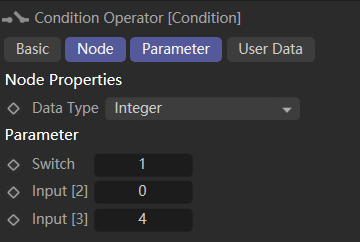
I want to set condition node input port (GvPort) value, but it seems I can not do this via __settitem__ / SetParameter, is this is a limit or I do it in wrong way?
Cheers~
DunHou

import c4d
def iterateNodes(node):
while node:
description = node.GetDescription(c4d.DESCFLAGS_DESC_0)
data: c4d.BaseContainer
pid: c4d.DescID
for data, pid, _ in description:
value: any | None = None
try:
value = node[pid]
except:
value = "Inaccessible in Python"
if str(data[c4d.DESC_NAME]).startswith("Input"):
print(f"\tInput '{data[c4d.DESC_NAME]}'(c4d.{data[c4d.DESC_IDENT]}) = {value} type: {type(value)}")
node[2000, 1001] = 2 # TypeError: __setitem__ got unexpected type 'int'.
node.SetParameter([2000, 1002],2,0) # no error but not worrk.
print(node[2000, 1001].GetDataInstance()) # AttributeError: parameter access failed
if node.IsGroupNode():
iterateNodes(node.GetDown())
node = node.GetNext()
def main():
# Checks if selected object is valid
if op is None:
raise ValueError("op is none, please select one object.")
# Retrieves the xpresso Tag
xpressoTag = op.GetTag(c4d.Texpresso)
if xpressoTag is None:
raise ValueError("Make sure the selected object get an Xpresso Tag.")
# Retrieves the node master
gvNodeMaster = xpressoTag.GetNodeMaster()
if gvNodeMaster is None:
raise RuntimeError("Failed to retrieve the Node Master.")
# Retrieves the Root node (the Main XGroup) that holds all others nodes
gvRoot = gvNodeMaster.GetRoot()
if gvRoot is None:
raise RuntimeError("Failed to retrieve the Root Node.")
# Iterates overs all nodes of this root node.
iterateNodes(gvRoot)
if __name__ == '__main__':
main()
I think you need to override RenderEngineCheck to false, the document said:
Bool MyRenderer::RenderEngineCheck(const BaseVideoPost* node, Int32 id) const
{
switch (id)
{
case RENDERSETTING_STATICTAB_MULTIPASS:
case RENDERSETTING_STATICTAB_ANTIALIASING:
case RENDERSETTING_STATICTAB_OPTIONS:
case RENDERSETTING_STATICTAB_STEREO:
return false;
}
return true;
}
Cheers~
DunHou
@ferdinand love the new mxutils functions, Great work!
btw, python SDK change notes seems link to C++ docs.
Cheers~
DunHou
Hey @ferdinand , thanks for your information, Iterate graph is one of the solutions to listen to name change, but what I want is the "state" of any text input.
As I had posted on the beta forums (Typing software issue with Cinema 4D.), if someone used non-Latin languages, like Chinese for example, If you use a typing software like IME( Mircosoft Pinyin ), it should ship an English input. When we want to change something like an object name, it will set the typing to English mode. It is very annoying when you have tons of objects to rename one by one.
So I wonder if I can get the "typing mode" so I can set the IME always in Chinese mode when I input a text, and keep in English when not typing text to use shortcuts.
I am a very stupid beginner in C++, but you know what I mean. I try to use GetGUIThreadInfo and GUI_CARETBLINKING to get the text cursor, but it seems not work.
Hope it is clear.
Cheers~
DunHou
Hey community.
I wonder if we can get the text input event in Cinema like this. That is to say, when pressing the keyboard, it is the action of inputting text.

Another corresponding state is the shortcut key state, such as pressing C to collapse a certain object.
How can I get this state via Python or in C++?
Cheers~
DunHou
Thanks @ferdinand for your great solution!
Cheers~
DunHou
Hey @ferdinand ,
thanks for details.
Cheers~
DunHou
About forum, I can get notification about my own topic, And I clear all the cache, but nothing changed.
After I tried to reset my account settings manually, then it worked as expected.
Hey @ferdinand ,
Thanks for your answer, unfortunately, the answer is the same as I thought, and I am powerless to do anything about it. I can only wait for the exposed parameters.
Based on your suggestion, there may be many issues, and it is not worth spending a lot of time debugging them. Fortunately, this is not a very urgent task.
Cheers~
DunHou
Hey @ferdinand,
Thanks for your tips! Disabled validateAbsolutePaths with lazy paths can also work in this case, but if you interested, here is the console without disabled:
I know third party APIs are not supported, just want to know if it is possible due to Arnold. It looks like it is due to my poor knowledge 
And as I know, Arnold has demo plugin that only has watermark on render, I use the demo to create plugins and it it worked as same as the full version.
Cheers~
DunHou
Traceback (most recent call last):
File "scriptmanager", line 19, in <module>
File "C:\Program Files\Maxon Cinema 4D 2025\resource\modules\python\libs\python311\maxon\frameworks\nodes.py", line 548, in ApplyDescription
res: DataDictionary = GraphDescription._ApplyDescription(
^^^^^^^^^^^^^^^^^^^^^^^^^^^^^^^^^^^
File "C:\Program Files\Maxon Cinema 4D 2025\resource\modules\python\libs\python311\maxon\decorators.py", line 495, in Auto
ExecStaticMethod(*args)
RuntimeError: The node attribute reference '>output.r' (space: 'com.autodesk.arnold.nodespace', lang: 'en-US', node: 'com.autodesk.arnold.shader.image') is not associated with any IDs. [graphdescription_impl.cpp(2003)]
In:
{ <- Error in this scope ->
$type: #~.image
#<filename: asset:///file_2e316c303b15a330
#<multiply -> #>output.r: {
$type: #~.image
#<filename: asset:///file_2e316c303b15a330
}
} [graphdescription_impl.cpp(203)]
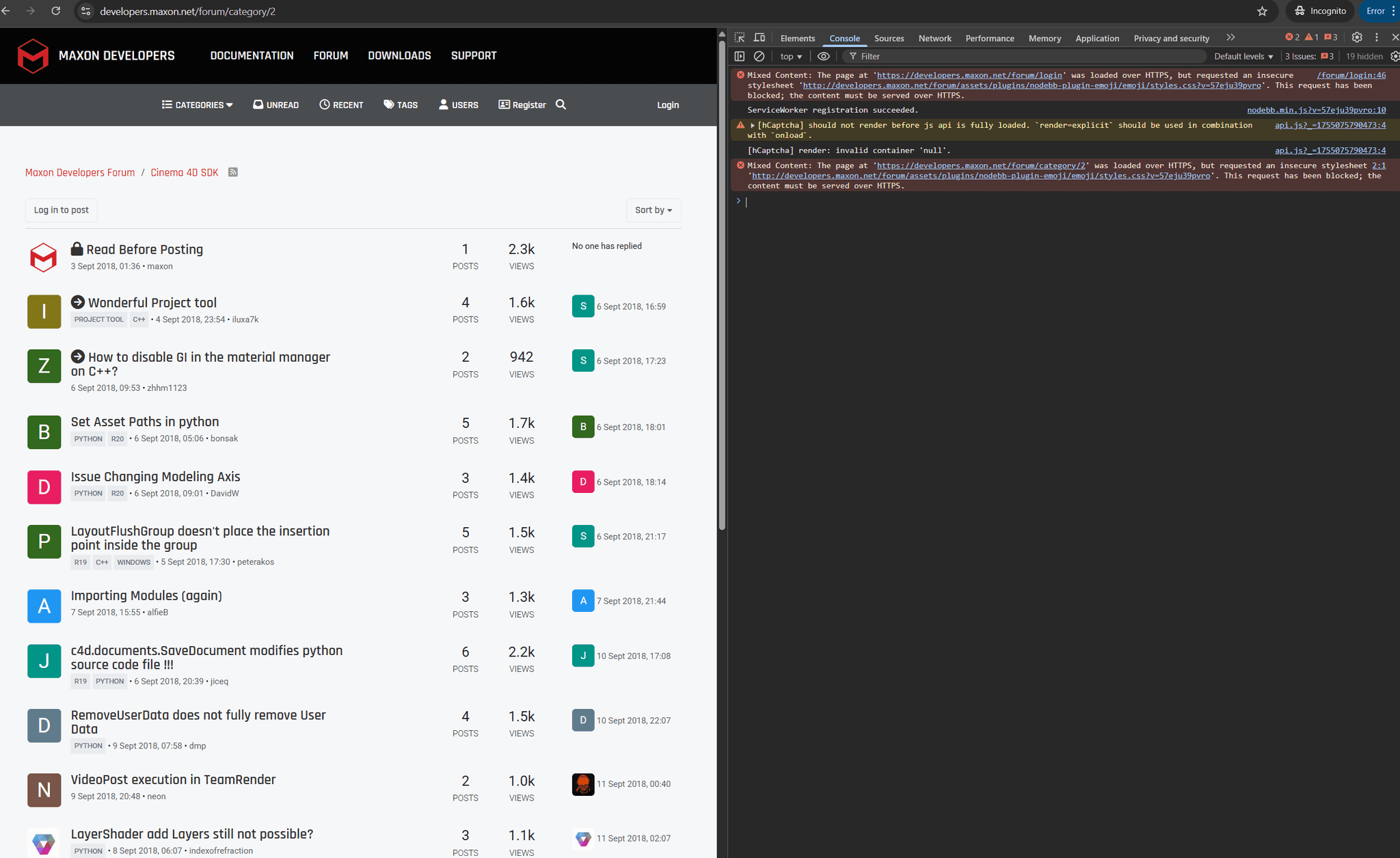
I test on a brand new Macbook, and refresh my PC browser, and try to use private mode. None of them worked, but the notification of my question does show in the Ring icon, but the sort does not work. not sure about UNREAD, but I do miss the recent topic.

Hey community,
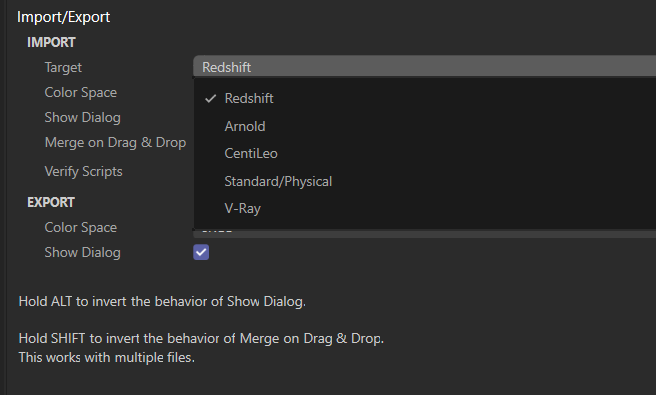
I want to get the explicit render engine name of the default import plugin but not the index, can I do this?
e.g. I want to set the importor to Standard or Redshift, but if I remove some renderer like CentiLeo, the index of Standard will changed.
Cheers~
DunHou

Hey @ferdinand ,
I notice that GraphDescription also have two undo steps even I create graph and insert before apply description, how can I avoid this.
the description dict is steal from GraphDescription Manual
Cheers~
DunHou
import c4d
import maxon
data = {
"$type": "Output",
"Surface -> outColor": {
"$type": "Standard Material",
"Base/Metalness": 1.,
"Base/Color": {
"$type": "Texture",
"Image/Filename/Path": maxon.Url("asset:///file_eb62aff065c50a2b"),
"Scale": {
"$type": "Value",
"$id": "texTransform",
"Input": maxon.Color(2, 2, 1)
}
},
"Reflection/Roughness": {
"$type": "Texture",
"Image/Filename/Path": maxon.Url("asset:///file_8bf49bb0b9992dbe"),
"Scale": "#texTransform"
},
"Geometry/Bump Map": {
"$type": "Bump Map",
"Input Map Type": 0,
"Height Scale": .2,
"Input": {
"$type": "Texture",
"Image/Filename/Path": maxon.Url("asset:///file_e706df60a3a533d2"),
"Scale": "#texTransform"
}
}
}
}
def main() -> None:
"""Called by Cinema 4D when the script is being executed.
"""
doc = c4d.documents.GetActiveDocument()
doc.StartUndo()
material = c4d.BaseMaterial(c4d.Mmaterial)
node_space = maxon.Id("com.redshift3d.redshift4c4d.class.nodespace")
graph: maxon.NodesGraphModelRef = maxon.GraphDescription.GetGraph(material, node_space, True)
doc.InsertMaterial(material)
doc.AddUndo(c4d.UNDOTYPE_NEWOBJ, material)
maxon.GraphDescription.ApplyDescription(graph, data)
doc.EndUndo()
if __name__ == '__main__':
main()
Hey community,
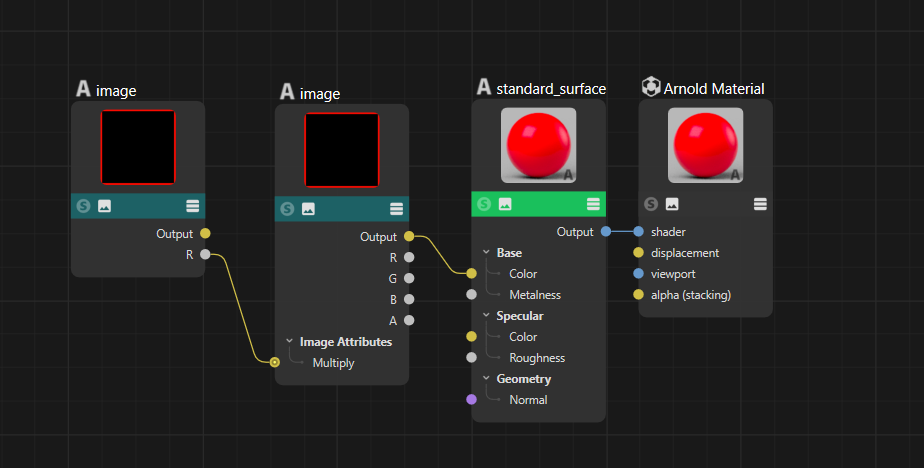
I am working on something with GraphDescription, but seems I can not use explicit connection with Arnold, but Redshift and VRay worked as I want.
I know 3rd is not full supported, but is this a problem with SDK design or Arnold's lack of adaptation, should I ask to Arnold dev?
I tried match label/id/lazy id, but none of them work.
btw: The notification and sorting of the forum have not been fixed yet. I have also tested it on a new computer and browser
Cheers~
DunHou

import maxon
desc = {
"$type": "#~.material",
"#<shader":
{
"$type": "#~.standard_surface",
"#<base_color": {
"$type": "#~.image",
"#<filename": maxon.Url("asset:///file_2e316c303b15a330"),
"#<multiply -> #>output.r": {
"$type": "#~.image",
"#<filename": maxon.Url("asset:///file_2e316c303b15a330")
}
}
}
}
maxon.GraphDescription.ApplyDescription(
maxon.GraphDescription.GetGraph(name="test"), desc)
Hi community,
I notice that I can not get the newest and unread topic, when I open the form the sort seems not worked as before, I need to changed it manually to NEWEST TO OLDEST. Has anyone else encountered a similar situation?
Cheers~
DunHou
Maybe you can try Google Chrome browser. The auto-fill doesn't work well in Edge sometimes, even manually passing your info. I can not login old plugin cafe with Edge, but it can work with Chrome, @ferdinand reminds me that in the past, I think it is good to mention here.
Cheers~
DunHou
Hey @ferdinand,
Sorry to interject here, I'm just curious why it's recommended to put the return type at the end (of course, I prefer this Python-like writing style), but as far as I know, this is a relatively old-fashioned writing style (c++11), and the code I observed during my learning process was all of the predecessor types, this is quite confusing for a C++ beginner like me.
Cheers~
DunHou
Result<GraphNode> getConnectedNode(const GraphNode& input, const NODE_KIND kind);```
Hey @m_adam ,
Yes , I had a look at this example, but I'm confusing to understand how it can apply to my case, sorry for my foolish brain.
If I keep InputEvent as @ferdinand did in the example, HandleMouseDrag will return True if I have a little move, I try to stop this,
so I want to execute HandleDragEvent only when mouse "obvious interaction outside the ua",to avoid the accompanying effect of dragging when lightly clicked (download) .
def InputEvent(self, msg: c4d.BaseContainer) -> bool:
"""Called by Cinema 4D when the user area receives input events.
Here we implement creating drag events when the user drags from this user area. The type of
drag event which is initiated is determined by the drag type selected in the combo box
of the dialog.
"""
# When this is not a left mouse button event on this user area, we just get out without
# consuming the event (by returning False).
if (msg.GetInt32(c4d.BFM_INPUT_DEVICE) != c4d.BFM_INPUT_MOUSE or
msg.GetInt32(c4d.BFM_INPUT_CHANNEL) != c4d.BFM_INPUT_MOUSELEFT):
return False
# Get the type of drag event that should be generated, and handle it.
dragType: int = self._host.GetInt32(self._host.ID_DRAG_TYPE)
return self.HandleDragEvent(msg, dragType)
my code did stop the HandleDragEvent execute if I didn't want to.
but in this situation, even if I print and execute HandleDragEvent successfully, C4D does not accept drag events, which means the material cannot be assigned to the object. I don't know what is preventing this.
def InputEvent(self, msg: c4d.BaseContainer) -> bool:
"""Called by Cinema 4D when the user area receives input events.
Here we implement creating drag events when the user drags from this user area. The type of
drag event which is initiated is determined by the drag type selected in the combo box
of the dialog.
"""
# When this is not a left mouse button event on this user area, we just get out without
# consuming the event (by returning False).
if msg[c4d.BFM_INPUT_DEVICE] != c4d.BFM_INPUT_MOUSE and msg[c4d.BFM_INPUT_CHANNEL] != c4d.BFM_INPUT_MOUSELEFT:
return False
dragType: int = self._host.GetInt32(self._host.ID_DRAG_TYPE)
if msg.GetBool(c4d.BFM_INPUT_DOUBLECLICK):
print("Double click detected, generating drag event")
return True
mx = int(msg[c4d.BFM_INPUT_X])
my = int(msg[c4d.BFM_INPUT_Y])
mx -= self.Local2Global()["x"]
my -= self.Local2Global()["y"]
# print(f"Start mouse: {mx}, {my}")
state = c4d.BaseContainer()
self.MouseDragStart(c4d.BFM_INPUT_MOUSELEFT,mx,my,c4d.MOUSEDRAGFLAGS_DONTHIDEMOUSE|c4d.MOUSEDRAGFLAGS_NOMOVE)
isFirstTick = True
s = 0
dua = 0
while True:
res, dx, dy, channels = self.MouseDrag()
if res != c4d.MOUSEDRAGRESULT_CONTINUE:
break
mx -= dx
my -= dy
self.GetInputState(c4d.BFM_INPUT_MOUSE, c4d.BFM_INPUT_MOUSELEFT, state)
# mouse released, this can triggered by a click or a drag end
if state[c4d.BFM_INPUT_VALUE] == 0:
dua = time.perf_counter() - s
print (f"Released Mouse in {dua:.4f} seconds")
# drag too short, not starting drag event
if dua < 0.15:
return False
break
if isFirstTick:
isFirstTick = False
s = time.perf_counter()
print(f"\t-- first click : {mx}, {my}")
continue
endState = self.MouseDragEnd()
if endState == c4d.MOUSEDRAGRESULT_FINISHED:
print(f"\t-- drag finished : {mx}, {my}")
# drag end inside ua, not generating drag event
if (0 <= mx <= 0 + self.width and 0 <= my <= 0 + self.height):
return False
print('Now ,try to start drag event')
return self.HandleDragEvent(msg, dragType)
Cheers~
DunHou

Hey @ferdinand ,
Sorry for silence, quite busy last days, anyway, back to the question.
It should be noted that from the results, I have found an alternative way to implement it as mentioned above. I just want to review the diagram to understand the logic of the input event
I'm not questioning the rationality of this setting, I just want to know if there's a way to control it more finely
A more precise question may be control over clicking and dragging, e.g. :
BFM_INPUT_MOUSELEFT, and hold on more than 0.1s and mouse move as HandleMouseDrag.InputEvent, the conditions I set are judged correctly, but the drag time is masked, which means that the drag behavior cannot be triggered(e.g., no plus under the cursor, and no material created).like our asset browser, click or drag between the green arrow will not trigger the download progress. only click download/double click/drag outside will download and assign the asset.

Cheers~
DunHou
Hey @ferdinand,
Is there any deficiency in pathlib ? I just think its writing style is more convenient and it produces less code. Lazy me
@ferdinand said in ImportSymbols with single file didn't return as expect.:
does not support passing a file as an input but only directories
I'm a bit confused, does this mean that ImportSymbols only support directories, but the documentation says that files can be passed for parsing, or did I misunderstand again...

Cheers~
DunHou
Hey @ferdinand ,
An extension issue, which is actually the original intention of this issue, I followed your suggestion and implemented "user seamless interaction" using a timer, but there is still one issue that troubles me.
These methods certainly cannot separate clicking and dragging intuitively. Is it possible to achieve this?
get idea from https://developers.maxon.net/forum/topic/16267/marquee-selection-of-items-in-geuserarea
Cheers~
DunHou
def InputEvent(self, msg: c4d.BaseContainer) -> bool:
mx = int(msg[c4d.BFM_INPUT_X])
my = int(msg[c4d.BFM_INPUT_Y])
gx,gy = mx,my
mx -= self.Local2Global()["x"]
my -= self.Local2Global()["y"]
channel = msg[c4d.BFM_INPUT_CHANNEL]
state = c4d.BaseContainer()
mousex = mx
mousey = my
if channel == c4d.BFM_INPUT_MOUSELEFT:
# res, dx, dy, channels = self.MouseDrag()
# print(res, dx, dy, channels)
self.MouseDragStart(
c4d.BFM_INPUT_MOUSELEFT,
mx,
my,
c4d.MOUSEDRAGFLAGS_DONTHIDEMOUSE,
)
while True:
res, dx, dy, channels = self.MouseDrag()
if res == c4d.MOUSEDRAGRESULT_ESCAPE:
self._drag_enabled = False
break
elif res == c4d.MOUSEDRAGRESULT_CONTINUE:
mx -= dx
my -= dy
if not self.GetInputState(c4d.BFM_INPUT_MOUSE, c4d.BFM_INPUT_MOUSELEFT, state):
break
if state[c4d.BFM_INPUT_VALUE] == 0:
print ("Released Left Mouse")
break
if dx == 0 and dy == 0:
continue
mousex += dx
mousey += dy
print("Mouse Dragging at position [%f,%f]" % (mousex, mousey))
if res == c4d.MOUSEDRAGRESULT_FINISHED:
print("dra finished")
# print(mx,my)
# print(f"inside: {self.is_inside(mx, my)}")
if self.is_inside(mx, my):
print("end inside")
if min(abs(gx-mx), abs(gy-my)) < 20:
print("move little, treat as click")
self._drag_enabled = False
return True
break
else:
self._drag_enabled = True
print("end outside, drag enabled")
break
self.MouseDragEnd()
if self._drag_enabled:
print('try to start drag event')
dragType: int = self._host.GetInt32(self._host.ID_DRAG_TYPE)
return self.HandleDragEvent(msg, dragType)
return True