Maxon Developers Maxon Developers
    • Documentation
      • Cinema 4D Python API
      • Cinema 4D C++ API
      • Cineware API
      • ZBrush Python API
      • ZBrush GoZ API
      • Code Examples on Github
    • Forum
    • Downloads
    • Support
      • Support Procedures
      • Registered Developer Program
      • Plugin IDs
      • Contact Us
    • Categories
      • Overview
      • News & Information
      • Cinema 4D SDK Support
      • Cineware SDK Support
      • ZBrush 4D SDK Support
      • Bugs
      • General Talk
    • Recent
    • Tags
    • Users
    • Register
    • Login
    1. Maxon Developers Forum
    2. aturtur
    3. Topics
    A
    Offline
    • Profile
    • Following 0
    • Followers 0
    • Topics 7
    • Posts 13
    • Groups 0

    Topics

    • A

      EventAdd doesn't work with a modal dialog in C4D 2026

      Watching Ignoring Scheduled Pinned Locked Moved Cinema 4D SDK 2026 python windows
      2
      0 Votes
      2 Posts
      106 Views
      ferdinandF
      Hey @aturtur, Thank you for reaching out to us. EventAdd will never really work in script manager scripts in the sense you mean it, unless you use hacks like dangling async dialogs (which as I always point out are a really bad idea). The reason is that Script Manager scripts are blocking, i.e., all scene and GUI execution is being halted until the script finishes. You can hack yourself around this with a dangling async dialog, i.e., a dialog that lives beyond the life time of its script. But that is not a good idea, you should implement some form of plugin to host your asnyc dialog, as you otherwise risk crashes. A modal dialog is just an extension of this. It is right in the name, it is modal, i.e., synchronous. All scene and GUI execution is being halted while this dialog is open and only resumes once it closes. When you want updates while your dialog is open, you need an async dialog (and a plugin which hosts it). Cheers, Ferdinand Since you also might misunderstand the nature of EventAdd() I am also putting here the C++ docs I updated a few weeks ago, to better reflect the nature of it (not yet live): /// @brief Enqueues an update event for the active document. /// @details Only must be called when modifying the active document and is without meaning for other documents. The typical example of using `EventAdd` is after adding or removing elements from the active document; and wanting these changes to be reflected in the UI. The function itself is technically thread-safe, but the vast majority of operations that require calling `EventAdd` are not thread-safe and must be called from the main thread (and therefore calling this function is usually main thread bound). The function also does not enqueue a dedicated event item, but rather sets a flag that is checked when the next update event is processed. Therefore, calling `EventAdd` multiple times in one function scope is unnecessary overhead which must be avoided. Because such multiple event flags cannot be consumed while a function on the main thread is still running, and instead the event will only be consumed after that function returns. /// @code /// Result<void> AddCubes() /// { /// CheckState(maxon::ThreadInterface::IsMainThread(), "AddCubes must be called from the main thread."_s); /// /// // EventAdd(); // We could also technically call it here with the same effect. The event /// // will only happen after this function returns. /// /// BaseDocument* doc = GetActiveDocument(); /// for (int i = 0; i < 10; ++i) /// { /// BaseObject* cube = BaseObject::Alloc(Ocube); /// if (!cube) /// return maxon::OutOfMemoryError(MAXON_SOURCE_LOCATION, "Failed to allocate cube object."_s); /// /// doc->InsertObject(cube); /// /// // Calling EventAdd here would have no extra effect, since this event cannot be consumed while /// // our main thread function is still running. And such extra calls on a large scale can cause /// // considerable overhead. /// } /// /// // Notify C4D that the active document has changed. The very end of a function or scope is the /// // canonical place to call EventAdd(). /// EventAdd(); /// } /// @endcode /// @see The article @link page_manual_coremessages Core Messages@endlink for more information. /// @param[in] eventflag The event to add: @enumerateEnum{EVENT}

    • A

      Purpose of different preference folders

      Watching Ignoring Scheduled Pinned Locked Moved Cinema 4D SDK
      3
      0 Votes
      3 Posts
      1k Views
      A
      Hi @ferdinand, Thank you for the quick reply. This answers all my questions! Cheers, Arttu
    • A

      Change Bodypaint Active Channel Color

      Watching Ignoring Scheduled Pinned Locked Moved Cinema 4D SDK python
      3
      1
      0 Votes
      3 Posts
      610 Views
      A
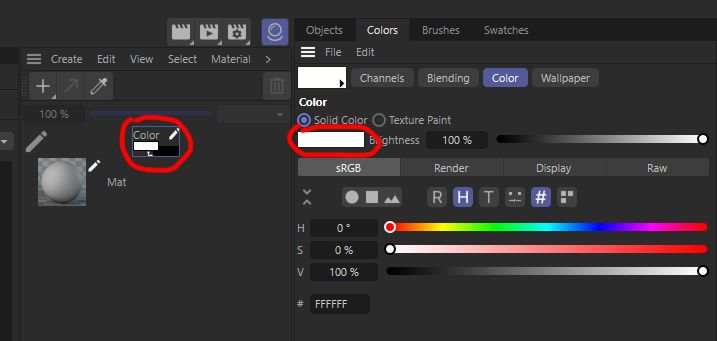
      Hi @m_adam. Thanks for the information! I needed this feature to generate UV texture, where polygon selection tags colorizes the texture with different colors. And since "Fill Layer, Fill Polygons and Outline Polygons" commands uses color from current "Channel Color" I needed option to change the color with a script. [image: 1675761996302-g89cotievo.png] c4d.CallCommand(170150) # Fill Layer c4d.CallCommand(170151) # Fill Polygons c4d.CallCommand(170152) # Outline Polygons But if this is not possible, one workaround that come to mind is to use "UV to Mesh" Scene Nodes Deformer/Capsule and render actual mesh with aligned camera. Cheers, Arttu
    • A

      Changing the Color field's color mode

      Watching Ignoring Scheduled Pinned Locked Moved Cinema 4D SDK
      3
      1
      0 Votes
      3 Posts
      953 Views
      A
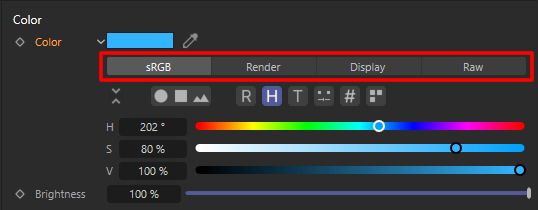
      Hi @ferdinand, Thanks for the reply and the information. Ok, it is an UX/UI thing. I know that the color value is just a Vector and the original value doesn't change when toggling between modes (sRGB, Render, Display and Raw). It's just confusing for the end user that by default C4D is displaying colors in sRGB mode (when using OCIO), especially when the given vector for the color is anyways in raw format. But as you said, it's UX/UI thing and I should do a feature request in Maxon's Support Center that it would be nice to be able to change the default mode for the color field. Thanks for the link to the OCIO article, really useful information! Cheers, Arttu
    • A

      ShowInFinder function in Cinema 4D S26

      Watching Ignoring Scheduled Pinned Locked Moved Cinema 4D SDK python
      7
      0 Votes
      7 Posts
      1k Views
      ManuelM
      @a_block said in ShowInFinder function in Cinema 4D S26: I tend to use GeExecuteFile() to open directories in Explorer/Finder. This seems to work for me regardless of OS. Are there any advantages of using ShowInFinder() instead? Or any disadvantages of using GeExecuteFile(). Absolutely None, except that the name of the function makes more sense if you just want to show the directory. Thanks for pointing that out, i overlooked that line. Bool ShowInFinder(const Filename& path, Bool open) { if (open) return GeExecuteFile(path); Cheers, Manuel
    • A

      R25 - Modal dialog's Color Chooser issue

      Watching Ignoring Scheduled Pinned Locked Moved Bugs python
      3
      2
      0 Votes
      3 Posts
      1k Views
      A
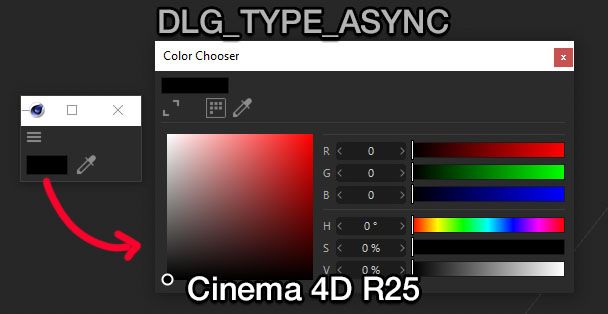
      Hi, thanks for the information. Hopefully it will get fixed in the future updates. Cheers, Arttu
    • A

      Removing color picker from ColorField

      Watching Ignoring Scheduled Pinned Locked Moved Cinema 4D SDK python r20
      9
      1 Votes
      9 Posts
      2k Views
      M
      And sorry @kbar, @C4DS, @aturtur I should have found it earlier, but after looking at how to implement it, I figured out it's already possible since R21 with the flag DR_COLORFIELD_NO_SCREENPICKER import c4d class MyDialog (c4d.gui.GeDialog): def CreateLayout(self): self.AddColorField(1000, c4d.BFH_LEFT | c4d.BFV_TOP, colorflags=c4d.DR_COLORFIELD_NO_SCREENPICKER) return True if __name__=='__main__': global dialog dialog = MyDialog() dialog.Open(c4d.DLG_TYPE_ASYNC, xpos=-2, ypos=-2) Cheers, Maxime.