• R25 project tool

    c++ windows project tool r25 sdk
    6
    0 Votes
    6 Posts
    1k Views
    ManuelM
    hxx files are created by the preprocesssor when you compile.They are created in the Generate subfolder of each project. Frameworks should work out of the box (even if sometimes, we have some bugs_ Cheers, manuel
  • Detect tool button pressed - outside tool plugin

    r20 python c++
    5
    0 Votes
    5 Posts
    887 Views
    C4DSC
    As I won't be spending more time on this project there is no need for delving further into the subject. As such I am setting the status of the topic to "solved".
  • Multi-line Tabs

    r20 r21 r23 r25 s22 s24 c++
    3
    1
    0 Votes
    3 Posts
    888 Views
    ManuelM
    Hi, Without more question we will consider this thread as solved and close it. Cheers, Manuel
  • How to Center the Axis of Objects

    python r21
    4
    0 Votes
    4 Posts
    3k Views
    ferdinandF
    Hello @roman, I have forked this topic since this a new question. Please refer to the Forum Guidelines for details on forum procedures. The error message AttributeError: 'NoneType' object has no attribute 'GetAllPoints'. likely stems from you having no object selected when trying to run the script you posted. This is because the script simply assumes that op is populated, i.e., some kind of BaseObject, and even further it assumes that it is not only a BaseObject but also a PointObject. Both assumptions can prove false, as the user can have no selection, then op is None, or a selection which is not a PointObject, e.g., some parametric object. Your code will also not work for what you wanted to do regarding the last thread, as this new code only applies to a singular object. Your code is also a bit complicated for my taste, it could be done more cleanly like this: # Get the origin of the bounding box of the object, i.e., where # the axis should be. origin = node.GetMp() # The global matrix of the object. mg = node.GetMg() # The delta between where the axis is and where it should be delta = c4d.Matrix(off=origin) # Move all points by the inverse of that delta. node.SetAllPoints([(p * ~delta) for p in node.GetAllPoints()]) # Set the new node position node.SetMg(mg * delta) I have provided an example solution in the context of your last topic. The major insight here is that you have to do things then in two steps. First you go over all selcted objects to set their layers and try to move their axis. And after that you can calaculate the position of the null. Please also note that: Moving the axis of an object can be quite the can of worms when you start touching orientation or scale, as you then also have to update tangent tags, normal tags and other data. The provided code is an example and might still contain bugs you must fix yourself. We cannot provide full solutions. Cheers, Ferdinand The result: [image: 1640948064379-origin.gif] The test scene: test_scene.c4d The code: import c4d def main(): """ """ # Start an undo stack item. doc.StartUndo() # Add a new top-level layer newLayer = c4d.documents.LayerObject() layerRoot = doc.GetLayerObjectRoot() newLayer.InsertUnder(layerRoot) doc.AddUndo(c4d.UNDOTYPE_NEWOBJ, newLayer) # Let the user name the new layer newName = c4d.gui.RenameDialog(newLayer.GetName()) newLayer[c4d.ID_BASELIST_NAME] = newName # Get the selected objects. selectedObjects = doc.GetActiveObjects(c4d.GETACTIVEOBJECTFLAGS_NONE) # Iterate over the selected objects to change their layer and the layer # of the attached materials and optionally center their axis. for node in selectedObjects: # Attempt to center the axis for editable objects. if isinstance(node, c4d.PointObject): # Get the origin of the bounding box of the object, i.e., where # the axis should be. origin = node.GetMp() # The global matrix of the object. mg = node.GetMg() # The delta between where the axis is and where it should be delta = c4d.Matrix(off=origin) # Move all points by the inverse that delta. doc.AddUndo(c4d.UNDOTYPE_CHANGE, node) node.SetAllPoints([(p * ~delta) for p in node.GetAllPoints()]) # Move the object by that delta. node.SetMg(mg * delta) # Set the layer of the current node. doc.AddUndo(c4d.UNDOTYPE_CHANGE, node) node[c4d.ID_LAYER_LINK] = newLayer # Get all materials attached with material tags to the node. isTex = lambda node: node.IsInstanceOf(c4d.Ttexture) for material in [t.GetMaterial() for t in node.GetTags() if isTex(t)]: doc.AddUndo(c4d.UNDOTYPE_CHANGE, material) material[c4d.ID_LAYER_LINK] = newLayer # Compute the mean global offset for all objects in the selection. meanOffset = (sum((n.GetMg().off for n in selectedObjects)) * (1. / len(selectedObjects))) # Create a null object at that offset to parent the selected objects to. newLayerNull = c4d.BaseObject(c4d.Onull) newLayerNull[c4d.ID_LAYER_LINK] = newLayer newLayerNull[c4d.ID_BASELIST_NAME] = newName newLayerNull.SetMg(c4d.Matrix(off=meanOffset)) doc.InsertObject(newLayerNull) doc.AddUndo(c4d.UNDOTYPE_NEWOBJ, newLayerNull) # Loop again over all selected objects to parent them to the new null # object. for node in selectedObjects: # Get the global matrix of the node and then remove it from the scene. mg = node.GetMg() doc.AddUndo(c4d.UNDOTYPE_CHANGE, node) node.Remove() # Attach the node to its new parent and set its global matrix to the # stored value. node.InsertUnder(newLayerNull) node.SetMg(mg) # Close the undo item and push an update event to Cinema 4D. doc.EndUndo() c4d.EventAdd() if __name__ == '__main__': main()
  • How to fix the bug of objects position in script

    python r21
    2
    0 Votes
    2 Posts
    761 Views
    ferdinandF
    Hello @roman, Thank you for reaching out to us. R21 has left the SDK support cycle, which primarily means we will not debug again such versions anymore and also do not fix bugs for it anymore. I have provided below a solution for your problem which has been tested with R25 because of that, but it should run fine in R21. Your problem primarily is rooted in you simply reparenting the objects. Objects store their transformation - their position, scale and orientation - as a matrix relative to their parent. So, when you have the objects a, b, c with the local positions (0, 100, 0), (0, 50, 0), (0, 0, 0) and b being parented to a, then the effective global position of b is (0, 100, 0) + (0, 50, 0) = (0, 150, 0). When you then parent b to c, its position will change from (0, 150, 0) to (0, 50, 0) since c only contributes the null vector to the position of its children. The same principle applies to the scale and orientation stored in the local transform matrix of an object. You were also missing some undo-steps, at least I assumed you did not skip them intentionally. The topic is also covered in the Python API Matrix Manual. Cheers, Ferdinand The result: [image: 1640700023739-reparent.gif] The script: """Moves the selected objects to a new layer and parent object. Your problem primarily is rooted in you simply reparenting the objects. Objects store their transformation - their position, scale and orientation - as a matrix relative to their parent. So, when you have the objects `a, b, c` with the local positions `(0, 100, 0), (0, 50, 0), (0, 0, 0)` and `b` being parented to `a`, then the effective global position of `b` is `(0, 100, 0) + (0, 50, 0) = (0, 150, 0)`. When you then parent `b` to `c`, its position will change from `(0, 150, 0)` to `(0, 50, 0)` since `c` only contributes the null vector to the position of its children. The same principle applies to the scale and orientation stored in the local transform matrix of an object. You were also missing some undo-steps, at least I assumed you did not skip them intentionally. """ import c4d def main(): """Entry point. """ # Start an undo stack item. doc.StartUndo() # Add a new top-level layer newLayer = c4d.documents.LayerObject() layerRoot = doc.GetLayerObjectRoot() newLayer.InsertUnder(layerRoot) doc.AddUndo(c4d.UNDOTYPE_NEWOBJ, newLayer) # Let the user name the new layer newName = c4d.gui.RenameDialog(newLayer.GetName()) newLayer [c4d.ID_BASELIST_NAME] = newName # Create a null object to parent the objects moved to the new layer to. newLayerNull = c4d.BaseObject(c4d.Onull) newLayerNull [c4d.ID_LAYER_LINK] = newLayer newLayerNull [c4d.ID_BASELIST_NAME] = newName doc.InsertObject(newLayerNull) doc.AddUndo(c4d.UNDOTYPE_NEWOBJ, newLayerNull) # Iterate over the selected objects and attach them both to the new layer # and layer null-object. for item in doc.GetActiveObjects(c4d.GETACTIVEOBJECTFLAGS_NONE): # Set the layer of the current item, detach it from its previous # parent and store its global matrix. doc.AddUndo(c4d.UNDOTYPE_CHANGE, item) item [c4d.ID_LAYER_LINK] = newLayer itemMg = item.GetMg() item.Remove() # Attach the object to the null and set its global matrix to the old # value. item.SetMg(itemMg) item.InsertUnder(newLayerNull) # Get all materials attached with material tags to the item. isTex = lambda item: item.IsInstanceOf(c4d.Ttexture) for material in [t.GetMaterial() for t in item.GetTags() if isTex(t)]: doc.AddUndo(c4d.UNDOTYPE_CHANGE, material) material[c4d.ID_LAYER_LINK] = newLayer # Close the undo item and push an update event to Cinema 4D. doc.EndUndo() c4d.EventAdd() if __name__ == '__main__': main()
  • ZipFile::CopyInFileInZip() file names

    c++ r21
    2
    1
    0 Votes
    2 Posts
    509 Views
    M
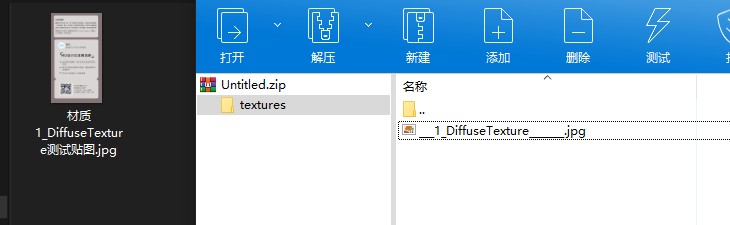
    Hi @AiMiDi you are using the old ZipFile implementation, instead, you should use the new one from the MAXON API as explained in Archives Manual. And here an example of how to copy a file. #include "maxon/ioarchivehandler.h" Bool res = false; Filename importFilename; res = importFilename.FileSelect(FILESELECTTYPE::ANYTHING, FILESELECT::LOAD, "Load"_s); if (!res) return maxon::UnknownError(MAXON_SOURCE_LOCATION); maxon::Url importUrl = MaxonConvert(importFilename, MAXONCONVERTMODE::READ); Filename zipFilename; res = zipFilename.FileSelect(FILESELECTTYPE::ANYTHING, FILESELECT::SAVE, "Save"_s, "zip"_s); if (!res) return maxon::UnknownError(MAXON_SOURCE_LOCATION); const maxon::WriteArchiveRef zipArchive = maxon::WriteArchiveClasses::Zip().Create() iferr_return; zipArchive.Open(MaxonConvert(zipFilename, MAXONCONVERTMODE::WRITE), false) iferr_return; zipArchive.SetCompressionLevel(2) iferr_return; zipArchive.CopyFile(importUrl, importUrl.GetName()) iferr_return; zipArchive.Close() iferr_return; This new Maxon API support correctly non ASCII character. Cheers, Maxime.
  • CSTO over object.GetClone() produces excess geometry

    python
    5
    1
    0 Votes
    5 Posts
    784 Views
    bacaB
    @m_magalhaes Thanks Manuel, I appreciate your wise support every time. Merry Xmas and Happy New Year!
  • 0 Votes
    5 Posts
    2k Views
    H
    Many thanks for your help and thorough explanations, Ferdinand! Much appreciated! I'll go create a temp document and clones, and don't expect much more resistance from this particular issue. Thanks again, and have a happy holiday season!
  • How to pass a value from GeDialog to another class

    5
    0 Votes
    5 Posts
    966 Views
    D
    @ferdinand Thank you for your awesome explanation! I will keep this post as a reference for my studies as your approach seems a bit complicated for my understanding at the moment. I'm learning a lot with your contribution in this forum, and in this case here it's not gonna be different. Cheers
  • Keyframing morph pose animations in Python

    Moved python
    7
    1 Votes
    7 Posts
    2k Views
    ferdinandF
    Hello @augustin, without any further questions we will consider this topic as solved by Friday, December the 17th. Thank you for your understanding, Ferdinand
  • select subobjects assign command

    r21
    4
    0 Votes
    4 Posts
    708 Views
    ferdinandF
    Hello @WDP, without any further questions we will consider this topic as solved by Friday, December the 17th. Thank you for your understanding, Ferdinand
  • Python script to keyframe visibility of object

    Moved
    4
    0 Votes
    4 Posts
    1k Views
    ferdinandF
    Hello @augustin, without any further questions we will consider this topic as solved by Friday, December the 17th. Thank you for your understanding, Ferdinand
  • How to traverse a GeListNode tree

    python r25 r23 s24 windows macos
    5
    0 Votes
    5 Posts
    2k Views
    ferdinandF
    Hello @WDP, without any further questions we will consider this topic as solved by Friday, December the 17th. Thank you for your understanding, Ferdinand
  • Global change notifications

    c++ sdk
    3
    0 Votes
    3 Posts
    484 Views
    ferdinandF
    Hello @BarnaBuzaVentuz, without any further questions we will consider this topic as solved by Friday, December the 17th. Thank you for your understanding, Ferdinand
  • Assignment Grouped

    r21
    6
    0 Votes
    6 Posts
    925 Views
    ferdinandF
    Hello @wdp, without any further questions we will consider this topic as solved by Friday, December the 17th. Thank you for your understanding, Ferdinand
  • 0 Votes
    9 Posts
    1k Views
    ferdinandF
    Hello @jenandesign, without any further questions we will consider this topic as solved by Friday, December the 17th. Thank you for your understanding, Ferdinand
  • Mospline iterate start/end

    4
    0 Votes
    4 Posts
    776 Views
    ferdinandF
    Hello @ashambe, without any further questions we will consider this topic as solved by Friday, December the 17th. Thank you for your understanding, Ferdinand
  • How to move multiple objects axis to origin?

    Moved python
    4
    0 Votes
    4 Posts
    1k Views
    ferdinandF
    Hello @wilsonic, without any further questions we will consider this topic as solved by Friday, December the 17th. Thank you for your understanding, Ferdinand
  • 0 Votes
    4 Posts
    2k Views
    ferdinandF
    Hello @yaya, without any further questions we will consider this topic as solved by Friday, December the 17th. Thank you for your understanding, Ferdinand
  • Cutome Render Token do not update Filename each Frame

    11
    1
    0 Votes
    11 Posts
    2k Views
    ferdinandF
    Hello @nason, without any further questions we will consider this topic as solved by Friday, December the 17th. Thank you for your understanding, Ferdinand