• Get the random result of Cloner Object

    c++ 2025 windows
    9
    2
    0 Votes
    9 Posts
    781 Views
    F
    @ferdinand Thank you very much! The problem is solved and now I know the way of MODATA_CLONE used.
  • TreeView rows selected?

    2024 python
    4
    1
    0 Votes
    4 Posts
    462 Views
    chuanzhenC
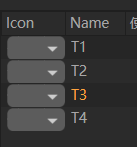
    @m_adam Thanks,it works well [image: 1737723959721-2b524b98-f131-4d69-bcf0-4dec858821ab-image.png] this is code: import c4d import random from c4d import gui # Welcome to the world of Python NAME = 0 LINKTO = 1 LINK = 2 TYPE = 3 class TreeView_Item(object): def __init__(self,): self.type = 'psr' self.selected = False self.obj_name = str(random.randint(1,100)) self.linkto_name = "" @property def IsSelected(self): return self.selected def Select(self): self.selected = True def Deselect(self): self.selected = False def __repr__(self): return str(self) def __str__(self): return self.obj_name class TreeView(c4d.gui.TreeViewFunctions): def __init__(self,items_list=None): self.items_list = items_list if items_list else [] def GetLineHeight(self,root, userdata, obj, col, area): return area.DrawGetFontHeight() def IsResizeColAllowed(self, root, userdata, lColID): return True def IsTristate(self, root, userdata): return False def GetColumnWidth(self, root, userdata, obj, col, area): """Measures the width of cells. Although this function is called #GetColumnWidth and has a #col, it is not only executed by column but by cell. So, when there is a column with items requiring the width 5, 10, and 15, then there is no need for evaluating all items. Each item can return its ideal width and Cinema 4D will then pick the largest value. Args: root (any): The root node of the tree view. userdata (any): The user data of the tree view. obj (any): The item for the current cell. col (int): The index of the column #obj is contained in. area (GeUserArea): An already initialized GeUserArea to measure the width of strings. Returns: TYPE: Description """ # The default width of a column is 80 units. width = 80 # Replace the width with the text width. area is a prepopulated # user area which has already setup all the font stuff, we can # measure right away. if col == NAME: return area.DrawGetTextWidth(obj.obj_name) + 5 if col == LINKTO: return area.DrawGetTextWidth("-->") + 5 if col == LINK: return area.DrawGetTextWidth(obj.linkto_name) + 5 if col == TYPE: return area.DrawGetTextWidth(obj.type) + 5 return width def GetFirst(self, root, userdata): """ Return the first element in the hierarchy, or None if there is no element. """ rValue = None if not len(self.items_list) else self.items_list[0] return rValue def GetNext(self, root, userdata, obj): """ Returns the next Object to display after arg:'obj' """ rValue = None currentObjIndex = self.items_list.index(obj) nextIndex = currentObjIndex + 1 if nextIndex < len(self.items_list): rValue = self.items_list[nextIndex] return rValue def GetPred(self, root, userdata, obj): """ Returns the previous Object to display before arg:'obj' """ rValue = None currentObjIndex = self.items_list.index(obj) predIndex = currentObjIndex - 1 if 0 <= predIndex < len(self.items_list): rValue = self.items_list[predIndex] return rValue def GetId(self, root, userdata, obj): """ Return a unique ID for the element in the TreeView. """ return hash(obj) def Select(self, root, userdata, obj, mode): print(obj.obj_name) if mode == c4d.SELECTION_NEW: for item in self.items_list: item.Deselect() obj.Select() elif mode == c4d.SELECTION_ADD: obj.Select() elif mode == c4d.SELECTION_SUB: obj.Deselect() def IsSelected(self, root, userdata, obj): return obj.IsSelected def DeletePressed(self, root, userdata): "Called when a delete event is received." for item in reversed(self.items_list): if item.IsSelected: self.items_list.remove(item) def GetName(self, root, userdata, obj): """ Returns the name to display for arg:'obj', only called for column of type LV_TREE """ return str(obj) # Or obj.texturePath def DrawCell(self, root, userdata, obj, col, drawinfo, bgColor): """ Draw into a Cell, only called for column of type LV_USER """ if col == NAME: text = obj.obj_name elif col == LINKTO: text = '-->' elif col == LINK: text = obj.linkto_name elif col == TYPE: text = obj.type else: text = '' canvas = drawinfo["frame"] xpos = drawinfo["xpos"] ypos = drawinfo["ypos"] txtColorDict = canvas.GetColorRGB(c4d.COLOR_TEXT_SELECTED) if obj.IsSelected else canvas.GetColorRGB( c4d.COLOR_TEXT) txtColorVector = c4d.Vector(txtColorDict["r"] / 255.0, txtColorDict["g"] / 255.0, txtColorDict["b"] / 255.0) canvas.DrawSetTextCol(txtColorVector, bgColor) canvas.DrawText(text, xpos, ypos) def DoubleClick(self, root, userdata, obj, col, mouseinfo): return True class test_dialog(gui.GeDialog): def __init__(self): self._treegui = None self.treeview = TreeView() def CreateLayout(self): # Other than edit fields, buttons do not have a builtin bubble help. customgui = c4d.BaseContainer() customgui.SetBool(c4d.TREEVIEW_BORDER, c4d.BORDER_THIN_IN) customgui.SetBool(c4d.TREEVIEW_HAS_HEADER, True) # True if the tree view may have a header line. customgui.SetBool(c4d.TREEVIEW_HIDE_LINES, False) # True if no lines should be drawn. customgui.SetBool(c4d.TREEVIEW_MOVE_COLUMN, False) # True if the user can move the columns. customgui.SetBool(c4d.TREEVIEW_RESIZE_HEADER, True) # True if the column width can be changed by the user. customgui.SetBool(c4d.TREEVIEW_FIXED_LAYOUT, True) # True if all lines have the same height. customgui.SetBool(c4d.TREEVIEW_ALTERNATE_BG, True) # Alternate background per line. customgui.SetBool(c4d.TREEVIEW_CURSORKEYS, True) # True if cursor keys should be processed. customgui.SetBool(c4d.TREEVIEW_NOENTERRENAME, True) # Suppresses the rename popup when the user presses enter. customgui.SetBool(c4d.TREEVIEW_NO_MULTISELECT, False) self._treegui = self.AddCustomGui(1000, c4d.CUSTOMGUI_TREEVIEW, "", c4d.BFH_SCALEFIT | c4d.BFV_SCALEFIT, 300, 300, customgui) if not self._treegui: print("[ERROR]: Could not create TreeView") return False self.AddButton(1001, c4d.BFH_CENTER, name="Add") return True def InitValues(self) -> bool: layout = c4d.BaseContainer() layout.SetInt32(NAME, c4d.LV_USER) layout.SetInt32(LINKTO, c4d.LV_USER) layout.SetInt32(LINK, c4d.LV_USER) layout.SetInt32(TYPE, c4d.LV_USER) self.layout = layout self._treegui.SetLayout(4, layout) # Set the header titles. self._treegui.SetHeaderText(NAME, "Name") self._treegui.SetHeaderText(LINKTO, "") self._treegui.SetHeaderText(LINK, "Link") self._treegui.SetHeaderText(TYPE, "Type") # Set TreeViewFunctions instance used by our CUSTOMGUI_TREEVIEW self._treegui.SetRoot(self._treegui, self.treeview, None) self._treegui.Refresh() return True def Command(self, id, msg): if id == 1001: item = TreeView_Item() self.treeview.items_list.append(item) self._treegui.Refresh() return True return True # Execute main() if __name__=='__main__': dlg = test_dialog() dlg.Open(c4d.DLG_TYPE_ASYNC,0 -1,-1,400,400)
  • Cinema4D 2025 get user data value parameter not accessible?

    2025 python
    5
    0 Votes
    5 Posts
    624 Views
    ferdinandF
    Good to hear!
  • Creating a Playblast script falling at the hurdle.

    windows python 2024
    3
    2
    0 Votes
    3 Posts
    355 Views
    A
    That is perfect, thank you for being through and concise, lifesaver.
  • Displacer Deformer with Mograph Camera Shader not working

    s26 python
    3
    0 Votes
    3 Posts
    604 Views
    B
    Hello, Thanks for your complete answer. I think I will not start in thread management, but opted for your last solution which will still go through an external image but in an automated way by a python script. Thanks again.
  • 2025 Python - No Plugin UI, can't find the reason

    2025 windows python
    2
    1
    0 Votes
    2 Posts
    369 Views
    i_mazlovI
    Hi @derudo, Welcome to the Maxon developers forum and its community, it is great to have you with us! Getting Started Before creating your next postings, we would recommend making yourself accustomed with our forum and support procedures. You did not do anything wrong, we point all new users to these rules. Forum Overview: Provides a broad overview of the fundamental structure and rules of this forum, such as the purpose of the different sub-forums or the fact that we will ban users who engage in hate speech or harassment. Support Procedures: Provides a more in detail overview of how we provide technical support for APIs here. This topic will tell you how to ask good questions and limits of our technical support. Forum Features: Provides an overview of the technical features of this forum, such as Markdown markup or file uploads. It is strongly recommended to read the first two topics carefully, especially the section Support Procedures: Asking Questions. About your First Question There's no single known "thing" we're aware of that could lead to such behavior. In other words, it can be lots of different "things" that caused the symptoms you're describing. Hence, without any further details everything I'm pointing out here is highly speculative. I also don't think answering the question "What could have happened?" is by any means productive, so let's switch the point of view to "How one could diagnose it?". Since you haven't posted any console output in your question, I assume you haven't checked that. This would actually be the first thing to check. Please refer to our Python Console Manual and searching on the forum. Next, try to figure out if it's only UI that stopped appearing or your plugin isn't registered at all anymore. You can do this by checking (e.g. with some temporary print statements) if you plugin is actually functional. On the screenshot you've posted the structure is kind of strange, but we're not sure if it's just a visualization matter of your software. Namely, the plugin.pyp file is expected to reside in the root of the plugin folder. Essentially, the following hierarchy level is not supposed to be there: [image: 1737450594273-232c47cd-171e-4642-8c12-7661b51e6ce5-image.png] Please refer to the article Plugin Structure Manual: Directory Structure and double check your plugin in this regard. If the points above don't lead to any result, try debugging it step-by-step. Namely, strip out everything except the essentials (like plugin registration) and continue adding things piece-by-piece until it starts failing. By the way, one can easily achieve this by using any version control system (e.g. git), as they typically provide a lossless way to manage your code (i.e. remove and add parts of code, without being worried to lose any of them). This approach could also have prevented your scenario in first place, when something stopped working and there're no clues about the change that has lead to it. If this still doesn't help, you can share your plugin here (or send us via contact form, when confidential information is involved). However, I must warn you that our Support Procedures still fully apply, namely: We cannot debug your code for you and instead provide answers to specific problems. Cheers, Ilia
  • Retrieve the current Unit and listen to changes

    c++ s24
    12
    0 Votes
    12 Posts
    1k Views
    ferdinandF
    Hey @Cankar001, Good to hear that you found your solution! One minor thing - you should avoid ApplicationOutput in production code, as it leads to console spam which we want to avoid in Cinema 4D. Using it in test code is fine. See Debug and Output Functions for alternatives. An even better way to do what you did in your code would be to use error handling. E.g., your code could look like this: // Your original function, I turned this into a function using our error system, indicated by the // Result<T> return type. static maxon::Result<maxon::Float> GetCurrentUnitScale(const BaseDocument* const document) { // The error scope handler for this function, i.e., all error returns exit through this handler. iferr_scope; // When there is no document, we return an error. When printed, this will then print the error // message and the source code location, e.g., myfile.cpp:123. if (!document) return maxon::NullptrError(MAXON_SOURCE_LOCATION, "Invalid document pointer."_s); // Your code goes here. // ... return 1.0f; } // A function calling this function which does use error handling itself. static maxon::Result<void> Foo(const BaseDocument* const document) { iferr_scope; // Call the function and return, i.e., propagate the error upwards when there is one. const maxon::Float unitScale = GetCurrentUnitScale(document) iferr_return; // voids in the Result<T> return type are returned with maxon::OK. return maxon::OK; } // A function calling this function which does not use error handling itself, i.e., the error // must terminate here. static bool Bar(const BaseDocument* const document) { // Here we use a manual scope handler to terminate the error chain. You have often to do this in // Cinema API (e.g., ObjectData::GetVirtualObjects), as methods there are not error handled // opposed to the Maxon API. iferr_scope_handler { // Print a debug message with the passed in error #err and the name of this function. And // force a debugger to halt when some condition is met. WarningOutput("@ failed with error: @"_s, MAXON_FUNCTIONNAME, err); if (someErrorCondition) DebugStop(); return false; }; // Call the function (we still have to handle the error with an iferr_return), and then let it // terminate in our manual scope handler. const maxon::Float unitScale = GetCurrentUnitScale(document) iferr_return; return true; } Cheers, Ferdinand
  • Python script for keyframing node material geometry opacity

    python 2025
    4
    0 Votes
    4 Posts
    511 Views
    i_mazlovI
    Hi @mia-elisenberg, Thanks for reaching out to us! I must note that as per our Support Procedures we cannot debug your code. Hence, in your future postings I kindly ask you to try simplifying your code to a minimal viable example, which highlights your question. Regarding your question, creating keyframes for nodes can be a little trickier comparing to the ordinary objects, but the general data accessing scheme stays the same. @Dunhou has thankfully posted the simplified example for your question, which already shows crucial pieces of how one would access the CTrack, CCurve and CKey for the node port. (@Dunhou I won't get tired showing our appreciation in playing an active role in our community! ). Namely, you're expected to use GetBaseListForNode to get the BaseList2D element that corresponds to the node you have. Additionally, NimbusBaseInterface.GetDescID can be used to get the DescID of the port. After you have this information, the process of interacting with animation data isn't any different. Your can check the animation examples in our repository: Cinema-4D-Python-API-Examples/scripts/04_3d_concepts/scene_elements /animation. The only thing I'd like to point out here is handling color data. Namely, CKey is designed to operate with float values, but Opacity channel works with color data. Hence, you need to create a separate CTrack for each color channel. You basically do this by pushing your DescID one level further to access the elements of your color data. Please find small example below (based on the code shared by @Dunhou): descLevelsRGB: list[c4d.DescLevel] = [ c4d.DescLevel(c4d.COLOR_R, c4d.DTYPE_REAL, 0), c4d.DescLevel(c4d.COLOR_G, c4d.DTYPE_REAL, 0), c4d.DescLevel(c4d.COLOR_B, c4d.DTYPE_REAL, 0) ] opacityValue: list[float] = [0.55, 0.66, 0.77] # example data to store in the keyframe ctime: c4d.BaseTime = c4d.BaseTime(doc.GetTime().GetFrame(doc.GetFps()), doc.GetFps()) for opacityChannelDescLevel, opacityChannelValue in zip(descLevelsRGB, opacityValue): # Get opacity channel DescID and push it to access color channel channelDescID: c4d.DescID = nimbusRef.GetDescID(opacityPort.GetPath()) channelDescID.PushId(opacityChannelDescLevel) track: c4d.CTrack = c4d.CTrack(opacityPortBL2D, channelDescID) opacityPortBL2D.InsertTrackSorted(track) curve: c4d.CCurve = track.GetCurve() key = c4d.CKey() track.FillKey(doc, opacityPortBL2D, key) # this is optional key.SetValue(curve, opacityChannelValue) key.SetTime(curve, ctime) curve.InsertKey(key) Cheers, Ilia
  • How to get the attributes of rsramp node in c++?

    c++ 2025
    3
    0 Votes
    3 Posts
    435 Views
    F
    @ferdinand Thank you for the answer! The problem is solved after I try to find the child of the port according to your answer.
  • New Condition Naming in Attribute Manager

    c++ r25
    3
    1
    0 Votes
    3 Posts
    562 Views
    D
    Thank you so much! I couldn't ask for a more thorough response. Dan
  • Help Needed: Filtering Selected Edges by Length

    windows python 2025
    2
    0 Votes
    2 Posts
    424 Views
    ferdinandF
    Hello @myosis, Welcome to the Maxon developers forum and its community, it is great to have you with us! Getting Started Before creating your next postings, we would recommend making yourself accustomed with our forum and support procedures. You did not do anything wrong, we point all new users to these rules. Forum Overview: Provides a broad overview of the fundamental structure and rules of this forum, such as the purpose of the different sub-forums or the fact that we will ban users who engage in hate speech or harassment. Support Procedures: Provides a more in detail overview of how we provide technical support for APIs here. This topic will tell you how to ask good questions and limits of our technical support. Forum Features: Provides an overview of the technical features of this forum, such as Markdown markup or file uploads. It is strongly recommended to read the first two topics carefully, especially the section Support Procedures: Asking Questions. About your First Question All the methods you list simply do not exist (neither in C++ nor in Python), see c4d.utils.Neighbor for the type overview. I therefore must assume that you are using an AI, like, for example, ChatGPT, which hallucinated these methods. Please note that we reserve the right to refuse support when confronted with undisclosed AI gibberish, especially for beginner content. Always state when you used an AI to generate code. Something such as an edge does not exist concretely in our API and many other APIs, i.e., other than for points and polygons, there is no explicit data type for edges which would be stored. Edges are defined implicitly by CPolygon. To filter a selection for edges of a certain length, you would have to convert edge indices to polygon and point indices and then measure the distance between the relevant points. Cheers, Ferdinand Result [image: 1737027755224-074e2ada-a9ce-45b4-800a-acf7e060941a-image-resized.png] Code """Deselects all edges in the edge selection of the active object whose edge length exceeds MAX_EDGE_LENGTH. Must be run as a Script Manager script with an editable polygon object selected. """ import c4d doc: c4d.documents.BaseDocument # The currently active document. op: c4d.BaseObject | None # The primary selected object in `doc`. Can be `None`. MAX_EDGE_LENGTH: float = 25.0 # The maximum length of an edge before to be considered too long. MAX_EDGE_LENGTH_SQUARED: float = MAX_EDGE_LENGTH ** 2 # The square of `MAX_EDGE_LENGTH`. def main() -> None: """Called by Cinema 4D when the script is being executed. """ if not op or not op.IsInstanceOf(c4d.Opolygon): raise ValueError("The selected object is not a polygon object.") # Get the edge selection of the object and turn it into a list of selected edges indices. Also, # get the points and polygons of the object. selection: c4d.BaseSelect = op.GetEdgeS() selectedEdges: list[int] = [i for i in range(op.GetEdgeCount()) if selection.IsSelected(i)] points: list[c4d.Vector] = op.GetAllPoints() polygons: list[c4d.CPolygon] = op.GetAllPolygons() def getPointByIndex(poly: c4d.CPolygon, index: int) -> c4d.Vector: """Returns the point of the polygon at the given index. CPolygon has no index access, so we fix that here. """ if index == 0: return points[poly.a] elif index == 1: return points[poly.b] elif index == 2: return points[poly.c] elif index == 3: return points[poly.d] # Iterate over the edges and find the one's that are longer than MAX_EDGE_LENGTH. An edge index # is defined as: # # "The edges are indexed by 4 * polygon + edge where polygon is the polygon index and edge is # the edge index between 0 and 3." # # So, we must revert that here, then measure the edge length, and collect all too long edges. tooLongEdges: list[int] = [] for edgeIndex in selectedEdges: polygonIndex: int = edgeIndex // 4 edgeInPolygonIndex: int = edgeIndex % 4 poly: c4d.CPolygon = polygons[polygonIndex] pointA: c4d.Vector = getPointByIndex(poly, edgeInPolygonIndex) pointB: c4d.Vector = getPointByIndex(poly, (edgeInPolygonIndex + 1) % 4) # Getting the length of a vector is quite expensive, so we compare the squared lengths. edgeLengthSq: float = (pointA - pointB).GetLengthSquared() if edgeLengthSq > MAX_EDGE_LENGTH_SQUARED: tooLongEdges.append(edgeIndex) # Print the indices of the edges that are too long. print("The following edges are too long:", tooLongEdges) # Deselect all edges in the object's edge selection that are too long. for edgeIndex in tooLongEdges: selection.Deselect(edgeIndex) # Push an update event to Cinema 4D to redraw the object. c4d.EventAdd() if __name__ == '__main__': main()
  • How to add a tree view to a Description Resource?

    2025 python
    3
    1
    0 Votes
    3 Posts
    419 Views
    chuanzhenC
    @ferdinand Thank you for your detailed answer.
  • Get command information from command palette

    python 2025 2024 2023
    5
    1
    0 Votes
    5 Posts
    794 Views
    gheyretG
    I get it, thanks for your reply and keeping the idea. If there are any workarounds or alternative solutions in the meantime, please let me know. I look forward to any updates regarding this feature in the future. Cheers~
  • About Texture Paths in MergeDocument

    2025 python windows
    3
    0 Votes
    3 Posts
    477 Views
    R
    @i_mazlov I get it, thanks for your reply.
  • python script change Redshift setting

    python windows 2024
    6
    0 Votes
    6 Posts
    1k Views
    R
    @Dunhou @i_mazlov Thanks a lot.
  • Automatically execute python scripte

    python 2024 windows
    2
    0 Votes
    2 Posts
    296 Views
    M
    Hi @serco, there is multiple way to execute a script automatically when Cinema 4D is opened. Use python_init.py, this force you to add your script into the temp folder. Bu it can be done for a particular instance of a Cinema 4D or it can also be applied to all Cinema 4D versions that use a given python version. Implement a Plugin and react to PluginMessage various event are sent to Python, and you can hook into them to execute your code. This require to have a Python plugin loaded by Cinema 4D. Depending of your needs there is c4dpy which act as a Python Interpreter, where you can pass directly your Python file as an argument. Then again depending of your need you may be able to start what you want to do next. Cheers, Maxime.
  • SetJointResetState() Parameter interpretation error in py doc?

    python
    4
    1
    0 Votes
    4 Posts
    437 Views
    M
    Thanks a lot for reporting this kind of issue ! This is going to be fixed in the next update of the doc. Cheers, Maxime.
  • Making changes to the document through a websocket

    windows s24 c++
    6
    0 Votes
    6 Posts
    861 Views
    C
    @m_adam Thank you very much for your help in the last days! This worked as well as expected
  • Gear Settings Icon Workflow

    python
    3
    0 Votes
    3 Posts
    459 Views
    M
    Hi @BretBays Happy Christmas ! Thanks for getting back, and indeed PLUGINFLAG_COMMAND_OPTION_DIALOG is the way to go. Find an example in CommandData with Options Dialog - Docked command button Cheers, Maxime.
  • Unexpected "refresh" behavior when manipulating linked object

    2024 c++ windows
    10
    3
    0 Votes
    10 Posts
    2k Views
    H
    @ferdinand After a lot of time forced to work on other projects, I have looked further into this, and sent you an email. I hope you don't see it until after the holiday season.