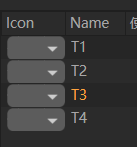
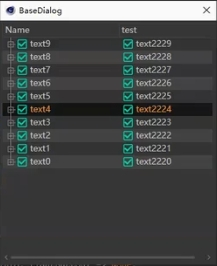
I hope to get a custom icon, similar to the green custom icon in image 2, and the treeview result will let me know what difficulty is
import c4d
PLUGINID = 1064765

ID_OTHER = 1124
ID_ICON = 1125
ID_NAME = 1126
# ///////////////// TreeView界面
class ProjectPreset(object):
# 类,它表示一个项目,也就是我们列表中的 Item
    projectptPath = "projectptPath"
    otherData = "OtherData"
    _selected = False

    def __init__(self, projectptPath) :
        self.projectptPath = projectptPath
        self.otherData += projectptPath

    @property
    def IsSelected(self) :
        return self._selected

    def Select(self) :
        self._selected = True

    def Deselect(self) :
        self._selected = False

    def __repr__(self) :
        return str(self)

    def __str__(self) :
        return self.projectptPath


class ListView(c4d.gui.TreeViewFunctions) :


    def __init__(self) :
        self.listOfProjectPreset = list() # 存储我们需要在此列表中显示的所有对象

        # Add some defaults values
        t1 = ProjectPreset("T1")
        t2 = ProjectPreset("T2")
        t3 = ProjectPreset("T3")
        t4 = ProjectPreset("T4")
        t5 = ProjectPreset("T5")

        self.listOfProjectPreset.extend([t1, t2, t3, t4])

    #TreeView 的整个概念是覆盖一些函数。因此,请务必阅读文档以了解根据您的需要覆盖哪些函数。
    # 因此,我们将为 TreeView 定义一些更通用的选项
    def IsResizeColAllowed(self, root, userdata, lColID) :
        return True

    def IsTristate(self, root, userdata) :
        return False

    def GetColumnWidth(self, root, userdata, obj, col, area) :
        return 80  # 所有的初始宽度都相同

    def IsMoveColAllowed(self, root, userdata, lColID) :
        # 允许用户移动所有列。
        # 必须在 AddCustomGui 的容器中设置 TREEVIEW_MOVE_COLUMN。
        return True
    def GetFirst(self, root, userdata) :
        # 返回层次结构中的第一个元素,如果没有元素,则返回 None
        rValue = None if not self.listOfProjectPreset else self.listOfProjectPreset[0]
        return rValue
    # 然后我们必须处理 GetDown(对于子对象,因为在我们的例子中它是一个简单的列表,我们返回 None)
    # GetNext 是当前 Object 之后的 Object,GetPred 是当前 Object 之前的 Object。
    # 我们还必须覆盖 GetID 才能唯一标识列表中的对象

    def GetDown(self, root, userdata, obj) :
        # 返回节点的子节点,因为我们只需要一个列表,所以每次都返回 None
        return None

    def GetNext(self, root, userdata, obj) :
        # 返回 arg:'obj' 之后要显示的下一个对象
        rValue = None
        currentObjIndex = self.listOfProjectPreset.index(obj)
        nextIndex = currentObjIndex + 1
        if nextIndex < len(self.listOfProjectPreset) :
            rValue = self.listOfProjectPreset[nextIndex]

        return rValue

    def GetPred(self, root, userdata, obj) :
        # 返回要在 arg 之前显示的上一个 Object:'obj'
        rValue = None
        currentObjIndex = self.listOfProjectPreset.index(obj)
        predIndex = currentObjIndex - 1
        if 0 <= predIndex < len(self.listOfProjectPreset) :
            rValue = self.listOfProjectPreset[predIndex]

        return rValue

    def GetId(self, root, userdata, obj) :
        # 返回 TreeView 中元素的唯一 ID
        return hash(obj)

    def Select(self, root, userdata, obj, mode) :
        # 在用户选择元素时调用
        if mode == c4d.SELECTION_NEW:
            for tex in self.listOfProjectPreset:
                tex.Deselect()
            obj.Select()
        elif mode == c4d.SELECTION_ADD:
            obj.Select()
        elif mode == c4d.SELECTION_SUB:
            obj.Deselect()

    def IsSelected(self, root, userdata, obj) :
        # 返回: 如果选择了 *obj*,则为 True,否则为 False
        return obj.IsSelected

    def InsertObject(self, root, userdata, obj, dragtype, dragobject, insertmode, bCopy):
        self.listOfProjectPreset.append(dragobject)

        return True

    def SetCheck(self, root, userdata, obj, column, checked, msg) :
        # 当用户单击'c4d.LV_CHECKBOX' 列中对象的复选框时调用
        if checked:
            obj.Select()
        else:
            obj.Deselect()

    def IsChecked(self, root, userdata, obj, column) :
        # 返回: (int) : *obj* 的指定 *column* 中复选框的状态
        if obj.IsSelected:
            return c4d.LV_CHECKBOX_CHECKED | c4d.LV_CHECKBOX_ENABLED
        else:
            return c4d.LV_CHECKBOX_ENABLED

    # 然后LV_TREE元素将通过调用 GetName 来检查 Object name
    def GetName(self, root, userdata, obj) :
        # 返回要为 arg:'obj' 显示的名称, 仅对type LV_TREE类型的列调用

        return str(obj) # Or obj.texturePath

    # 最后,LV_USER允许我们执行一些绘图功能,就像您在 GeUserArea 中所做的那样
    # 使用 DrawCell 绘制您想要的任何内容(在我们的例子中是文本)。看看 DrawInfo-Dict
    def DrawCell(self, root, userdata, obj, col, drawinfo, bgColor):
        # 在 TreeView 的单元格中绘制内容 LV_USER
        if col == ID_NAME:
            print("Drawcell obj: ", str(obj))
            geUserArea = drawinfo["frame"]
            ICON_SIZE = drawinfo["height"]
            TEXT_SPACER = 6
            bgColor = c4d.COLOR_SB_TEXTHG1 if drawinfo["line"] % 2 else c4d.COLOR_SB_TEXTHG2

            # 使用自定义图标
            icon = c4d.bitmaps.BaseBitmap()
            path = os.path.join(PLUGINPATH, "res", "icon.tif")
            if not icon.InitWith(path):
                print("图标加载失败,请检查路径!")
                return False  # 图标加载失败,退出

            geUserArea.DrawSetPen(bgColor)
            geUserArea.DrawBitmap(icon, drawinfo["xpos"], drawinfo["ypos"], ICON_SIZE, ICON_SIZE, 0, 0, icon.GetBw(), icon.GetBh(), c4d.BMP_ALLOWALPHA)

            # 绘制文本
            name = str(obj)
            fontHeight = geUserArea.DrawGetFontHeight()
            fontWidth = geUserArea.DrawGetTextWidth(name)

            x = drawinfo["xpos"] + ICON_SIZE + TEXT_SPACER
            y = drawinfo["ypos"] + (ICON_SIZE - fontHeight) / 2

            txtColor = c4d.COLOR_SB_TEXT_ACTIVE1 if obj.IsSelected else c4d.COLOR_SB_TEXT
            geUserArea.DrawSetTextCol(txtColor, bgColor)

            geUserArea.DrawText(name, x, y)


    # Performing a rename on any item in the Treeview is crashing Cinema reliably.
    def SetName(self, root, userdata, obj, name):
        # 当用户重命名元素时调用`DoubleClick()`必须返回False才能正常工作


        doc = c4d.documents.GetActiveDocument()
        doc.StartUndo()
        doc.AddUndo(c4d.UNDOTYPE_CHANGE_SMALL, obj)
        obj.SetName(name)
        doc.EndUndo()
        c4d.EventAdd()


    # 然后很少有有用的东西,比如当你双击时通过覆盖 DoubleClick
    # 触发一些脚本,以及通过覆盖 DeletePressed 来管理器 Delete 键
    def DoubleClick(self, root, userdata, obj, col, mouseinfo) :
        # 当用户双击 TreeView 中的条目时调用。返回:返回:(bool) :如果双击
        # 已处理,则为 True,如果default作应启动,则为 False。默认作将调用对
        # 象的重命名过程,启用 'SetName()'
        if not isinstance(obj, c4d.BaseList2D):
            return True

        obj.SetName(c4d.gui.RenameDialog(obj.GetName()))
        return True
        #c4d.gui.MessageDialog("你确定要合并 " + str(obj)+"到当前项目吗?(增加确定和取消按钮)")
        #return True

    def DeletePressed(self, root, userdata) :
        # 收到删除事件时调用
        for tex in reversed(self.listOfProjectPreset) :
            if tex.IsSelected:
                self.listOfProjectPreset.remove(tex)

class DL_MainDialog(c4d.gui.GeDialog):


        ID_TREEVIEW = 6001
        ID_NAME = 6501
        ID_RENDER = 6502
        ID_TREEICON1 = 7001

        _treegui = None # 我们的 CustomGui TreeView
        _listView = ListView() # 我们的 c4d.gui.TreeViewFunctions 实例


        def __init__(self):
            super().__init__()
            # treeview 容器预设
            # self.tv_manager = TV_Manager()


        def CreateLayout(self):
            self.SetTitle(PLUGINNAME)

            # 添加菜单
            self.MenuSubBegin("File")
            self.MenuAddString(self.ID_MENU1,"What")
            self.MenuSubEnd()

            self.MenuSubBegin("Edit")
            self.MenuAddString(self.ID_MENU2,"What")
            self.MenuSubEnd()


            if self.GroupBegin(self.ID_GROUP_NONE1, c4d.BFH_SCALEFIT | c4d.BFV_SCALEFIT, 0, 1, "项目预设", groupflags=0, initw=0, inith=0):
                self.GroupBorder(c4d.BORDER_ACTIVE_1)
                self.GroupBorderSpace(6,6,6,6)
                customdata = c4d.BaseContainer()
                customdata.SetBool(c4d.TREEVIEW_BORDER,c4d.BORDER_ROUND)
                customdata.SetBool(c4d.TREEVIEW_HAS_HEADER, True)
                customdata.SetBool(c4d.TREEVIEW_HIDE_LINES, True)
                customdata.SetBool(c4d.TREEVIEW_MOVE_COLUMN, True)
                customdata.SetBool(c4d.TREEVIEW_RESIZE_HEADER, True)
                customdata.SetBool(c4d.TREEVIEW_FIXED_LAYOUT, True)
                customdata.SetBool(c4d.TREEVIEW_ALTERNATE_BG, True)
                customdata.SetBool(c4d.TREEVIEW_OUTSIDE_DROP, True)
                customdata.SetBool(c4d.TREEVIEW_NO_MULTISELECT, True)
                customdata.SetBool(c4d.TREEVIEW_NO_OPEN_CTRLCLK, False)
                self._treegui = self.AddCustomGui(self.ID_TREEVIEW,c4d.CUSTOMGUI_TREEVIEW,"",c4d.BFH_SCALEFIT | c4d.BFV_SCALEFIT,0,0,customdata)
                self.AddButton(self.ID_TREEBUTTON1, c4d.BFH_CENTER | c4d.BFH_SCALEFIT | c4d.BFV_SCALE, 100, 20, name="展开所有")
                # self.AddMultiLineEditText(1541, c4d.BFH_SCALEFIT | c4d.BFV_SCALE, 0, 40)
                # self.AddEditText(1842, c4d.BFH_SCALEFIT, 0, 25)
                # self.Hierarchy(self,tv,headlist = ["Name","test"])
                # 添加列标题(这里添加了三列)
                if not self._treegui:
                    print ("[ERROR]: 不能生成TreeView")
                    return False
                self.GroupEnd()
            return True

        def InitValues(self) :

            icon = c4d.bitmaps.BaseBitmap()
            path = os.path.join(PLUGINPATH, "res", "icon.tif")
            if not icon.InitWith(path):
                print("图标加载失败,请检查路径!")
                return False  # 图标加载失败,退出
            icon.InitWith(path)

            # Initialize the column layout for the TreeView.
            layout = c4d.BaseContainer()
            layout.SetLong(self.ID_TREEICON1, c4d.LV_DROPDOWN)
            layout.SetLong(self.ID_NAME, c4d.LV_TREE )
            layout.SetLong(self.ID_RENDER, c4d.LV_CHECKBOX)
            self._treegui.SetLayout(3, layout)

            # 设置头部标题

            self._treegui.SetHeaderText(self.ID_TREEICON1, "Icon")
            self._treegui.SetHeaderText(self.ID_NAME, "Name")
            self._treegui.SetHeaderText(self.ID_RENDER, "使用渲染器")

            self._treegui.Refresh()

            # # 设置根节点
            self._treegui.SetRoot(self._treegui, self._listView, None)

            return True
When you pass LV_TREE the Draw method is not called to have it called you need to pass either LV_USERTREE or LV_USER.
Cheers,
Maxime.
boghma
I did refer to the teaching of Jack, a member of Boghma, which involved some methods and pre written libraries for calling. However, I would prefer to start from scratch because it is not as simple as the add button. The code snippets use parts of the function from Git and Boghma respectively. I can copy the parts that I have already learned. Thank you to the members of Boghma
]]>Those look like a very old code snippet in boghma community website (closed and turn to discord).
If you want to use TreeView more easily and less codes, please check the new easy_tree in our boghma lib, which I used in my Octane Lister plugin.
btw, in boghma library, we have two examples toshow how to use easey_tree.
Have fun.
Cheers~
DunHou