In addition, I have attached an image where I want to remove the red null object and keep the green null object (green object 1111 is linked to the target label, hoping to handle different levels), as it points to the target label. Other default colors are used for various working conditions and have already met the code settings..
Thank you.

def check_references(obj):
    references = []

    # 检查标签引用
    for tag in obj.GetTags():
        tag_type = tag.GetType()
        if tag_type in [c4d.Tphong, c4d.Ttexture, c4d.Texpresso]:  # 更新为 Texpresso(表达式标签)
            references.append(f"Tag link: {tag_type}")

    if references:
        print(f"Object {obj.GetName()} has references: {', '.join(references)}")
    return references

# 判断 Null 对象是否为空
def is_empty_null(obj):
    if not obj or obj.GetType() != c4d.Onull:
        return False

    if obj.GetTags():
        return False

    child = obj.GetDown()
    while child:
        if child.GetType() != c4d.Onull:
            return False
        if not is_empty_null(child):
            return False
        child = child.GetNext()

    return True

# 获取场景中所有对象
def get_all_objects(obj):
    all_objects = []
    while obj:
        all_objects.append(obj)
        all_objects.extend(get_all_objects(obj.GetDown()))
        obj = obj.GetNext()
    return all_objects

# 删除无效 Null 对象
def delete_null_objects():
    doc = c4d.documents.GetActiveDocument()
    if not doc:
        return

    doc.StartUndo()

    # 获取场景中的所有对象
    objects = doc.GetObjects()

    for obj in objects:
        if obj.GetType() == c4d.Onull:

            if check_references(obj):
                continue  # 被引用的对象跳过

            # 只有 `is_empty_null` 返回 True 才会删除
            if not is_empty_null(obj):
                continue

            # 记录删除操作的撤销
            doc.AddUndo(c4d.UNDOTYPE_DELETE, obj)

            # 获取 Null 对象的父对象
            parent = obj.GetUp()

            # 获取子对象并移到父对象下
            child = obj.GetDown()
            while child:
                next_child = child.GetNext()
                child.Remove()

                # 记录撤销(对于每个子对象的改变)
                if parent:
                    doc.AddUndo(c4d.UNDOTYPE_CHANGE, child)
                    parent.InsertUnder(child)

                child = next_child

            # 删除 Null 对象
            obj.Remove()

    # 更新对象列表,因为在删除过程中可能会修改它
    objects = doc.GetObjects()

    # 额外逻辑:删除非 `Null` 对象下的空 `Null` 子对象
    for obj in objects:
        child = obj.GetDown()
        while child:
            next_child = child.GetNext()

            # 如果子对象是 `Null` 且为空,并且没有标签,则递归删除该 `Null` 对象及其子对象
            if child.GetType() == c4d.Onull:
                if is_empty_null(child):
                    doc.AddUndo(c4d.UNDOTYPE_DELETE, child)
                    child.Remove()
                else:
                    # 如果子对象不是空 `Null`,递归检查其子级
                    delete_empty_null_children(child)

            child = next_child

    # 更新界面
    c4d.EventAdd()

    doc.EndUndo()

# 递归删除子级空 Null 对象
def delete_empty_null_children(parent):
    doc = c4d.documents.GetActiveDocument()
    child = parent.GetDown()
    while child:
        next_child = child.GetNext()
        if child.GetType() == c4d.Onull:
            if is_empty_null(child):
                # 记录撤销
                doc.AddUndo(c4d.UNDOTYPE_DELETE, child)
                child.Remove()
            else:
                delete_empty_null_children(child)

        child = next_child
Thank you for reaching out to us. We were not 100% sure in our morning meeting if we understood your question correctly. But I basically understood it as 'how can I find out if a C4DAtom is referenced in a BaseLink in a scene?'. So, to pick an example, you would want to find out if the node A shown in the screen below is linked anywhere in the scene. In that case the answer would be 'yes', since A is linked in a Target Tag of B.
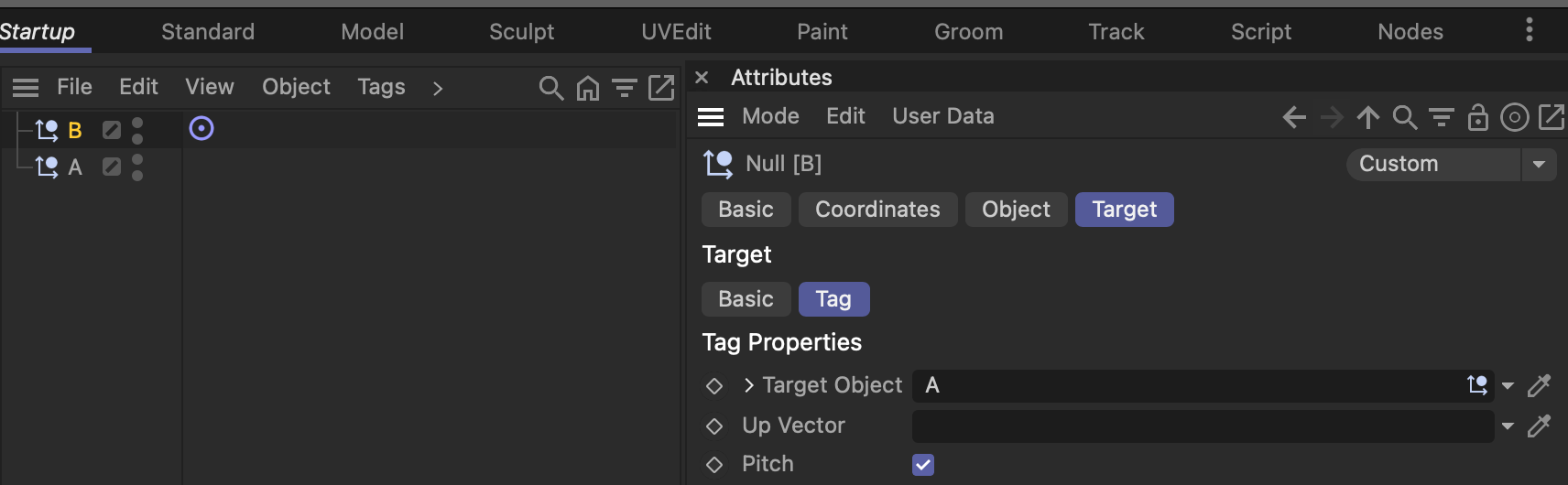
The goal then seems to be to delete such objects which are not referenced in any manner. There are two problems here at play:
- Abstracted scene traversal, i.e., iterating/recursing over all elements of a scene: The assumption of your code is that a null object is only linked in tags. Which can work when you do not care about other cases of these nulls being referenced. But in practice any form of
BaseList2Dcan hold a link to your null object, i.e., there could be other objects, materials, shaders, etc. linking to that null. To visit each node in a scene you then need such abstracted scene traversal. There are many postings about this subject in the forum, here is for example one. In 2025.0.0 we added mxutils.RecurseGraph which does that out of the box. - Figuring out if a given node holds a parameter of type
DTYPE_BASELISTLINKwhich also happens to point towards your null. You can use C4DAtom.GetDescription to look for parameters of a specific type. @i_mazlov has once shown here how this can be done.
There are also some issues with your code, as for example that seems to point into an exponential time complexity direction, i.e., you seem to plan to iterate over all objects in a scene (to find potential objects to remove). That would be very slow.
Find below how I would write something like this. Please note that these scene operation tasks tend to be more finnicky than one usually assumes, so you might have to add features yourself. We cannot debug your code for you or write a solution for you.
Cheers,
Ferdinand
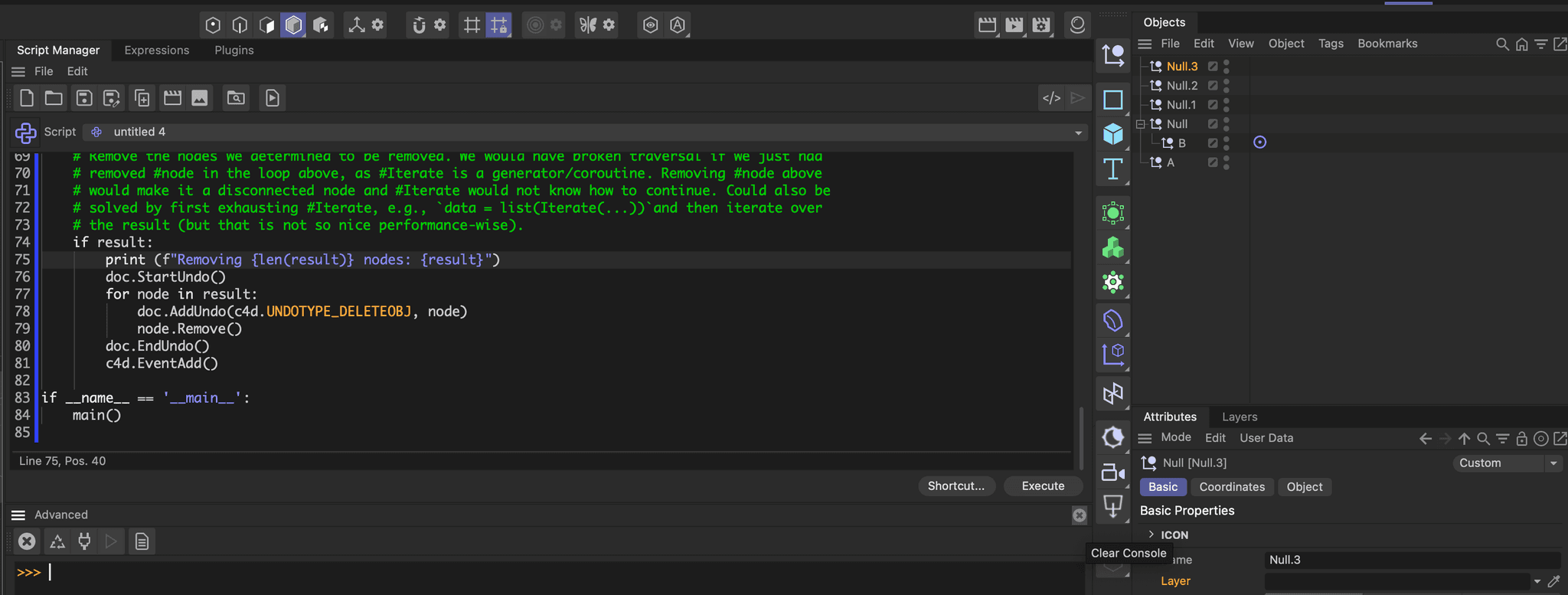
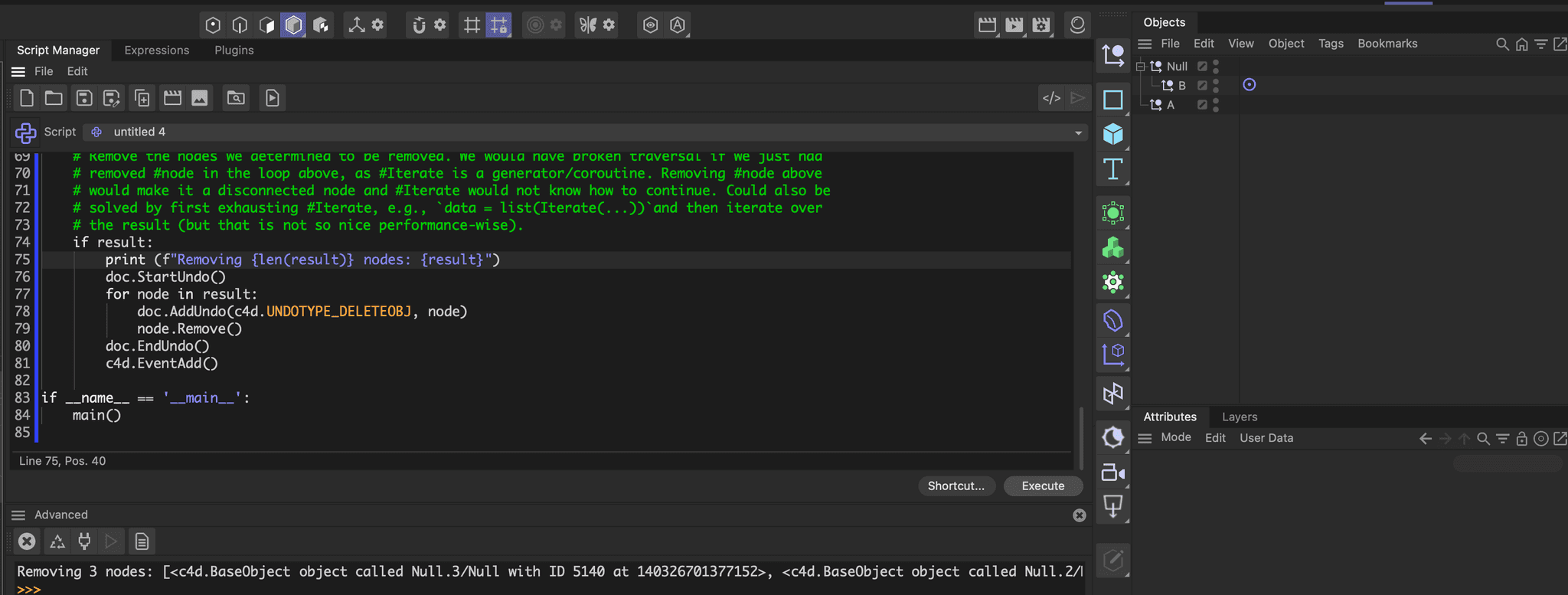
Result
Before:
After:
Code
"""Demonstrates how to search for a scene for nodes that do not appear as links in other objects.

Must be run as a script manager script. Will remove all null objects from a scene which do not appear
as linked objects in other tags or objects (and some other criteria, see main() for details).
"""

import c4d
from typing import Iterator

doc: c4d.documents.BaseDocument  # The currently active document.
op: c4d.BaseObject | None  # The primary selected object in `doc`. Can be `None`.


def Iterate(node: c4d.BaseObject, yieldSiblings: bool = True) -> Iterator[c4d.GeListNode]:
    """Traverses a tree of objects and their tags, yielding each element, including the passed #node.

    I implemented here a traversal tailored to your case. Check out scene traversal threads for more
    abstracted traversal or use 2025's mxutils traversal methods.
    """
    def iterate(node: c4d.GeListNode) -> Iterator[c4d.GeListNode]:
        if not node:
            return
        yield node

        # Yield tags when #node is an object.
        if isinstance(node, c4d.BaseObject):
            for t in node.GetTags():
                yield t

        # Traverse hierarchy.
        for child in node.GetChildren():
            yield from iterate(child)

    while node:
        yield from iterate(node)
        node = node.GetNext() if yieldSiblings else None

def GetLinkedNodes(node: c4d.BaseList2D) -> set[c4d.BaseList2D]:
    """Returns the set (i.e., no repetitions) of nodes this #node has links established to.
    """
    result: set = set()
    for _, descid, _ in node.GetDescription(c4d.DESCFLAGS_DESC_NONE):
        # We found a parameter of type baselink, append the value to the result when it is not null.
        # You might want to fine tune things here, to exclude parameter IDs, e.g., ID_LAYER_LINK, or
        # value types, e.g., c4d.BaseLayer, from being here links you want to consider.
        if descid[0].dtype == c4d.DTYPE_BASELISTLINK and node[descid]:
            result.add(node[descid])
    return result


def main() -> None:
    """
    """
    # Get all the nodes that are somewhere referenced in objects or their tags in the scene. Also
    # store all the nodes which contain links.
    linkSources: set = set()
    linkTargets: set = set()

    for node in Iterate(doc.GetFirstObject()):
        links: set = GetLinkedNodes(node)
        if links:
            linkSources.add(node)
            linkTargets = linkTargets.union(links)

    # Now iterate the scene again, looking for nodes matching our removal criteria.
    result: list[c4d.BaseList2D] = []
    for node in Iterate(doc.GetFirstObject()):
        # Continue when the node is not an object of type Onull, has children, or does appear as a
        # linked node somewhere (e.g., a null object which has a target tag).
        if (node.GetType() != c4d.Onull or node.GetChildren() or
            node in linkTargets or linkSources.intersection(Iterate(node, False))):
            continue

        # This is a node we want to remove.
        result.append(node)

    # Remove the nodes we determined to be removed. We would have broken traversal if we just had
    # removed #node in the loop above, as #Iterate is a generator/coroutine. Removing #node above
    # would make it a disconnected node and #Iterate would not know how to continue. Could also be
    # solved by first exhausting #Iterate, e.g., `data = list(Iterate(...))`and then iterate over
    # the result (but that is not so nice performance-wise).
    if result:
        print (f"Removing '{len(result)}' nodes: {result}")
        doc.StartUndo()
        for node in result:
            doc.AddUndo(c4d.UNDOTYPE_DELETEOBJ, node)
            node.Remove()
        doc.EndUndo()
        c4d.EventAdd()

if __name__ == '__main__':
    main()