

py_obj_assetcontainer
Demonstrates NodeData serialization and custom branching.
DETAILS
NodeData serialization functions let a node store, read, and copy custom data. This preserves additional plugin data with the scene and when the node is duplicated. This example applies that general mechanism to a custom scene-graph branch, storing objects as branch data and using them to generate the object's output.
Cinema 4D represents its scene graph as sets of hierarchies where each node can have zero to many
relations to other hierarchies; Cinema calls these relations branches. A document, for example, is
also a node and has an object branch and a material branch, among others, which hold the objects
and materials as the user sees them in the Object and Material Managers (documents themselves are
in fact also in a hierarchy as all loaded documents are in a sibling relation). An object in a
document is also a node and can have branches for tags, tracks, and other things. A tag in turn is
also a node and can have branches for tracks, and so on. See mxutils.GetSceneGraphString in the
documentation for a visual overview of the scene graph and its branches. In addition to the custom
read, save, and copy operations, this example also implements a custom branch for storing and
managing scene objects, the assets hosted by the plugin.
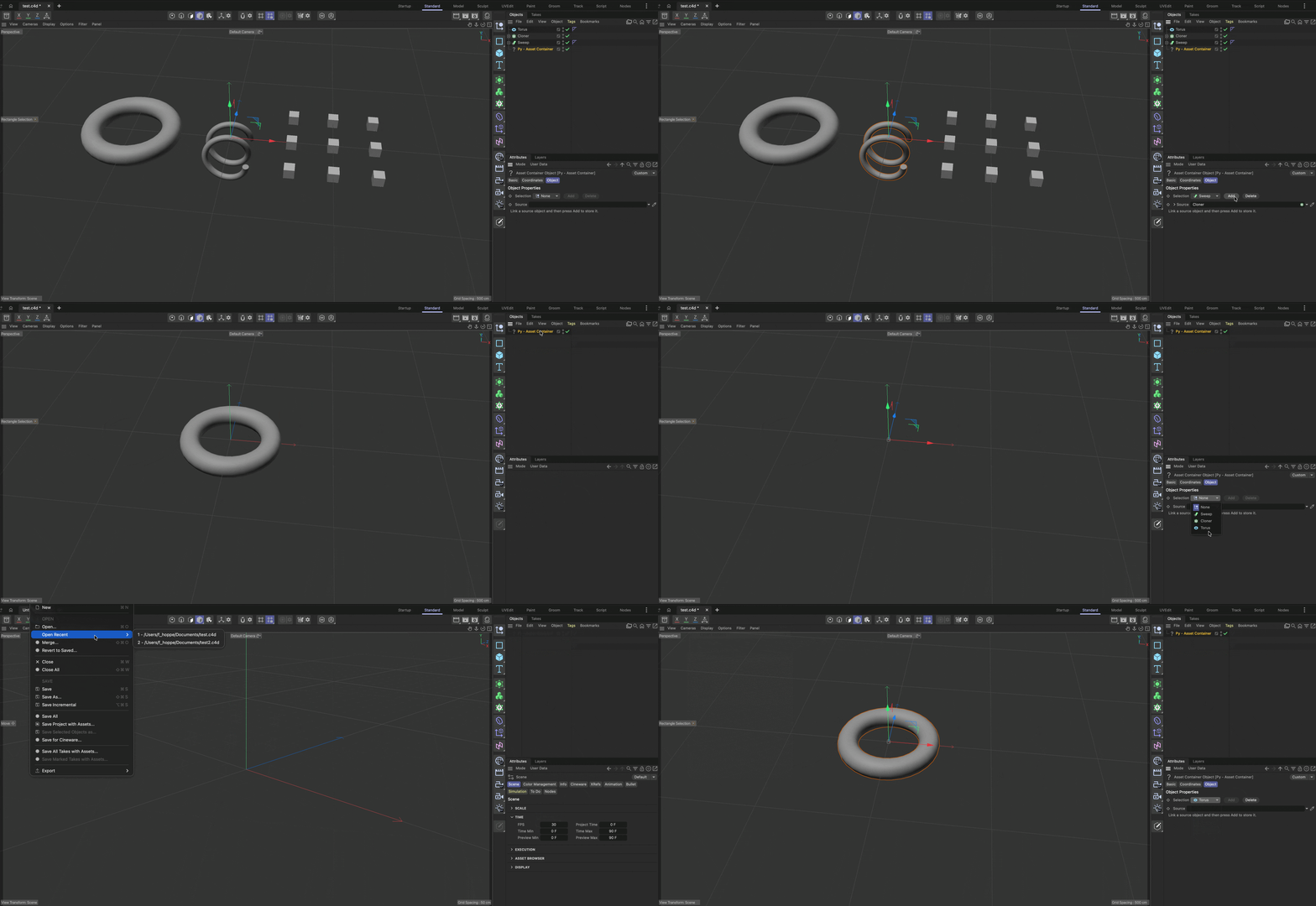
To run this example, create a new scene, add a Py - Asset Container object, link a source object, and press Add to store it. You can then select the stored assets from the Selection cycle. You can delete the source object and save and reload the scene; the internalized assets will be preserved.
Topics:
- Owning a custom GeListHead branch
- Reading, writing, and copying custom data with a node
- Serializing and copying branch data
- Populating a dynamic description cycle
Files
py_obj_assetcontainer.pyp
"""Demonstrates NodeData serialization and custom branching.

NodeData serialization functions let a node store, read, and copy custom data. This preserves
additional plugin data with the scene and when the node is duplicated. This example applies that
general mechanism to a custom scene-graph branch, storing objects as branch data and using them to
generate the object's output.

Cinema 4D represents its scene graph as sets of hierarchies where each node can have zero to many
relations to other hierarchies; Cinema calls these relations branches. A document, for example, is
also a node and has an object branch and a material branch, among others, which hold the objects
and materials as the user sees them in the Object and Material Managers (documents themselves are
in fact also in a hierarchy as all loaded documents are in a sibling relation). An object in a
document is also a node and can have branches for tags, tracks, and other things. A tag in turn is
also a node and can have branches for tracks, and so on. See `mxutils.GetSceneGraphString` in the
documentation for a visual overview of the scene graph and its branches. In addition to the custom
read, save, and copy operations, this example also implements a custom branch for storing and
managing scene objects, the assets hosted by the plugin.

To run this example, create a new scene, add a Py - Asset Container object, link a source object,
and press Add to store it. You can then select the stored assets from the Selection cycle. You can
delete the source object and save and reload the scene; the internalized assets will be preserved.

Topics:
    - Owning a custom GeListHead branch
    - Reading, writing, and copying custom data with a node
    - Serializing and copying branch data
    - Populating a dynamic description cycle
"""
__copyright__ = "Copyright 2026, MAXON Computer"
__author__ = "Ferdinand Hoppe"
__date__ = "18/08/2026"
__license__ = "Apache-2.0 license"
__version__ = "2027.0.0"

import c4d


class AssetContainerObjectData(c4d.plugins.ObjectData):
    """Stores scene objects in and exposes a custom asset branch."""

    PLUGIN_ID: int = 1069813
    PLUGIN_NAME: str = "Py SDK - Asset Container"

    BRANCH_NAME: str = "net.maxonexample.branch.assetcontainer"

    def __init__(self) -> None:
        self._assetHead: c4d.GeListHead | None = None

    def Init(self, node: c4d.BaseObject, isCloneInit: bool = False) -> bool:
        """Initializes the private branch owned by this ObjectData instance.
        """
        if not node or node.GetDataInstance() is None:
            return False

        # Our plugin holds the custom branch in a private GeListHead. The head is created and attached
        # to this node instance. Other than for the virtual object hierarchies returned by
        # GetVirtualObjects(), it is not Cinema but us who owns and must manage custom branches.

        # Create the branch head for the "asset container" branch and set the node which represents
        # this plugin hook (in this case a BaseObject) as its parent.
        self._assetHead = c4d.GeListHead(c4d.Obase)
        self._assetHead.SetParent(node)

        # Set the instructions text
        node[c4d.PY_ASSETCONTAINER_INSTRUCTIONS] = (
            "Link a source object and then press Add to store it.")
        return True

    # What follows is the implementation of the NodeData::Read(), NodeData::Write(),
    # NodeData::CopyTo(), and NodeData::GetBranchInfo() methods, which are the core of this example.
    # Branches technically only have to implement GetBranchInfo(), but would then be volatile, i.e.,
    # lost on read, save, and copy events, which is almost never what we want.

    def Read(self, node: c4d.BaseObject, hf: c4d.storage.HyperFile, level: int) -> bool:
        """Called by Cinema 4D when it loads a scene file which contains an instance of this plugin.

        We must read the custom branch from the scene file so that it can be restored when the scene
        is loaded again.
        """
        assetHead: c4d.GeListHead | None = self.GetAssetHead()
        if assetHead is None:
            return False

        # ReadObject() is the counterpart to WriteObject() and deserializes the complete node from
        # the passed hyper file (which was taken from the .c4d file being loaded) into our
        # GeListHead instance, so that we can re-establish the internal handle to our custom branch.
        # The word "Object" in ReadObject() is meant in a programming sense, not in the sense of a
        # scene object. That is, with Read/WriteObject we can read and write any C4DAtom, not just
        # BaseObject instances.
        return assetHead.ReadObject(hf, True)

    def Write(self, node: c4d.BaseObject, hf: c4d.storage.HyperFile) -> bool:
        """Called by Cinema 4D when it saves a scene file which contains an instance of this plugin.

        We must add the custom branch to the scene file so that it can be restored when the scene
        is loaded again.
        """
        assetHead: c4d.GeListHead | None = self.GetAssetHead()
        if assetHead is None:
            return False

        # WriteObject() serializes the complete node, in this case our custom branch, into the
        # passed hyper file (which will be written to the c4d file which is being saved).
        return assetHead.WriteObject(hf)

    def CopyTo(self, dest: c4d.plugins.NodeData, snode: c4d.BaseObject,
               dnode: c4d.BaseObject, flags: int, trn: c4d.AliasTrans) -> bool:
        """Called by Cinema 4D when it copies one instance of this plugin to another, e.g., when
        duplicating the object.

        In this case we must copy the contents of our custom branch to the new instance, since
        Cinema only copies the data containers of the nodes (the BaseObject in the scene), not the
        plugin hooks (this class) that drive them.
        """
        # #dest is the destination ObjectData instance, i.e., the plugin hook to copy to. We are
        # in this sense #src. #snode is the source node (BaseObject), and #dnode is the destination
        # node.
        if not isinstance(dest, AssetContainerObjectData):
            return False

        selfAssetHead: c4d.GeListHead | None = self.GetAssetHead()
        destAssetHead: c4d.GeListHead | None = dest.GetAssetHead()
        if selfAssetHead is None or destAssetHead is None:
            return False

        # Copy the branch contents using the flags and alias translation supplied by Cinema 4D.
        # Flush the destination branch first to ensure there is no residual data in it. We then copy
        # the children of the source branch one by one into the destination branch. Technically we
        # could also call GeListHead.CopyTo() to copy the whole branch to the destination, but that
        # would also copy data on the head itself. Since we do not set any flags on the head
        # ourselves, we copy only the children and leave the head data untouched.
        #
        # It is essential to copy the content of one branch to another rather than simply
        # assigning or inserting the data, as a node (e.g., a BaseObject) can only be owned by one
        # branch at a time. The Python API is somewhat forgiving here: unlike in C++, insertion
        # calls such as InsertLast() will first remove the node from its current owner before
        # inserting it into the new one. But if we did not copy, we would lose the original data in
        # the source branch, which is not what we want.
        destAssetHead.FlushAll()
        asset: c4d.BaseObject | None = selfAssetHead.GetFirst()

        while asset:
            clone: c4d.BaseObject | None = asset.GetClone(flags, trn)
            if clone is None:
                return False

            destAssetHead.InsertLast(clone)
            asset = asset.GetNext()

        return True

    def GetBranchInfo(self, node: c4d.GeListNode,
                      flags: int = c4d.GETBRANCHINFO_NONE) -> list[dict]:
        """Called by Cinema 4D to query the branches owned by this node.

        This is the central part of this example. It makes Cinema aware of the new custom branch
        and allows it to be traversed by scene-graph traversal code, e.g., mxutils.RecurseGraph()
        or BaseList2D.GetBranchInfo().
        """
        # We have no valid asset head for some reason, so we cannot expose a branch.
        assetHead: c4d.GeListHead | None = self.GetAssetHead()
        if assetHead is None:
            return []

        # Return no branch when the caller only wants branches that have children, and our branch
        # is empty.
        if flags & c4d.GETBRANCHINFO_ONLYWITHCHILDREN and self._assetHead.GetFirst() is None:
            return []

        # Return our branches as a list of dictionaries. A node can have many branches, but we only
        # have one in this example. Cinema uses plain labels for branch names such as "Objects" for
        # an Obase branch, or "Tags" for a Tag branch. For plugins, it is advisable to keep branch
        # names reasonably unique by, for example, using a reverse-domain name or a unique prefix.
        # The reason is that there may be code out there that identifies branches by name instead of
        # by ID, and if you name your branch "Objects" this might cause problems for your users.
        #
        # THE BRANCH ID MUST BE UNIQUE and obtained from developer.maxon.net. It is, however, fine
        # to reuse the ID of the NodeData plugin that holds that branch — Cinema does this itself.
        # Obase, the base node type for all objects, is also the ID of all object branches. If
        # another plugin of yours implements the same branch, you can of course reuse your own ID;
        # you even have to, as otherwise the two branches would not be the same in the eyes of
        # Cinema 4D. In that multi-plugin scenario it is strongly recommended to use inheritance
        # between the two plugins rather than duplicating branch code.
        return [{
            "head": self._assetHead,             # The GeListHead that owns the branch contents
            "name": self.BRANCH_NAME,           # A human-readable identifier for the branch.
            "id": self.PLUGIN_ID,               # The plugin ID that identifies the branch kind.
            "flags": c4d.BRANCHINFOFLAGS_NONE,  # Flags that describe the branch behavior.
        },
            # { ... another branch dictionary ... }, ...
        ]

    def GetVirtualObjects(self, op: c4d.BaseObject, hh: object) -> c4d.BaseObject:
        """Returns the selected stored asset as the generator output.
        """
        # Generators are called during scene updates even when no input changed. Reuse the cache
        # when it is valid and the node data is not dirty; otherwise build a fresh output object.
        if op.CheckCache(hh) and not op.IsDirty(c4d.DIRTYFLAGS_DATA):
            return op.GetCache()

        selection: int | None = op[c4d.PY_ASSETCONTAINER_SELECTION]
        # The None cycle item and failed parameter access both produce a null cache object.
        if selection in (None, c4d.NOTOK, c4d.PY_ASSETCONTAINER_SELECTION_NONE):
            return c4d.BaseObject(c4d.Onull)

        # The first cycle item is None, so subtract one to address the stored asset list.
        asset: c4d.BaseObject | None = self.GetAssetCopy(selection - 1)
        # GetAssetCopy() is required because generator output must not be an object owned by the
        # custom branch or already attached to the document.
        return asset if asset is not None else c4d.BaseObject(c4d.Onull)

    def Message(self, node: c4d.BaseObject, msgId: int, data: object) -> bool:
        """Called by Cinema 4D to notify the plugin of various events.

        We use it to store a clone of the linked source when the Add button is pressed,
        and to delete the currently selected asset when the Delete button is pressed.
        """
        # The user clicked a button in the node's GUI. We also add a main-thread check since we
        # open dialog boxes below. This is not strictly necessary, as MSG_DESCRIPTION_COMMAND should
        # only be sent from the main thread, but it is good practice to verify anyway.
        if msgId == c4d.MSG_DESCRIPTION_COMMAND and c4d.threading.GeIsMainThread():
            cmd_id: int = data["id"][0].id

            # The guards below should not normally be triggered, as we have ensured elsewhere
            # (e.g., via GetDEnabling) that the user cannot, for example, click the Add button
            # when there is no linked source. They are kept here as a defensive measure.

            # The user clicked the Add button, so we clone the linked source and store it in the
            # custom branch. AddAsset() will also select the newly added asset and make the node
            # dirty so that the generator output is updated.
            if cmd_id == c4d.PY_ASSETCONTAINER_ADD:
                source: c4d.BaseObject | None = node[c4d.PY_ASSETCONTAINER_SOURCE]
                if source is not None and not self.AddAsset(node, source):
                    c4d.gui.MessageDialog(f"Failed to add asset '{source.GetName()}'.")

            # The user clicked the Delete button, so we remove the selected asset from the custom
            # branch and switch to the previous asset, or None if it was the first/only asset,
            # invoking GetVirtualObjects() to update the generator output.
            elif cmd_id == c4d.PY_ASSETCONTAINER_DELETE:

                selection: int | None = node[c4d.PY_ASSETCONTAINER_SELECTION]
                if selection == c4d.PY_ASSETCONTAINER_SELECTION_NONE:
                    c4d.gui.MessageDialog("No valid asset is selected to delete.")
                    return True

                asset: c4d.BaseObject | None = self.GetAssetCopy(selection - 1)
                if asset is None:
                    c4d.gui.MessageDialog("Failed to retrieve the selected asset, interface is in "
                                          "corrupted state, please reload this scene.",
                                          c4d.GEMB_ICONEXCLAMATION)
                    return True

                res: bool = c4d.gui.QuestionDialog(
                    f"Are you sure you want to delete the asset '{asset.GetName()}'?")
                if not res:
                    return True

                # Delete the asset, DeleteAsset() will also update the asset selection and with that
                # enqueue a generator output update.
                if not self.DeleteAsset(node, selection - 1):
                    c4d.gui.MessageDialog(
                        f"Failed to delete the asset '{asset.GetName()}', interface is in "
                        f"corrupted state. Please reload this scene.")
        return True

    def GetDDescription(self, node: c4d.BaseObject, description: c4d.Description,
                        flags: int) -> bool | tuple[bool, int]:
        """Called by Cinema 4D to dynamically update the GUI of the node.

        We use it to update the selection cycle with the names of the stored assets.
        """
        # The description (the GUI definition of this node) cannot be loaded, all GetDDescription()
        # are pointless.
        if not description.LoadDescription(node.GetType()):
            return False, flags

        # Update selection cycle
        selection_id: c4d.DescID = c4d.DescID(c4d.DescLevel(c4d.PY_ASSETCONTAINER_SELECTION))
        query_id: c4d.DescID | None = description.GetSingleDescID()

        # Only update when explicitly queried, for performance reasons.
        if query_id is not None and not selection_id.IsPartOf(query_id)[0]:
            return True, flags

        # Get the description container for the selection cycle and update its entries with the names
        # of the stored assets.
        parameter: c4d.BaseContainer | None = description.GetParameterI(selection_id)
        if parameter is not None:
            # Populate the cycle with the names of the stored assets. The first item is always "None" to
            # allow the user to deselect any asset.
            items: c4d.BaseContainer = c4d.BaseContainer()
            items.SetString(c4d.PY_ASSETCONTAINER_SELECTION_NONE, f"None&i{c4d.Onull}&")
            for i, asset in enumerate(self.GetAssetInstances(), start=1):
                items.SetString(i, f"{asset.GetName()}&i{asset.GetType()}&")

            # Write the updated cycle items back to the parameter container and append the
            # DESCFLAGS_DESC_LOADED flag to indicate that we have updated the parameter.
            parameter.SetContainer(c4d.DESC_CYCLE, items)
            flags |= c4d.DESCFLAGS_DESC_LOADED

        return True, flags

    def GetDEnabling(self, node: c4d.BaseObject, id: c4d.DescID,
                     t_data: object, flags: int, itemdesc: c4d.BaseContainer) -> bool:
        """Called by Cinema 4D to determine if a parameter should be enabled or greyed out.

        We disable the Add button when there is no linked source, and disable the Delete button
        when no asset is selected.
        """
        # Grey out the Add button when there is no linked source object to add.
        if id[0].id == c4d.PY_ASSETCONTAINER_ADD:
            source: c4d.BaseObject | None = node[c4d.PY_ASSETCONTAINER_SOURCE]
            return source is not None

        # Grey out the Delete button when there is no selected asset to delete.
        elif id[0].id == c4d.PY_ASSETCONTAINER_DELETE:
            selection: int | None = node[c4d.PY_ASSETCONTAINER_SELECTION]
            return selection not in (None, c4d.NOTOK, c4d.PY_ASSETCONTAINER_SELECTION_NONE)

        return True

    # --- Custom Helper Methods --------------------------------------------------------------------

    # Below you will find custom helper methods that are not part of the NodeData/ObjectData interface.
    # They are used to manage the assets stored in the custom branch.

    def GetAssetCount(self) -> int:
        """Returns the number of objects currently stored in the custom branch.
        """
        assetHead: c4d.GeListHead | None = self.GetAssetHead()
        if not isinstance(assetHead, c4d.GeListHead):
            return 0

        return len(self.GetAssetInstances())

    def GetAssetHead(self) -> c4d.GeListHead | None:
        """Returns the GeListHead that owns the custom branch.

        This is a convenience method to access the private branch head. It is not strictly necessary,
        # but scene element references ('nodes') can become stale in Python and we shield ourselves
        # against that by explicitly returning None in that case, to propagate the error early.
        """
        # Our stored head is well and alive, we can return it.
        if isinstance(self._assetHead, c4d.GeListHead) and self._assetHead.IsAlive():
            return self._assetHead

        # Our head is either not a GeListHead or is no longer alive. A node becoming stale can
        # happen when Cinema reallocates or deletes it without our knowledge. It is extremely
        # unlikely in this case, as this is a custom branch owned by this plugin, but you should
        # be aware that storing references to scene elements long-term in Python is not guaranteed
        # to be safe (e.g., storing "myObject" as an attribute on your plugin class).
        return None

    def GetAssetInstances(self) -> list[c4d.BaseObject]:
        """Returns the list of objects currently stored in the custom branch.

        .. warning::

            The returned objects are owned by the custom branch and must not be inserted without
            first being cloned. Use GetAssetCopy() to obtain a clone suitable for insertion into
            another branch.
        """
        assetHead: c4d.GeListHead | None = self.GetAssetHead()
        if not isinstance(assetHead, c4d.GeListHead) or not assetHead.GetFirst():
            return []

        asset: c4d.BaseObject | None = assetHead.GetFirst()
        assets: list[c4d.BaseObject] = []
        while asset:
            assets.append(asset)
            asset = asset.GetNext()

        return assets

    def GetAssetCopy(self, index: int) -> c4d.BaseObject | None:
        """Returns a copy of the stored asset at the given zero-based index.

        This function must be used when we want to insert a stored asset into another branch, e.g.,
        when returning it as generator output.
        """
        assets: list[c4d.BaseObject] = self.GetAssetInstances()
        if index < 0 or index >= len(assets):
            return None

        return assets[index].GetClone(c4d.COPYFLAGS_NO_BITS)

    def AddAsset(self, owner: c4d.BaseObject, asset: c4d.BaseObject) -> bool:
        """Clones and appends one source object to the private asset branch.

        The source is copied with its hierarchy (child objects) while retaining the branches needed
        by the object, such as its tags and tracks. Use the COPYFLAGS_* flags to control what is
        copied — for example, to omit tags or tracks, or to exclude the hierarchy.

        In a production implementation you might also want to collect the dependencies of the source
        object, e.g., materials or nodes linked in BaseLink parameters. This example omits that for
        simplicity.
        """
        assetHead: c4d.GeListHead | None = self.GetAssetHead()
        if assetHead is None:
            return False

        # Do not insert the linked source itself. The branch must own an independent clone as nodes
        # can only be owned by one parent at a time.
        clone: c4d.BaseObject | None = asset.GetClone(c4d.COPYFLAGS_NO_BITS)
        if clone is None:
            return False

        # Here we could do all sorts of post-processing on the cloned asset, e.g., rename it, remove
        # or add selections, delete certain tracks or branches, etc. But we keep it simple here and
        # just reset the transform of the clone to the identity matrix, so that the asset is always
        # shown at the origin of our generator output.
        clone.SetMg(c4d.Matrix())

        assetHead.InsertLast(clone)

        # Since we changed data outside the native data container of the node, we should mark
        # ourselves dirty so Cinema knows it may need to rebuild the generator output. This is not
        # strictly necessary here, since we set PY_ASSETCONTAINER_SELECTION to the newly added
        # asset below, which will already dirty the node. It is nonetheless good practice to
        # reflect internal data changes by incrementing the dirty count.
        owner.SetDirty(c4d.DIRTYFLAGS_DATA)

        # Select the newly added asset which has been appended. Our asset index is zero-based, but
        # the first cycle item is None, so we can just use the child count of the branch to select
        # the last added asset.
        owner[c4d.PY_ASSETCONTAINER_SELECTION] = self.GetAssetCount()

        return True

    def DeleteAsset(self, owner: c4d.BaseObject, index: int) -> bool:
        """Deletes the asset at the given zero-based index and switches to the previous asset.
        """
        assets: list[c4d.BaseObject] = self.GetAssetInstances()
        if index < 0 or index >= len(assets):
            return False

        # Remove the asset from the branch and set the selection to the previous asset, or None if
        # it was the first/only asset. Again, marking ourselves dirty is not strictly necessary
        # here, since we set PY_ASSETCONTAINER_SELECTION below.
        assets[index].Remove()
        owner.SetDirty(c4d.DIRTYFLAGS_DATA)
        owner[c4d.PY_ASSETCONTAINER_SELECTION] = (index
                                                  if index > 0 else
                                                  c4d.PY_ASSETCONTAINER_SELECTION_NONE)
        return True

    @staticmethod
    def RegisterPlugin() -> None:
        """Registers the Asset Container plugin with Cinema 4D.
        """
        # Registers the object plugin. PLUGINFLAG_HIDEPLUGINMENU hides the natural menu entry of
        # this plugin. Omit this flag or replace it by 0 when you do not have custom menu handling
        # as the SDK has (see py_menu).
        if not c4d.plugins.RegisterObjectPlugin(
                id=AssetContainerObjectData.PLUGIN_ID,
                str=AssetContainerObjectData.PLUGIN_NAME,
                g=AssetContainerObjectData,
                description="opyassetcontainer",
                icon=None,
                info=c4d.OBJECT_GENERATOR | c4d.PLUGINFLAG_HIDEPLUGINMENU):
            raise RuntimeError(
                f"Failed to register the {AssetContainerObjectData.PLUGIN_NAME} plugin.")


if __name__ == "__main__":
    # Register our plugin when the module is (re)loaded by Cinema 4D.
    AssetContainerObjectData.RegisterPlugin()
res/c4d_symbols.h
#ifndef C4D_SYMBOLS_H__
#define C4D_SYMBOLS_H__

enum
{
    _DUMMY_ELEMENT_
};

#endif // C4D_SYMBOLS_H__
res/description/opyassetcontainer.h
#ifndef OPYASSETCONTAINER_H__
#define OPYASSETCONTAINER_H__

enum
{
    PY_ASSETCONTAINER_SELECTION = 1000,
    PY_ASSETCONTAINER_SELECTION_NONE = 0,
    PY_ASSETCONTAINER_SOURCE = 1001,
    PY_ASSETCONTAINER_ADD = 1002,
    PY_ASSETCONTAINER_DELETE = 1003,
    PY_ASSETCONTAINER_INSTRUCTIONS = 1004
};

#endif // OPYASSETCONTAINER_H__
res/description/opyassetcontainer.res
CONTAINER Opyassetcontainer
{
    NAME Opyassetcontainer;
    INCLUDE Obase;

    GROUP ID_OBJECTPROPERTIES
    {
        // The horizontal layout group of the selection, add and delete buttons.
        GROUP
        {
            COLUMNS 3;

            LONG PY_ASSETCONTAINER_SELECTION
            {
                CYCLE
                {
                    PY_ASSETCONTAINER_SELECTION_NONE;
                }
            }

            BUTTON PY_ASSETCONTAINER_ADD {}
            BUTTON PY_ASSETCONTAINER_DELETE {}
        }

        // The source field for an asset to add, and the instructions parameter where we display
        // the instructions fore how to use the example.
        LINK PY_ASSETCONTAINER_SOURCE { ACCEPT { Obase; } }
        STATICTEXT PY_ASSETCONTAINER_INSTRUCTIONS {}
    }
}
res/strings_en-US/description/opyassetcontainer.str
STRINGTABLE Opyassetcontainer
{
    Opyassetcontainer "Asset Container Object";

    PY_ASSETCONTAINER_SELECTION "Selection";
    PY_ASSETCONTAINER_SELECTION_NONE "None";
    PY_ASSETCONTAINER_SOURCE "Source";
    PY_ASSETCONTAINER_ADD "Add";
    PY_ASSETCONTAINER_DELETE "Delete";
    PY_ASSETCONTAINER_INSTRUCTIONS "";
}